
All in One View
Content from 1. Introduction to RNA-seq
Last updated on 2026-11-10 | Edit this page
Overview
Questions
- What are the different choices to consider when planning an RNA-seq experiment?
- How does one process the raw fastq files to generate a table with read counts per gene and sample?
- Where does one find information about annotated genes for a given organism?
- What are the typical steps in an RNA-seq analysis?
Objectives
- Explain what RNA-seq is.
- Describe some of the most common design choices that have to be made before running an RNA-seq experiment.
- Provide an overview of the procedure to go from the raw data to the read count matrix that will be used for downstream analysis.
- Show some common types of results and visualizations generated in RNA-seq analyses.
What are we measuring in an RNA-seq experiment?
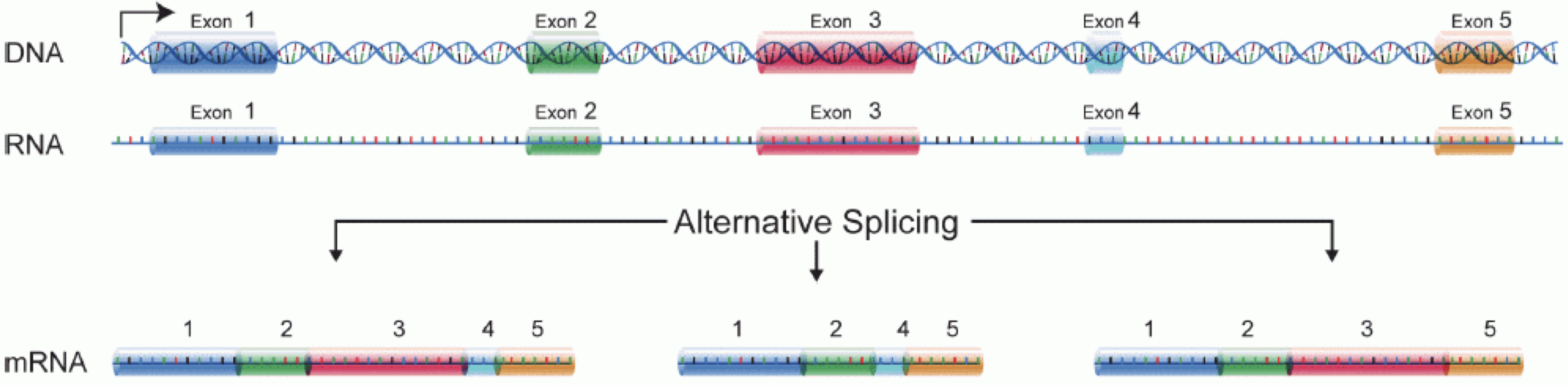
In order to produce an RNA molecule, a stretch of DNA is first transcribed into mRNA. Subsequently, intronic regions are spliced out, and exonic regions are combined into different isoforms of a gene.
Animation (30 seconds): one gene, three mRNA isoforms, three proteins. Press Play to start, or open it in a new tab.
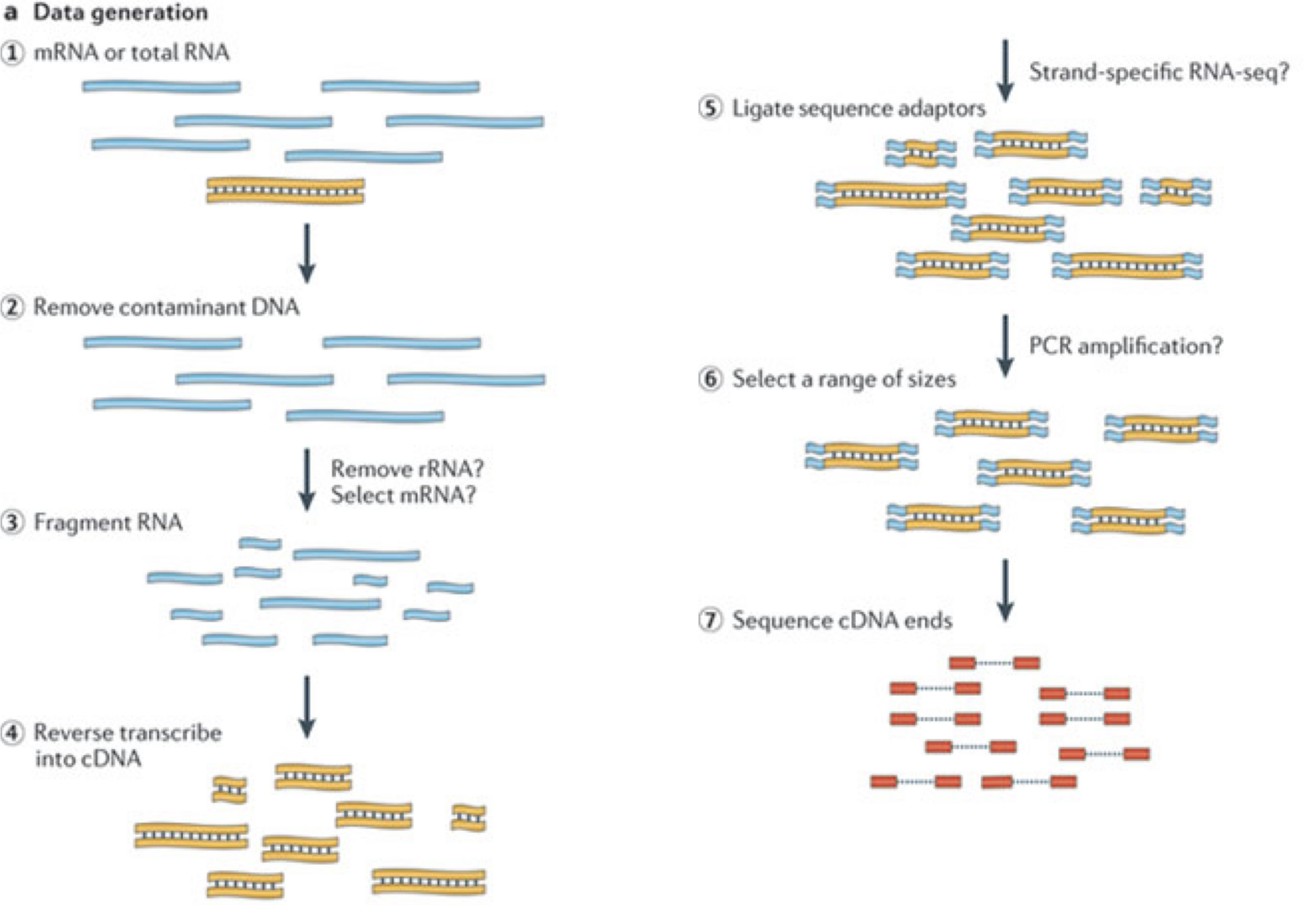
(figure adapted from Martin & Wang (2011)).
Animation (2 minutes): from RNA to FASTQ. It follows a typical current protocol, a stranded (dUTP), poly(A)-selected, paired-end library on a recent Illumina instrument. The workshop data is older and differs in two ways you will meet later: it is unstranded (Episode 4A checks this), and it was sequenced as 2 x 51 bp reads on an Illumina HiSeq 2000. Press Play to start, or open it in a new tab.
In a typical RNA-seq experiment, RNA molecules are first collected from a sample of interest. After a potential enrichment for molecules with polyA tails (predominantly mRNA), or depletion of otherwise highly abundant ribosomal RNA, the remaining molecules are fragmented into smaller pieces (there are also long-read protocols where entire molecules are considered, but those are not the focus of this lesson). It is important to keep in mind that because of the splicing excluding intronic sequences, an RNA molecule (and hence a generated fragment) may not correspond to an uninterrupted region of the genome. The RNA fragments are then reverse transcribed into cDNA, whereafter sequencing adapters are added to each end. These adapters allow the fragments to attach to the flow cell. Once attached, each fragment will be heavily amplified to generate a cluster of identical sequences on the flow cell. The sequencer then determines the sequence of the first 50-200 nucleotides of the cDNA fragments in each such cluster, starting from one end, which corresponds to a read. Many data sets are generated with so called paired-end protocols, in which the fragments are read from both ends. Millions of such reads (or pairs of reads) will be generated in an experiment, and these will be represented in a (pair of) FASTQ files. Each read is represented by four consecutive lines in such a file: first a line with a unique read identifier, next the inferred sequence of the read, then another identifier line, and finally a line containing the base quality for each inferred nucleotide, representing the probability that the nucleotide in the corresponding position has been correctly identified.
Challenge: Discuss the following points with your neighbor
- What are potential advantages and disadvantages of paired-end protocols compared to only sequencing one end of a fragment?
- What quality assessment can you think of that would be useful to perform on the FASTQ files with read sequences?
Experimental design considerations
Before starting to collect data, it is essential to take some time to think about the design of the experiment. Experimental design concerns the organization of experiments with the purpose of making sure that the right type of data, and enough of it, is available to answer the questions of interest as efficiently as possible. Aspects such as which conditions or sample groups to consider, how many replicates to collect, and how to plan the data collection in practice are important questions to consider. Many high-throughput biological experiments (including RNA-seq) are sensitive to ambient conditions, and it is often difficult to directly compare measurements that have been done on different days, by different analysts, in different centers, or using different batches of reagents. For this reason, it is very important to design experiments properly, to make it possible to disentangle different types of (primary and secondary) effects.
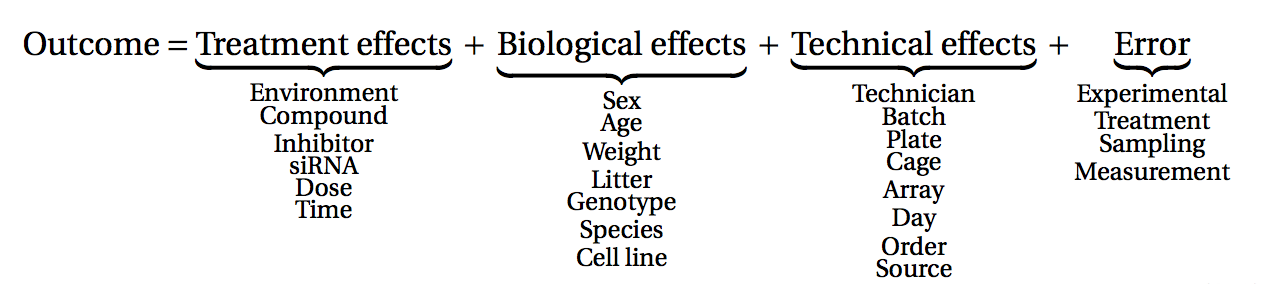
(figure from Lazic (2017)).
Challenge: Discuss with your neighbor
- Why is it essential to have replicates?
Importantly, not all replicates are equally useful, from a statistical point of view. One common way to classify the different types of replicates is as ‘biological’ and ‘technical’, where the latter are typically used to test the reproducibility of the measurement device, while biological replicates inform about the variability between different samples from a population of interest. Another scheme classifies replicates (or units) into ‘biological’, ‘experimental’ and ‘observational’. Here, biological units are entities we want to make inferences about (e.g., animals, persons). Replication of biological units is required to make a general statement of the effect of a treatment - we can not draw a conclusion about the effect of drug on a population of mice by studying a single mouse only. Experimental units are the smallest entities that can be independently assigned to a treatment (e.g., animal, litter, cage, well). Only replication of experimental units constitute true replication. Observational units, finally, are entities at which measurements are made.
To explore the impact of experimental design on the ability to answer questions of interest, we are going to use an interactive application, provided in the ConfoundingExplorer package.
Challenge
Launch the ConfoundingExplorer application and familiarize yourself with the interface.
Challenge
- For a balanced design (equal distribution of replicates between the two groups in each batch), what is the effect of increasing the strength of the batch effect? Does it matter whether one adjusts for the batch effect or not?
- For an increasingly unbalanced design (most or all replicates of one group coming from one batch), what is the effect of increasing the strength of the batch effect? Does it matter whether one adjusts for the batch effect or not?
RNA-seq quantification: from reads to count matrix
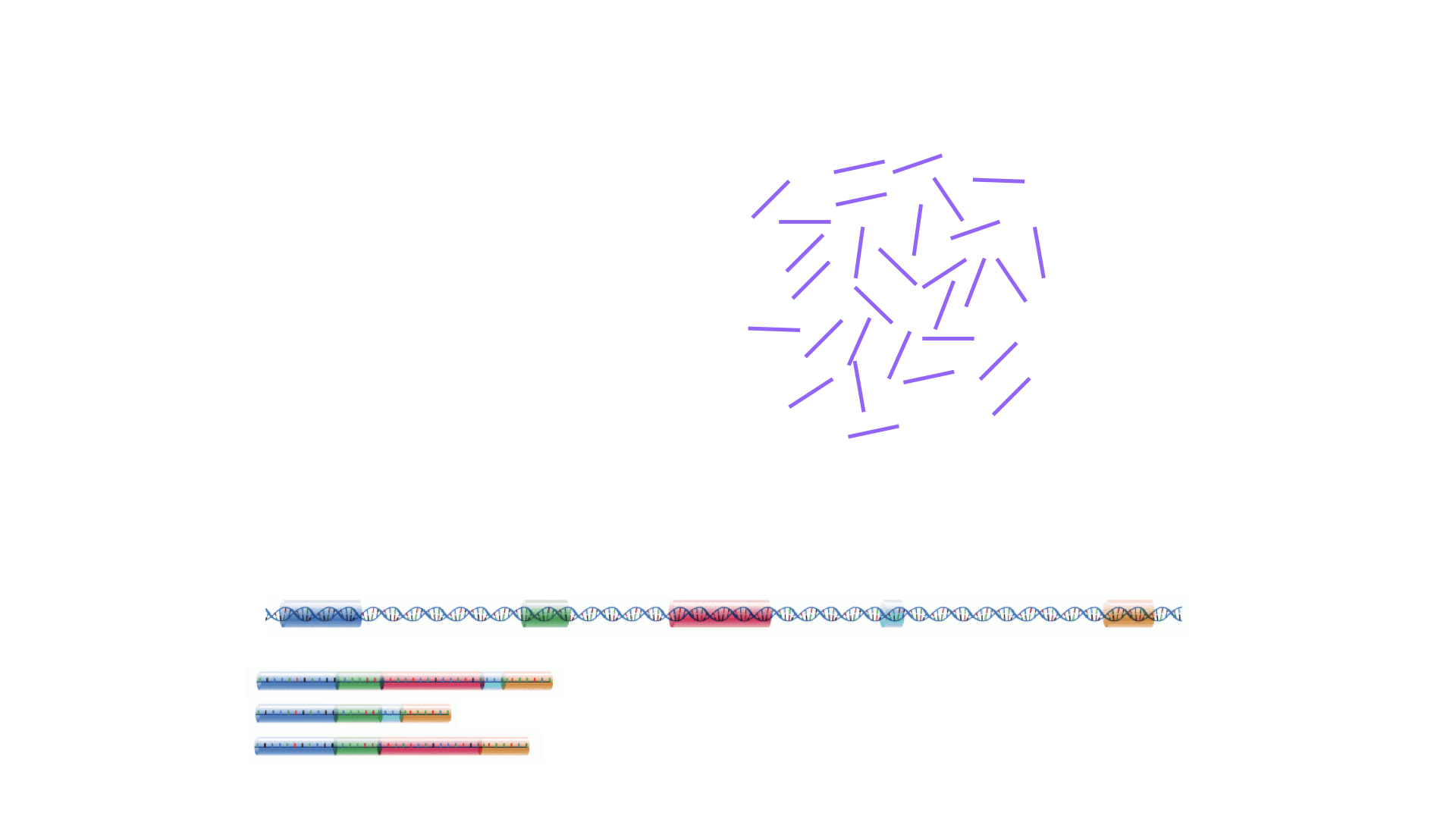
Animation (72 seconds): the genome-based route, approach 1 below: align reads to the genome, count reads per gene, and assemble the count matrix. Episode 4A does this with STAR and featureCounts. Press Play to start, or open it in a new tab.
The read sequences contained in the FASTQ files from the sequencer are typically not directly useful as they are, since we do not have the information about which gene or transcript they originate from. Thus, the first processing step is to attempt to identify the location of origin for each read, and use this to obtain an estimate of the number of reads originating from a gene (or another features, such as an individual transcript). This can then be used as a proxy for the abundance, or expression level, of the gene. There is a plethora of RNA quantification pipelines, and the most common approaches can be categorized into three main types:
Align reads to the genome, and count the number of reads that map within the exons of each gene. This is the one of simplest methods. For species for which the transcriptome is poorly annotated, this would be the preferred approach. Example:
STARalignment to GRCm39 +RsubreadfeatureCountsAlign reads to the transcriptome, quantify transcript expression, and summarize transcript expression into gene expression. This approach can produce accurate quantification results (independent benchmarking), particularly for high-quality samples without DNA contamination. Example: RSEM quantification using
rsem-calculate-expression --staron the GENCODE GRCh38 transcriptome +tximportPseudoalign reads against the transcriptome, using the corresponding genome as a decoy, quantifying transcript expression in the process, and summarize the transcript-level expression into gene-level expression. The advantages of this approach include: computational efficiency, mitigation of the effect of DNA contamination, and GC bias correction. Example:
salmon quant --gcBias+tximport
At typical sequencing read depth, gene expression quantification is often more accurate than transcript expression quantification. However, differential gene expression analyses can be improved by having access also to transcript-level quantifications.
Other tools used in RNA-seq quantification include: TopHat2, Bowtie2, Kallisto, HTSeq, among many others.
The choice of an appropriate RNA-seq quantification depends on the quality of the transcriptome annotation, the quality of the RNA-seq library preparation, the presence of contaminating sequences, among many factors. Often, it can be informative to compare the quantification results of multiple approaches.
The quantification method is species- and experiment-dependent, and often requires large amounts of computing resources, so we will give you a overview of how to perform quantification, and scripts to run the quantification. We will use pre-computed quantifications for the exercises in this workshop.
Challenge: Discuss the following points with your neighbor
- Which of the mentioned RNA-Seq quantification tools have you heard about? Do you know other pros and cons of the methods?
- Have you done your own RNA-Seq experiment? If so, what quantification tool did you use and why did you choose it?
- Do you have access to specific tools / local bioinformatics expert / computational resources for quantification? If you don’t, how might you gain access?
Finding the reference sequences
In order to quantify abundances of known genes or transcripts from RNA-seq data, we need a reference database informing us of the sequence of these features, to which we can then compare our reads. This information can be obtained from different online repositories. It is highly recommended to choose one of these for a particular project, and not mix information from different sources. Depending on the quantification tool you have chosen, you will need different types of reference information. If you are aligning your reads to the genome and investigating the overlap with known annotated features, you will need the full genome sequence (provided in a fasta file) and a file that tells you the genomic location of each annotated feature (typically provided in a gtf file). If you are mapping your reads to the transcriptome, you will instead need a file with the sequence of each transcript (again, a fasta file).
- If you are working with mouse or human samples, the GENCODE project provides well-curated reference files.
- Ensembl provides reference files for a large set of organisms, including plants and fungi.
- UCSC also provides reference files for many organisms.
Challenge
Download the latest mouse transcriptome fasta file from GENCODE. What
do the entries look like? Tip: to read the file into R, consider the
readDNAStringSet() function from the
Biostrings package.
Where are we heading towards in this workshop?
In this workshop, we will discuss and practice: downloading publicly available RNA-seq data, performing quality assessment of the raw data, quantifying gene expression, and performing differential expression analysis to identify genes that are expressed at different levels between two or more conditions. We will also cover some aspects of data visualization and interpretation of the results.
The animation below previews the path from a count matrix to biological insight: filtering, normalization, a PCA of the samples, testing each gene, and summarizing the results in a volcano plot and a heatmap.
Animation (90 seconds): from counts to insight. The values are illustrative. It names several tools (limma-voom, edgeR, DESeq2) and cutoffs of FDR < 0.05 and |log2 fold change| > 1; in this workshop we use DESeq2 with adjusted p-value ≤ 0.05 and a 1.5-fold change (|log2 fold change| ≥ 0.58). Press Play to start, or open it in a new tab.
The outcome of a differential expression analysis is often represented using graphical representations, such as MA plots and heatmaps (see below for examples).
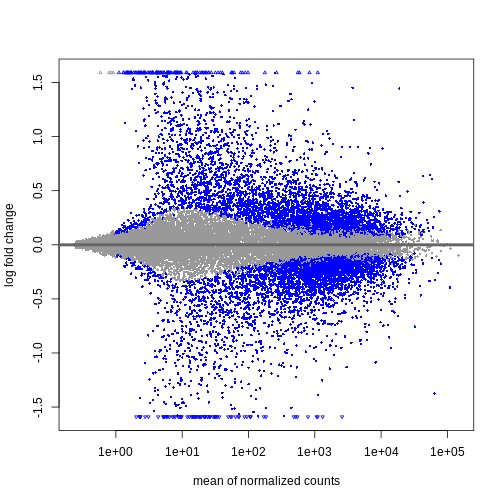
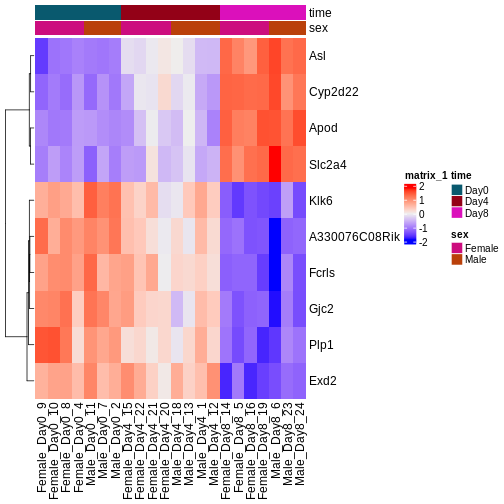
In the following episodes we will make and interpret the most common of these views for our own data: a PCA and a sample-distance heatmap to check the samples, and a volcano plot of the differential expression results. MA plots and gene-level heatmaps like the examples above are common alternatives that you can build from the same results. It is also common to perform follow-up analyses to investigate whether there is a functional relationship among the top-ranked genes, so called gene set (enrichment) analysis, which will also be covered in a later episode.
- RNA-seq is a technique of measuring the amount of RNA expressed within a cell/tissue and state at a given time.
- Many choices have to be made when planning an RNA-seq experiment, such as whether to perform poly-A selection or ribosomal depletion, whether to apply a stranded or an unstranded protocol, and whether to sequence the reads in a single-end or paired-end fashion. Each of the choices have consequences for the processing and interpretation of the data.
- Many approaches exist for quantification of RNA-seq data. Some methods align reads to the genome and count the number of reads overlapping gene loci. Other methods map reads to the transcriptome and use a probabilistic approach to estimate the abundance of each gene or transcript.
- Information about annotated genes can be accessed via several sources, including Ensembl, UCSC and GENCODE.
Content from 2. Downloading and organizing files
Last updated on 2026-11-10 | Edit this page
Overview
Questions
- What files are required to process raw RNA seq reads?
- Where do we obtain raw reads, reference genomes, annotations, and transcript sequences?
- How should project directories be organized to support a smooth workflow?
- What practical considerations matter when downloading and preparing RNA seq data?
Objectives
- Identify the essential inputs for RNA seq analysis: FASTQ files, reference genome, annotation, and transcript sequences.
- Learn where and how to download RNA seq datasets and reference materials.
- Create a clean project directory structure suitable for quality control, alignment, and quantification.
- Understand practical issues such as compressed FASTQ files and adapter trimming.
Introduction
Before we can perform quality control, mapping, or quantification, we must first gather the files required for RNA seq analysis and organize them in a reproducible way. This episode introduces the essential inputs of an RNA seq workflow and demonstrates how to obtain and structure them on a computing system.
We begin by discussing raw FASTQ reads, reference genomes, annotation files, and transcript sequences. We then download the dataset used throughout the workshop and set up the directory structure that supports downstream steps.
Most FASTQ files arrive compressed as .fastq.gz files.
Modern RNA seq tools accept compressed files directly, so uncompressing
them is usually unnecessary.
Should I uncompress FASTQ files?
In almost all RNA-seq workflows, you should keep FASTQ files
compressed. Tools such as FastQC, HISAT2, STAR, Salmon, and fastp can
read .gz files directly. Keeping files compressed saves
space and reduces input and output overhead.
Many library preparation protocols introduce adapter sequences at the ends of reads. For most alignment based analyses, explicit trimming is not required because aligners soft clip adapter sequences automatically.
Should I trim adapters for RNA seq analysis?
In most cases, no. Aligners such as HISAT2 and STAR soft clip adapter
sequences. Overly aggressive trimming can reduce mapping rates or
distort read length distributions. Trimming is needed only for specific
applications such as transcript assembly where uniform read lengths are
important.
More information: https://pmc.ncbi.nlm.nih.gov/articles/PMC4766705/
The workshop dataset: p53-mediated response to ionizing radiation
For this workshop, we use a subset of a publicly available dataset (GEO accession GSE71176) that investigates the transcriptional response to ionizing radiation (IR) in mouse B cells. The original study by Tonelli et al. (2015) examined how the tumor suppressor p53 (encoded by Trp53) regulates gene expression following DNA damage.
Biological context
The TP53 gene (called Trp53 in mice) encodes the p53 protein, often called the “guardian of the genome.” When cells experience DNA damage, such as double-strand breaks caused by ionizing radiation, p53 activates transcriptional programs that lead to:
- Cell cycle arrest (allowing time for DNA repair)
- Apoptosis (programmed cell death if damage is irreparable)
- Senescence (permanent growth arrest)
- Metabolic reprogramming
Mutations in TP53 are among the most common alterations in human cancers, occurring in approximately 50% of all tumors. Understanding p53-regulated genes is therefore central to cancer biology.
Experimental design
The full dataset includes wild-type (WT) and p53-knockout (KO) mouse B cells, with and without IR treatment (7 Gy, 4 hours post-exposure). For simplicity, we will focus on 8 samples from wild-type B cells only:
| Condition | Description | Samples | Replicates |
|---|---|---|---|
| WT_mock (control) | Wild-type B cells, no radiation | 4 | SRR2121778-81 |
| WT_IR (treatment) | Wild-type B cells, 4h post 7Gy IR | 4 | SRR2121786-89 |
This balanced design (n=4 per group) allows us to identify genes that respond to ionizing radiation in cells with functional p53.
The full GSE71176 series has 24 samples
GSE71176 (SRA study SRP061386; Illumina HiSeq 2000, paired-end reads) profiles splenic B cells and splenic non-B cells from wild-type (Trp53+/+) and p53-knockout (Trp53-/-) mice, mock-treated or 4 hours after 7 Gy whole-body irradiation:
| Genotype | Cell type | Mock | IR (7 Gy, 4 h) |
|---|---|---|---|
| Wild type | B cells | 4 (used here) | 4 (used here) |
| Wild type | non-B cells | 4 | 4 |
| Trp53-/- | B cells | 2 | 2 |
| Trp53-/- | non-B cells | 2 | 2 |
The workshop uses only the 8 wild-type B-cell samples. A single
two-group comparison with 4 replicates per group is the simplest design
that teaches the whole workflow, and the IR response in wild-type cells
gives clear positive controls. The knockout groups have only 2
replicates each, and bringing in genotype or cell type would need a
multi-factor design (for example
~ genotype + treatment + genotype:treatment to ask whether
the IR response depends on p53). Those samples make a good exercise
after the workshop.
Pick the workshop samples from the full series
The table below lists all 24 runs of SRP061386 (GEO sample characteristics and SRA run information, retrieved 2026-10-02). Which 8 runs make up the workshop dataset, and which of them are the controls?
| Run | GEO sample | Genotype | Cell type | Treatment | Read pairs (millions) |
|---|---|---|---|---|---|
| SRR2121770 | GSM1828861 | Trp53-/- | B cells | mock | 118 |
| SRR2121771 | GSM1828862 | Trp53-/- | B cells | mock | 103 |
| SRR2121772 | GSM1828863 | Trp53-/- | non-B cells | mock | 131 |
| SRR2121773 | GSM1828864 | Trp53-/- | non-B cells | mock | 128 |
| SRR2121774 | GSM1828865 | Trp53-/- | B cells | 7 Gy IR, 4 h | 91 |
| SRR2121775 | GSM1828866 | Trp53-/- | B cells | 7 Gy IR, 4 h | 109 |
| SRR2121776 | GSM1828867 | Trp53-/- | non-B cells | 7 Gy IR, 4 h | 110 |
| SRR2121777 | GSM1828868 | Trp53-/- | non-B cells | 7 Gy IR, 4 h | 76 |
| SRR2121778 | GSM1828869 | Trp53+/+ | B cells | mock | 137 |
| SRR2121779 | GSM1828870 | Trp53+/+ | B cells | mock | 124 |
| SRR2121780 | GSM1828871 | Trp53+/+ | B cells | mock | 100 |
| SRR2121781 | GSM1828872 | Trp53+/+ | B cells | mock | 106 |
| SRR2121782 | GSM1828873 | Trp53+/+ | non-B cells | mock | 103 |
| SRR2121783 | GSM1828874 | Trp53+/+ | non-B cells | mock | 109 |
| SRR2121784 | GSM1828875 | Trp53+/+ | non-B cells | mock | 98 |
| SRR2121785 | GSM1828876 | Trp53+/+ | non-B cells | mock | 105 |
| SRR2121786 | GSM1828877 | Trp53+/+ | B cells | 7 Gy IR, 4 h | 100 |
| SRR2121787 | GSM1828878 | Trp53+/+ | B cells | 7 Gy IR, 4 h | 75 |
| SRR2121788 | GSM1828879 | Trp53+/+ | B cells | 7 Gy IR, 4 h | 83 |
| SRR2121789 | GSM1828880 | Trp53+/+ | B cells | 7 Gy IR, 4 h | 92 |
| SRR2121790 | GSM1828881 | Trp53+/+ | non-B cells | 7 Gy IR, 4 h | 80 |
| SRR2121791 | GSM1828882 | Trp53+/+ | non-B cells | 7 Gy IR, 4 h | 83 |
| SRR2121792 | GSM1828883 | Trp53+/+ | non-B cells | 7 Gy IR, 4 h | 94 |
| SRR2121793 | GSM1828884 | Trp53+/+ | non-B cells | 7 Gy IR, 4 h | 157 |
The wild-type B-cell runs: SRR2121778 to SRR2121781 are the mock controls (WT_Bcell_mock_rep1 to rep4) and SRR2121786 to SRR2121789 are the irradiated samples (WT_Bcell_IR_rep1 to rep4). In the SRA Run Selector you would filter on genotype and cell type, then download the accession list for just these 8 runs.
Expected biological results
Because p53 is a transcription factor activated by DNA damage, we expect to see upregulation of canonical p53 target genes in IR-treated samples:
Genes expected to be upregulated (IR vs mock):
- Cdkn1a (p21) - cell cycle arrest
- Bax, Bbc3 (Puma), Pmaip1 (Noxa) - pro-apoptotic
- Mdm2 - negative feedback regulator of p53
- Gadd45a - DNA damage response (in the subsampled workshop data only a small increase that is not statistically significant)
- Fas, Tnfrsf10b (DR5) - death receptor signaling
Pathways expected to be enriched (all among genes that go up after IR, on both analysis tracks):
- p53 signaling: the KEGG p53 signaling pathway and the MSigDB Hallmark p53 pathway (Episode 6, over-representation analysis)
- DNA damage response: GO terms for DNA damage signal transduction by p53 (over-representation of upregulated genes and GSEA)
- Apoptosis: GO intrinsic apoptotic signaling in response to DNA damage (GSEA)
- Cell cycle: GO DNA damage and mitotic cell cycle checkpoint signaling (GSEA)
At 20 million read pairs, the broader Hallmark apoptosis and cell cycle (G2M, E2F) sets do not reach significance; the more specific GO terms do.
The presence of these expected results serves as a positive control that our analysis pipeline is working correctly.
Why this dataset?
This dataset is ideal for teaching because:
- Simple two-group comparison: Control vs. treatment with balanced replicates
- Clear biological interpretation: DNA damage response is well-characterized
- Expected positive controls: Known p53 targets should appear as top hits
- Clinical relevance: p53 biology is fundamental to cancer research
- Model organism: Mouse with excellent genome annotation
Project organization
Before downloading files, we create a reproducible directory layout for raw data, scripts, mapping outputs, and count files.
Create the directories needed for this episode
Create a working directory for the workshop (e.g.,
rnaseq-workshop). Inside it, create three
subdirectories:
-
data: raw FASTQ files, reference genome, annotation
-
scripts: custom scripts, SLURM job files
-
results: alignment, counts and various other outputs
What files do I need for RNA-seq analysis?
You will need:
- Raw reads (FASTQ)
- Usually
.fastq.gzfiles containing nucleotide sequences and per-base quality scores.
- Usually
For alignment based workflows
- Reference genome (FASTA)
- Contains chromosome or contig sequences.
- Annotation file (GTF/GFF)
- Describes gene models: exons, transcripts, coordinates.
For transcript-level quantification workflows
- Transcript sequences (FASTA)
- Required for transcript-based quantification with tools such as Salmon, Kallisto, and RSEM.
Reference files must be consistent with each other (same genome version). To ensure a smooth analysis workflow, keep these files logically organized. Good directory structure minimizes mistakes, simplifies scripting, and supports reproducibility.
Downloading the data
We now download:
- the GRCm39 reference genome
- the corresponding GENCODE annotation
- transcript sequences (if using transcript based quantification)
- raw FASTQ files from SRA
Reference genome and annotation
We will use GENCODE GRCm39 (M38) as the reference.
Annotation
Visit the GENCODE mouse page: https://www.gencodegenes.org/mouse/.
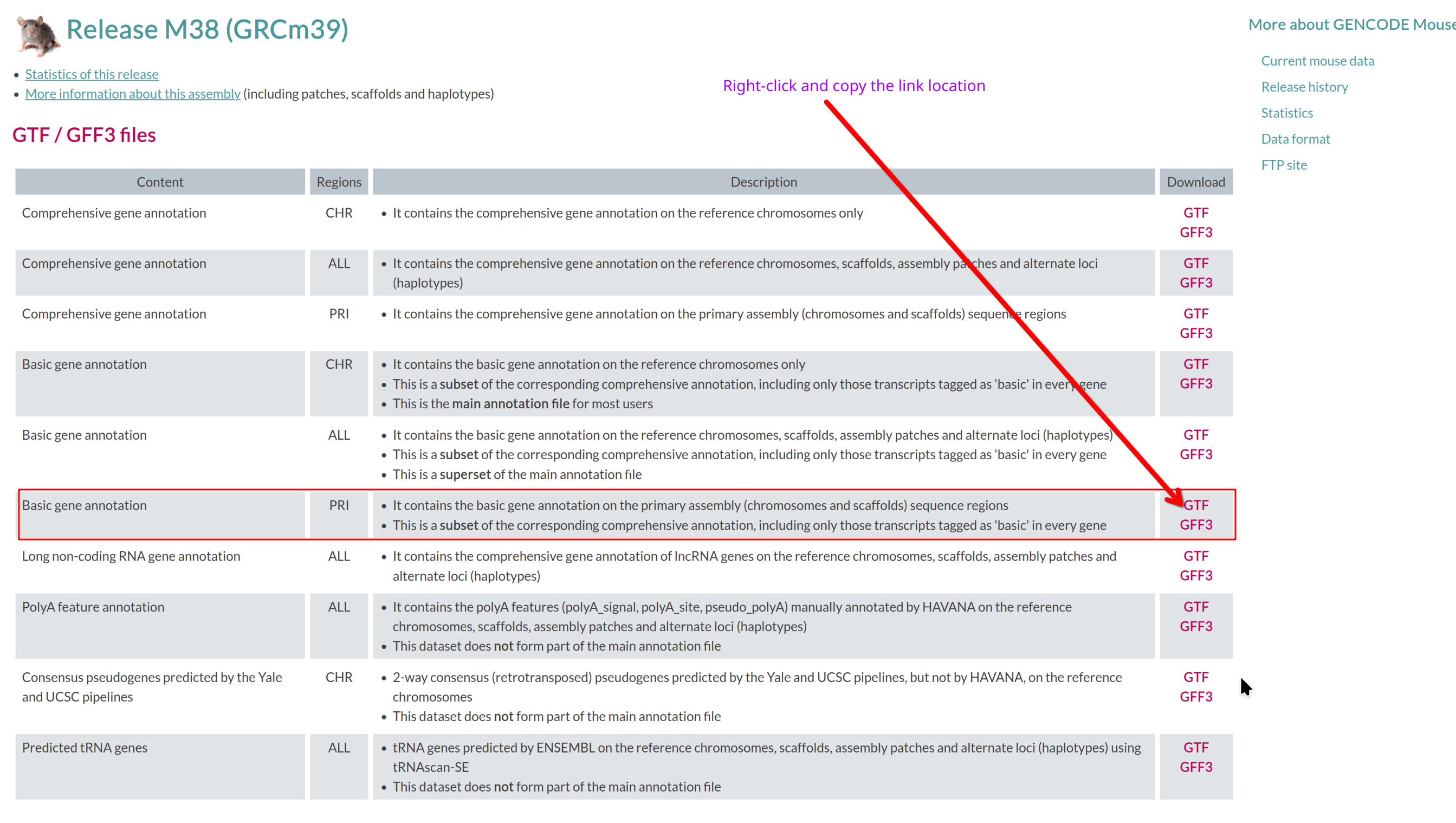
Which annotation file (GTF/GFF3 files section) should you download, and
why?
Use the basic gene annotation in GTF format (e.g.,
gencode.vM38.primary_assembly.basic.annotation.gtf.gz).
It contains essential gene and transcript models without pseudogenes or
other biotypes not typically used for RNA-seq quantification.
Reference genome
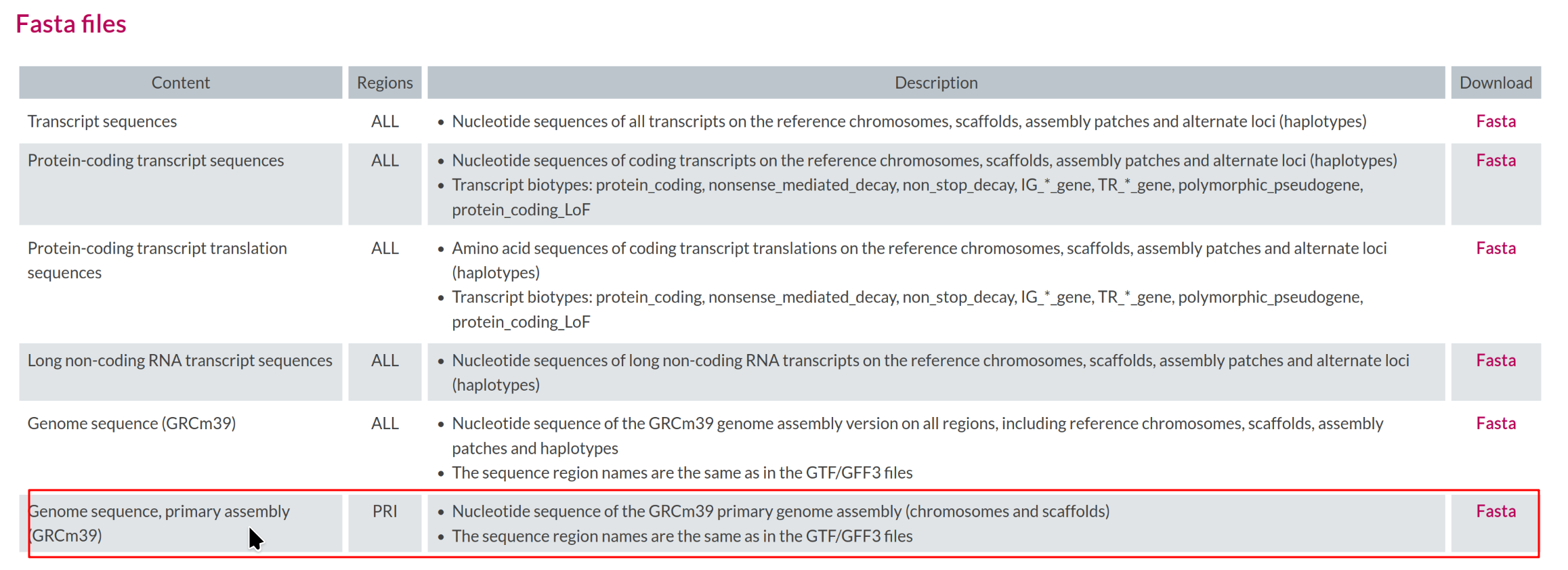
Select the corresponding Genome sequence (GRCm39)
FASTA (e.g.,
GRCm39.primary_assembly.genome.fa.gz).
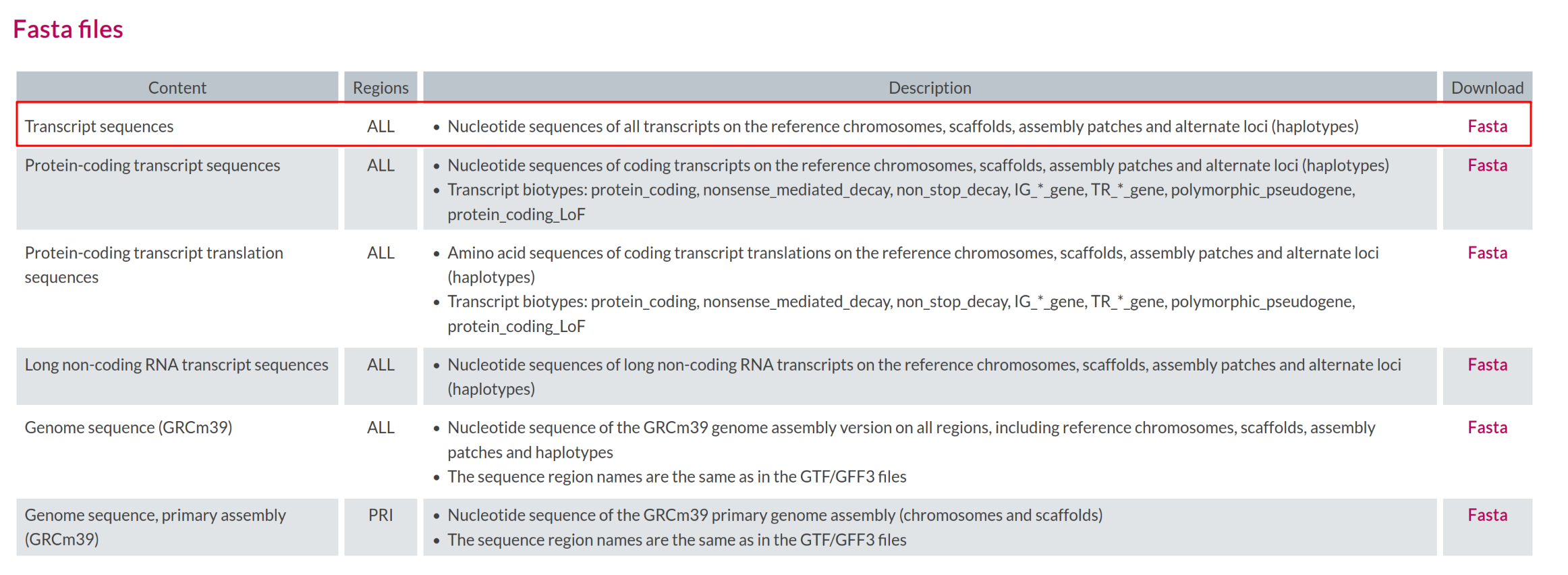
Transcript sequences
Transcript level quantification requires a transcript FASTA file
consistent with the annotation. GENCODE provides transcript sequences
for all transcripts in GRCm39
(gencode.vM38.transcripts.fa.gz).
Transcript sequence file
Where on the GENCODE page can you find the transcript FASTA file?
The transcript FASTA file is available in the same release directory
as the genome and annotation files (under FASTA files). It is named
gencode.vM38.transcripts.fa.gz.
Downloading all reference files
Already done if you copied the workshop data
The workshop copy you made in Setup already contains these reference
files, uncompressed, in data/. If you run this block in
that directory, gunzip stops with “already exists; not
overwritten” because the .fa and .gtf files
are present. Read the commands here; run them only when you set up a
project from scratch.
BASH
cd ${SCRATCH}/rnaseq-workshop

GTFlink="https://ftp.ebi.ac.uk/pub/databases/gencode/Gencode_mouse/release_M38/gencode.vM38.primary_assembly.basic.annotation.gtf.gz"
GENOMElink="https://ftp.ebi.ac.uk/pub/databases/gencode/Gencode_mouse/release_M38/GRCm39.primary_assembly.genome.fa.gz"
CDSLink="https://ftp.ebi.ac.uk/pub/databases/gencode/Gencode_mouse/release_M38/gencode.vM38.transcripts.fa.gz"

# Download to 'data'
wget -P data ${GENOMElink}
wget -P data ${GTFlink}
wget -P data ${CDSLink}

# Uncompress
cd data
gunzip GRCm39.primary_assembly.genome.fa.gz
gunzip gencode.vM38.primary_assembly.basic.annotation.gtf.gz
gunzip gencode.vM38.transcripts.fa.gz
The transcript file header has multiple pieces of information which often interfere with downstream analysis. We create a simplified version containing only the transcript IDs.
Raw reads
-
Study: Genome-wide analysis of p53 transcriptional
programs in B cells upon exposure to genotoxic stress in
vivo
- Organism: Mus musculus (C57BL/6)
- Cell type: Primary B cells from spleen
- Design: Wild-type mock vs Wild-type IR-treated (n=4 per group)
- Treatment: 7 Gy ionizing radiation, harvested 4 hours post-exposure
- Sequencing: Illumina HiSeq 2000, paired-end 51bp
- GEO: GSE71176
- Reference: Tonelli et al. Oncotarget 2015 Sep 22;6(28):24611-26. PMID: 26372730
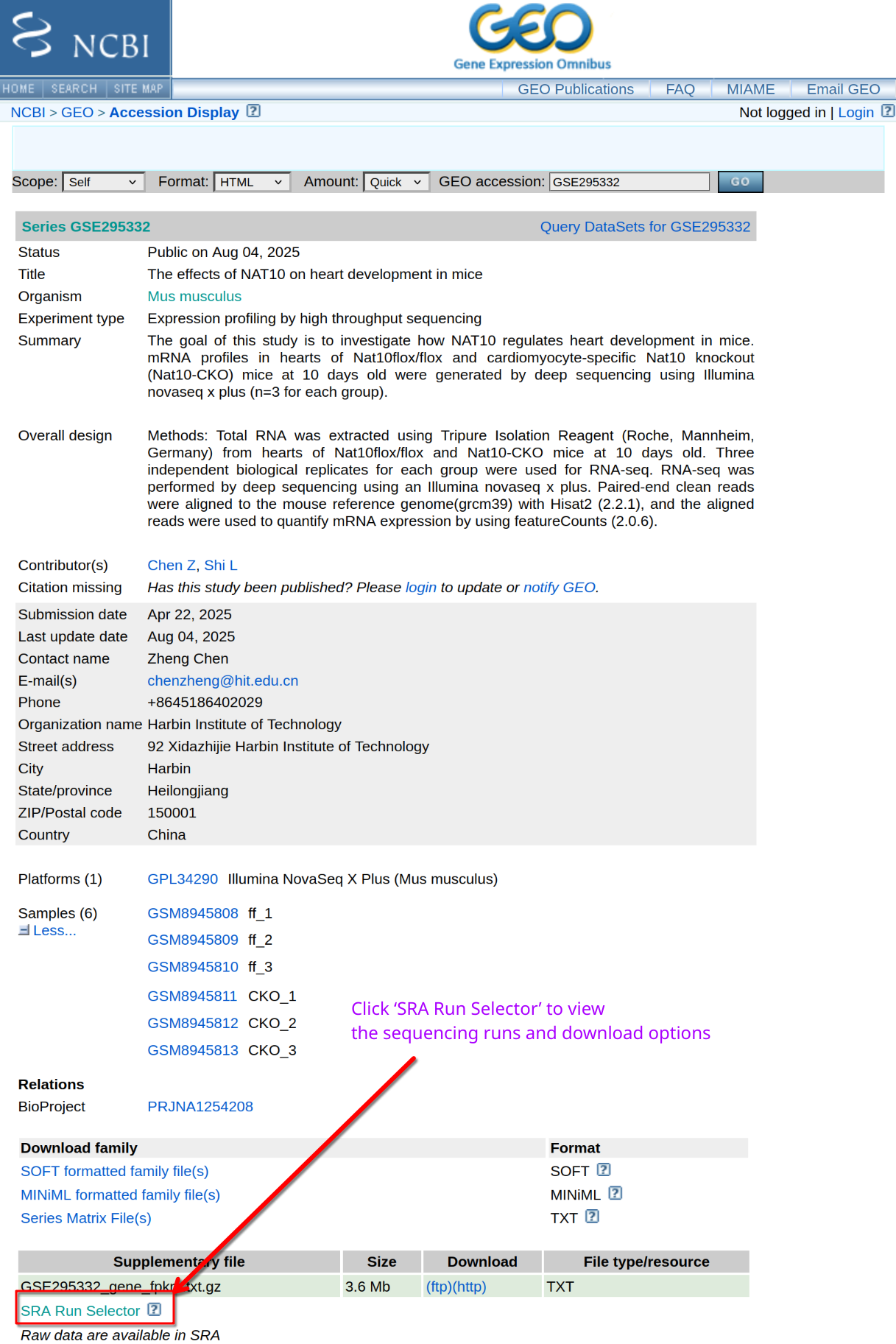
Where do you find FASTQ files?
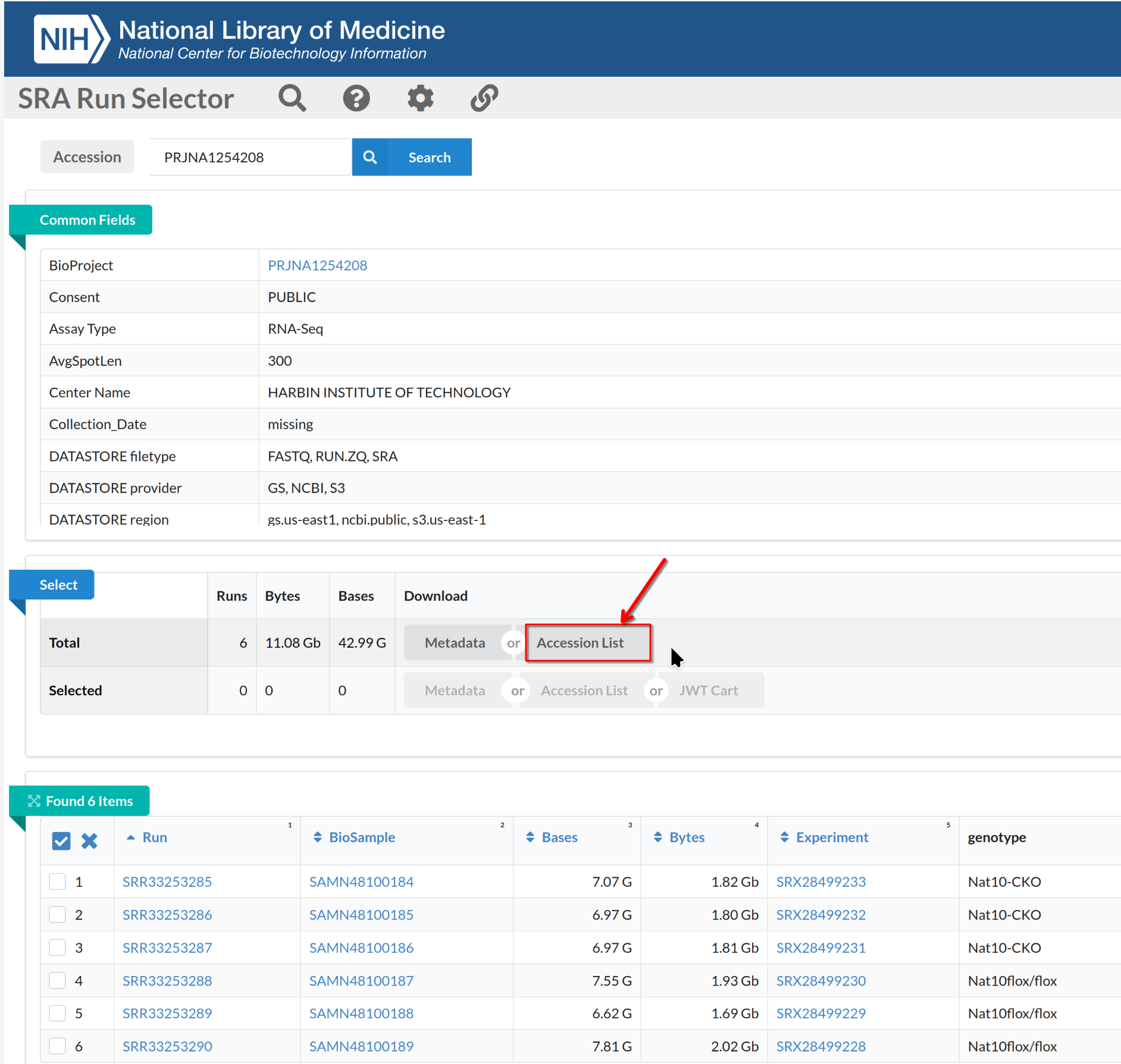
GEO provides metadata and experimental details, but FASTQ files are stored in the SRA. How do you obtain the complete list of sequencing runs?
Navigate to the SRA page for the BioProject and use Run
Selector to list runs.
On the Run Selector page, select the accessions (SRR2121778-81,
SRR2121786-89), toggle the “selected” and click Accession
List to download the selected SRR accession IDs.
Download FASTQ files with SRA Toolkit
[DO NOT RUN THIS COMMAND DURING THE WORKSHOP - IT TAKES TOO LONG TO COMPLETE]. You already copied the pre-downloaded data to your scratch space.
BASH
sinteractive -A rcac-rnaseq -q standby -p cpu -N 1 -n 4 --time=1:00:00
cd ${SCRATCH}/rnaseq-workshop/data
module load biocontainers
module load sra-tools
while read SRR; do
   fasterq-dump --threads 4 --progress $SRR;
   gzip ${SRR}_1.fastq
   gzip ${SRR}_2.fastq
done<SRR_Acc_List.txt
# rename files to meaningful names
# WT B cells - mock
mv SRR2121778_1.fastq.gz WT_Bcell_mock_rep1_R1.fastq.gz
mv SRR2121778_2.fastq.gz WT_Bcell_mock_rep1_R2.fastq.gz
mv SRR2121779_1.fastq.gz WT_Bcell_mock_rep2_R1.fastq.gz
mv SRR2121779_2.fastq.gz WT_Bcell_mock_rep2_R2.fastq.gz
mv SRR2121780_1.fastq.gz WT_Bcell_mock_rep3_R1.fastq.gz
mv SRR2121780_2.fastq.gz WT_Bcell_mock_rep3_R2.fastq.gz
mv SRR2121781_1.fastq.gz WT_Bcell_mock_rep4_R1.fastq.gz
mv SRR2121781_2.fastq.gz WT_Bcell_mock_rep4_R2.fastq.gz
# WT B cells - IR
mv SRR2121786_1.fastq.gz WT_Bcell_IR_rep1_R1.fastq.gz
mv SRR2121786_2.fastq.gz WT_Bcell_IR_rep1_R2.fastq.gz
mv SRR2121787_1.fastq.gz WT_Bcell_IR_rep2_R1.fastq.gz
mv SRR2121787_2.fastq.gz WT_Bcell_IR_rep2_R2.fastq.gz
mv SRR2121788_1.fastq.gz WT_Bcell_IR_rep3_R1.fastq.gz
mv SRR2121788_2.fastq.gz WT_Bcell_IR_rep3_R2.fastq.gz
mv SRR2121789_1.fastq.gz WT_Bcell_IR_rep4_R1.fastq.gz
mv SRR2121789_2.fastq.gz WT_Bcell_IR_rep4_R2.fastq.gzWorkshop data is subsampled
The FASTQ files provided for this workshop have been subsampled to 20 million read pairs per sample. The original samples contain 75 to 137 million read pairs each, and running the full pipeline would take many hours—far exceeding our workshop session time.
Never subsample your real experimental data. This is done exclusively for workshop time constraints. Subsampling reduces statistical power and may affect differential expression results.
For reference, here is how the workshop data was prepared. You do not need to run this—the pre-downloaded data is already subsampled.
The original samples from SRA contain 75 to 137 million read pairs
each (SRA run info for SRR2121778-81 and SRR2121786-89). To enable
completion of the full analysis pipeline within a single workshop day,
we subsample to 20 million read pairs per sample using
seqtk.
BASH
# Subsample reads to 20 million per sample (WORKSHOP ONLY - do not do this with real data!)
module load biocontainers
module load seqtk

mkdir -p subsampled
for sample in WT_Bcell_mock_rep1 WT_Bcell_mock_rep2 WT_Bcell_mock_rep3 WT_Bcell_mock_rep4 \
              WT_Bcell_IR_rep1 WT_Bcell_IR_rep2 WT_Bcell_IR_rep3 WT_Bcell_IR_rep4; do
    # Use same seed for R1 and R2 to maintain pairing
    seqtk sample -s 42 ${sample}_R1.fastq.gz 20000000 | gzip > subsampled/${sample}_R1.fastq.gz
    seqtk sample -s 42 ${sample}_R2.fastq.gz 20000000 | gzip > subsampled/${sample}_R2.fastq.gz
done

# Archive original files, then move the subsampled files into place
mkdir -p original_reads
mv *_R1.fastq.gz *_R2.fastq.gz original_reads/
mv subsampled/*.fastq.gz .
rmdir subsampled
Why 20 million reads?
- Sufficient depth for differential expression analysis of moderately expressed genes
- Keeps STAR alignment to 2 to 3 minutes per sample on 20 cores
- Allows completion of the full workshop pipeline in a single day
- Still produces biologically meaningful results for well-expressed p53 target genes
What you lose by subsampling:
- Statistical power to detect lowly expressed genes
- Precision in abundance estimates
- Ability to detect subtle fold changes
- Some lowly expressed transcripts may appear as zeros
For your own research, always use the full sequencing depth. Modern RNA-seq experiments typically aim for 20-50 million reads for differential expression, but the original unsubsampled data is always preferred.
The directory, after downloading, should look like this:
data
├── annot.tsv
├── gencode.vM38.primary_assembly.basic.annotation.gtf
├── gencode.vM38.transcripts-clean.fa
├── gencode.vM38.transcripts.fa
├── GRCm39.primary_assembly.genome.fa
├── mart.tsv
├── SRR_Acc_List.txt
├── tx2gene.tsv
├── WT_Bcell_IR_rep1_R1.fastq.gz
├── WT_Bcell_IR_rep1_R2.fastq.gz
├── WT_Bcell_IR_rep2_R1.fastq.gz
├── WT_Bcell_IR_rep2_R2.fastq.gz
├── WT_Bcell_IR_rep3_R1.fastq.gz
├── WT_Bcell_IR_rep3_R2.fastq.gz
├── WT_Bcell_IR_rep4_R1.fastq.gz
├── WT_Bcell_IR_rep4_R2.fastq.gz
├── WT_Bcell_mock_rep1_R1.fastq.gz
├── WT_Bcell_mock_rep1_R2.fastq.gz
├── WT_Bcell_mock_rep2_R1.fastq.gz
├── WT_Bcell_mock_rep2_R2.fastq.gz
├── WT_Bcell_mock_rep3_R1.fastq.gz
├── WT_Bcell_mock_rep3_R2.fastq.gz
├── WT_Bcell_mock_rep4_R1.fastq.gz
└── WT_Bcell_mock_rep4_R2.fastq.gz

0 directories, 24 files- RNA-seq requires three main inputs: FASTQ reads, a reference genome (FASTA), and gene annotation (GTF/GFF).
- In lieu of a reference genome and annotation, transcript sequences (FASTA) can be used for transcript-level quantification.
- Keeping files compressed and well-organized supports reproducible analysis.
- Reference files must match in genome build and version.
- Public data repositories such as GEO and SRA provide raw reads and metadata.
- Tools like
wgetandfasterq-dumpenable programmatic, reproducible data retrieval.
Content from 3. Quality control of RNA-seq reads
Last updated on 2026-11-10 | Edit this page
Overview
Questions
- How do we check the quality of raw RNA-seq reads?
- What information do FastQC and MultiQC provide?
- How do we decide if trimming is required?
- What QC issues are common in Illumina RNA-seq data?
Objectives
- Run FastQC and MultiQC on RNA-seq FASTQ files.
- Understand how to interpret the important FastQC modules.
- Learn which FastQC warnings are expected for RNA-seq.
- Understand why trimming is usually unnecessary for standard RNA-seq.
- Identify samples that may require closer inspection.
Introduction
Before mapping reads to a genome, it is important to evaluate the
quality of the raw RNA-seq data.
Quality control helps reveal problems such as adapter contamination, low
quality cycles, and unexpected technical issues.
In this episode, we will run FastQC and MultiQC on the p53/ionizing
radiation dataset and interpret the results.
We will also explain when trimming is useful and when it can be harmful
for alignment based RNA-seq workflows.
FastQC evaluates individual FASTQ files. MultiQC summarizes all FastQC reports into one view, which is helpful for comparing replicates.
Why do we perform QC on FASTQ files?
Quality control answers several questions:
- Are sequencing qualities stable across cycles?
- Are adapters present at high levels?
- Do different replicates show similar patterns?
- Are there outliers that indicate failed libraries?
QC provides confidence that downstream steps will be reliable.
Running FastQC
FastQC generates an HTML report for each FASTQ file. For paired-end datasets, you can run it on both R1 and R2 together or separately.
We will create a directory for QC output and then run FastQC on all FASTQ files.
Run FastQC on your FASTQ files
Use the commands below to run FastQC on all reads in the
data directory.
BASH
cd $SCRATCH/rnaseq-workshop
mkdir -p results/qc_fastq/

sinteractive -A rcac-rnaseq -q standby -p cpu -N 1 -n 4 --time=1:00:00
module load biocontainers
module load fastqc

fastqc data/*.fastq.gz --outdir results/qc_fastq/ --threads 4
FastQC writes one HTML report and one zip archive per FASTQ file:
WT_Bcell_IR_rep1_R1_fastqc.html
WT_Bcell_IR_rep1_R1_fastqc.zip
WT_Bcell_IR_rep1_R2_fastqc.html
WT_Bcell_IR_rep1_R2_fastqc.zip
WT_Bcell_IR_rep2_R1_fastqc.html
WT_Bcell_IR_rep2_R1_fastqc.zip
WT_Bcell_IR_rep2_R2_fastqc.html
WT_Bcell_IR_rep2_R2_fastqc.zip
WT_Bcell_IR_rep3_R1_fastqc.html
WT_Bcell_IR_rep3_R1_fastqc.zip
WT_Bcell_IR_rep3_R2_fastqc.html
WT_Bcell_IR_rep3_R2_fastqc.zip
WT_Bcell_IR_rep4_R1_fastqc.html
WT_Bcell_IR_rep4_R1_fastqc.zip
WT_Bcell_IR_rep4_R2_fastqc.html
WT_Bcell_IR_rep4_R2_fastqc.zip
WT_Bcell_mock_rep1_R1_fastqc.html
WT_Bcell_mock_rep1_R1_fastqc.zip
WT_Bcell_mock_rep1_R2_fastqc.html
WT_Bcell_mock_rep1_R2_fastqc.zip
WT_Bcell_mock_rep2_R1_fastqc.html
WT_Bcell_mock_rep2_R1_fastqc.zip
WT_Bcell_mock_rep2_R2_fastqc.html
WT_Bcell_mock_rep2_R2_fastqc.zip
WT_Bcell_mock_rep3_R1_fastqc.html
WT_Bcell_mock_rep3_R1_fastqc.zip
WT_Bcell_mock_rep3_R2_fastqc.html
WT_Bcell_mock_rep3_R2_fastqc.zip
WT_Bcell_mock_rep4_R1_fastqc.html
WT_Bcell_mock_rep4_R1_fastqc.zip
WT_Bcell_mock_rep4_R2_fastqc.html
WT_Bcell_mock_rep4_R2_fastqc.zip
Understanding the FastQC report
FastQC produces several diagnostic modules. RNA-seq users often misinterpret certain modules, so we focus on the ones that matter most.
Which FastQC modules are important for RNA-seq?
Most informative modules:
- Per base sequence quality
- Per sequence quality scores
- Per base sequence content
- Per sequence GC content
- Adapter content
- Overrepresented sequences
Modules that commonly show warnings for RNA-seq, even when libraries are fine:
- Per sequence GC content (RNA-seq reflects transcript GC bias, not whole genome)
- K-mer content (poly A tails and priming artifacts often trigger warnings)
Warnings do not always indicate problems. Context and comparison across samples matter more than individual icons.
Key modules explained
Below are guidelines for interpreting the most useful modules.
Each module below shows the plot from your own run of the workshop data (“your output”), followed by a contrast example: a schematic cartoon or a plot from a different dataset that shows what a problem, or a very clean run, looks like. The contrast examples are not from this workshop’s samples.
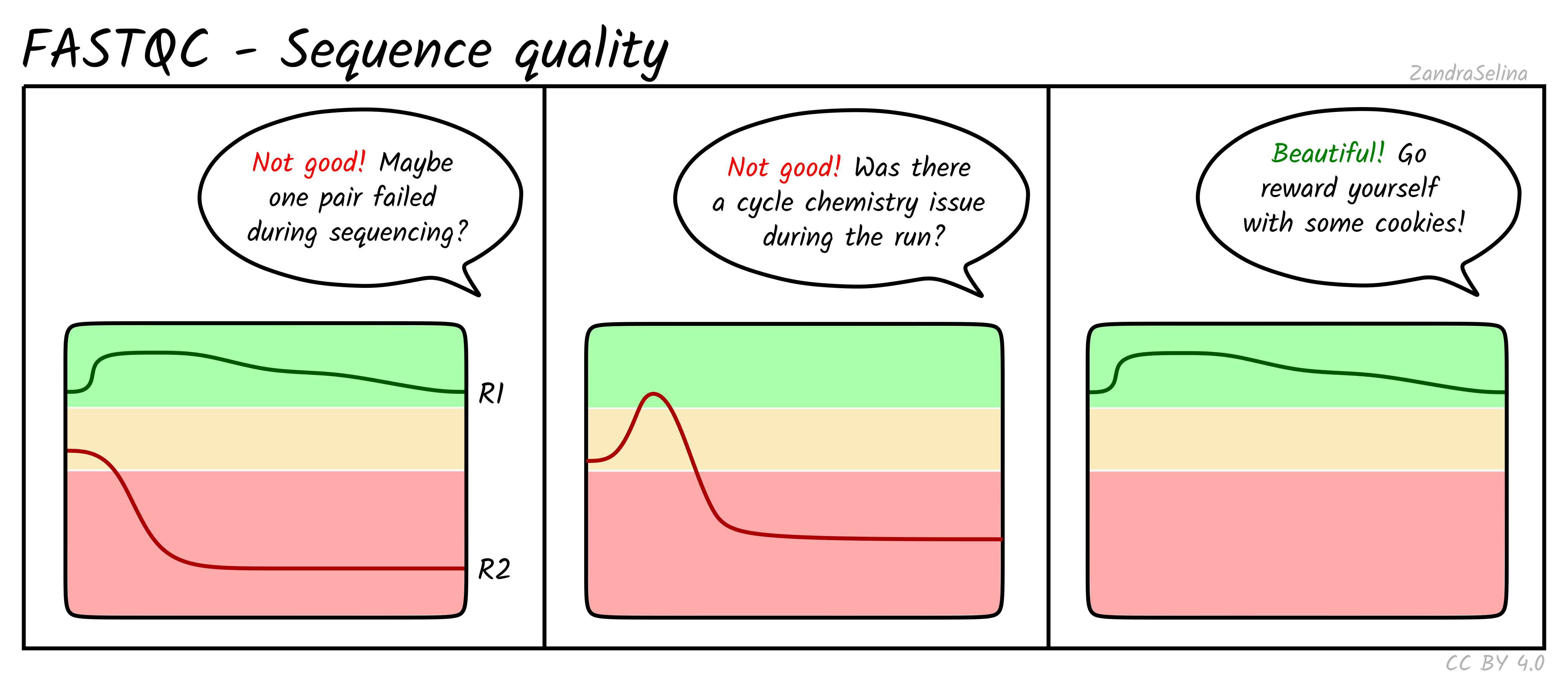
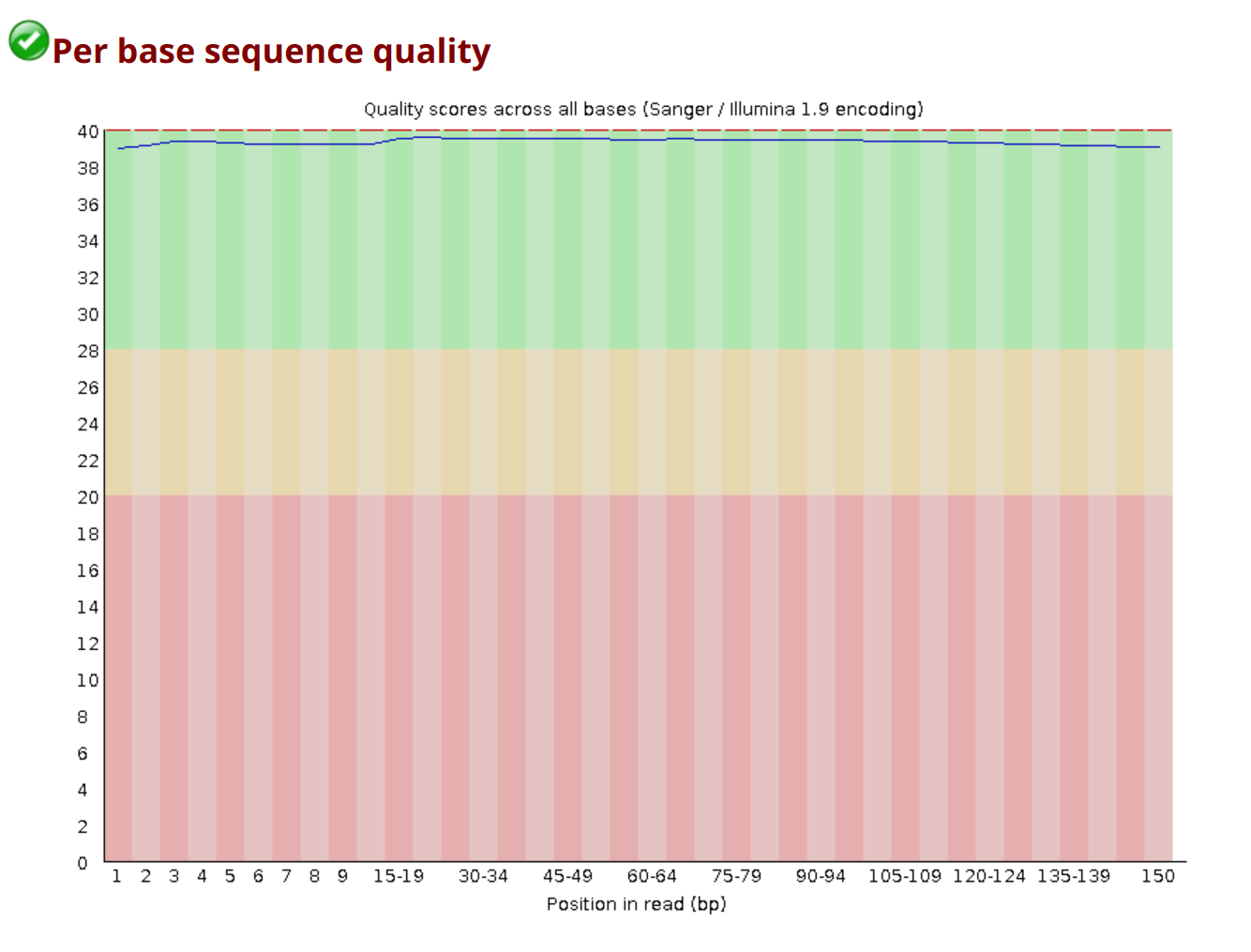
Per base sequence quality
Shows the distribution of quality scores at each position across all reads. You want high and stable quality across the read. A small quality drop at the end of R2 is common and usually not a problem.
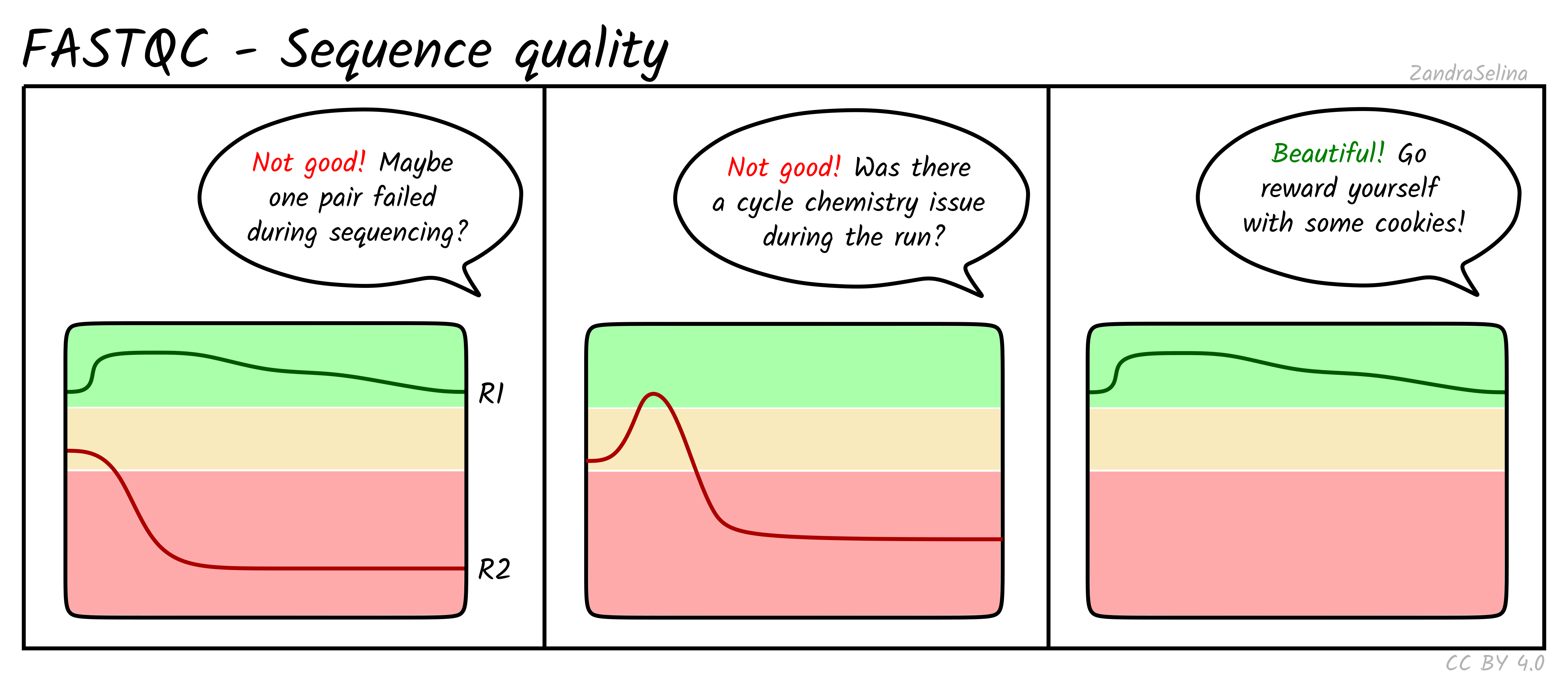
In the workshop data, the ten files from flowcell C1PF5ACXX (IR_rep1, IR_rep2, and mock_rep1 to mock_rep3) sit lower and drop sharply at the last cycle. The six files from the other two flowcells stay high, apart from a dip at cycle 27 in IR_rep4 R2 and a weaker last cycle in mock_rep4 R1.
Per tile sequence quality
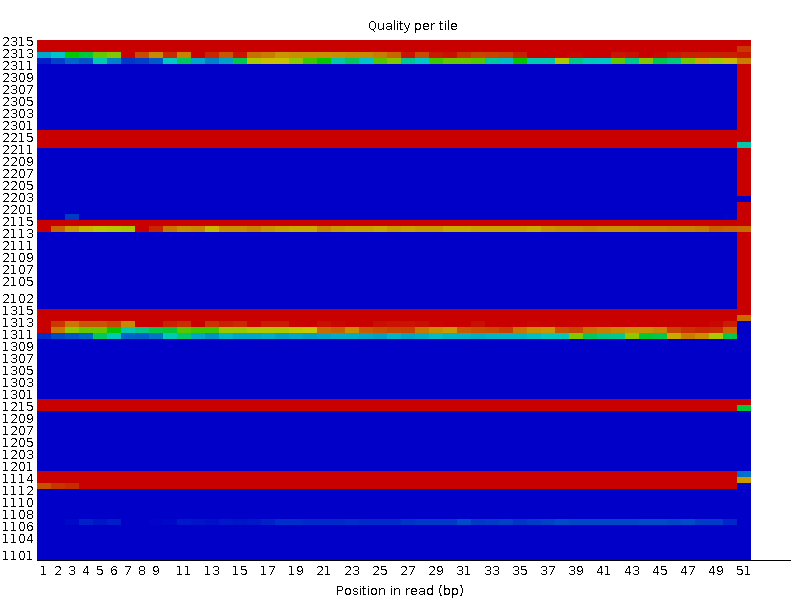
Reports whether specific regions of the flowcell produced lower quality reads. Uneven tiles can indicate instrument issues or bubble formation. In this workshop’s data the module fails in 12 of 16 files: all ten from flowcell C1PF5ACXX, plus IR_rep4 R2 and mock_rep4 R1.
Per sequence quality scores
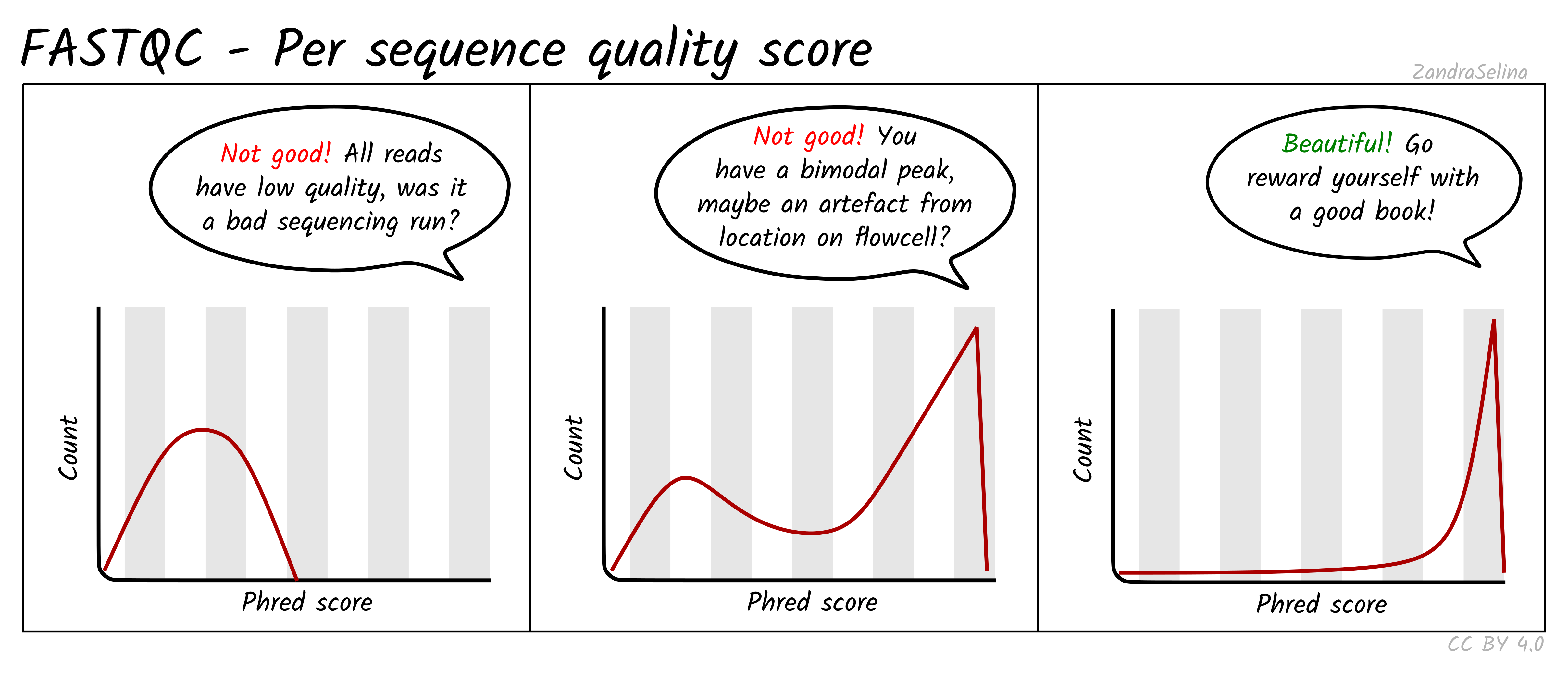
Shows how many reads have high or low overall quality. A good dataset has most reads with high scores and very few reads with low quality.
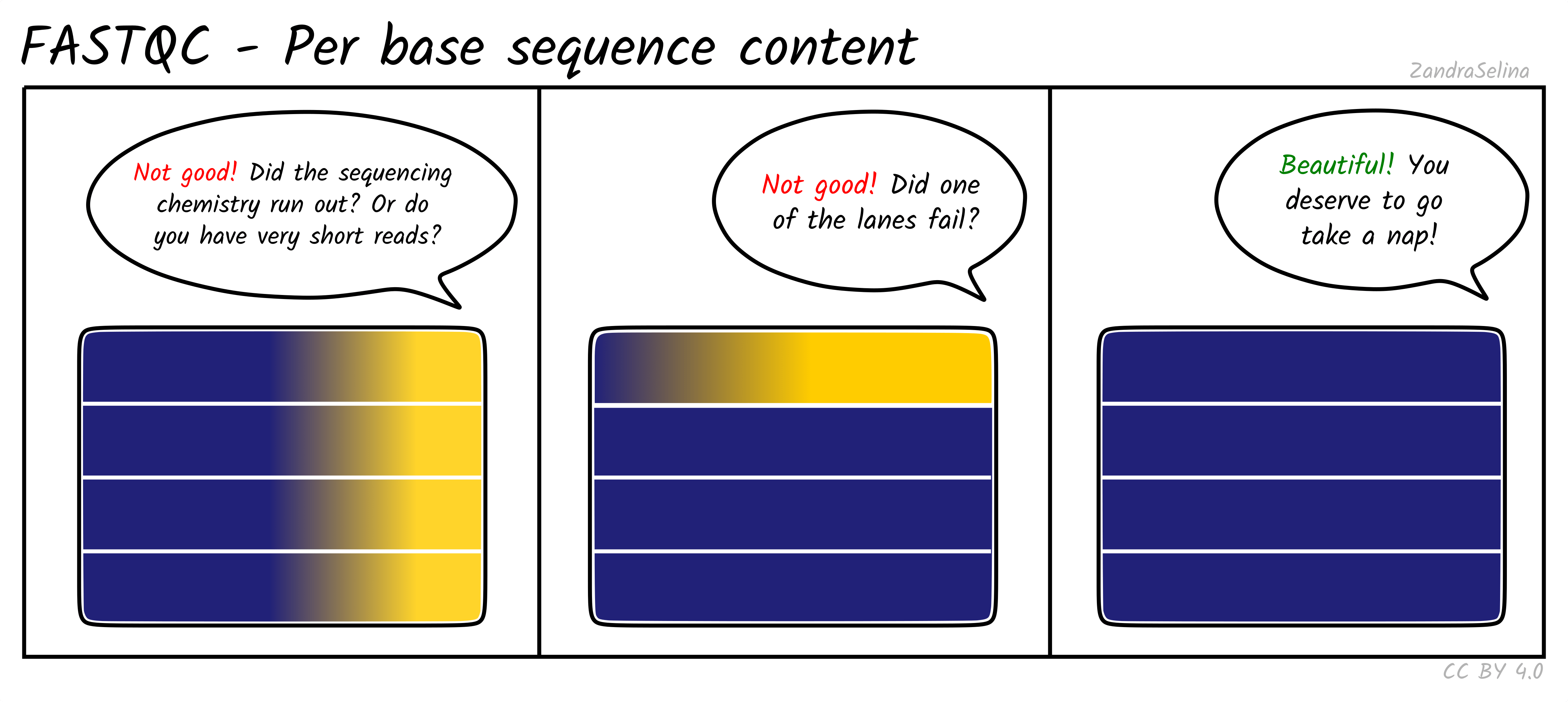
Per base sequence content
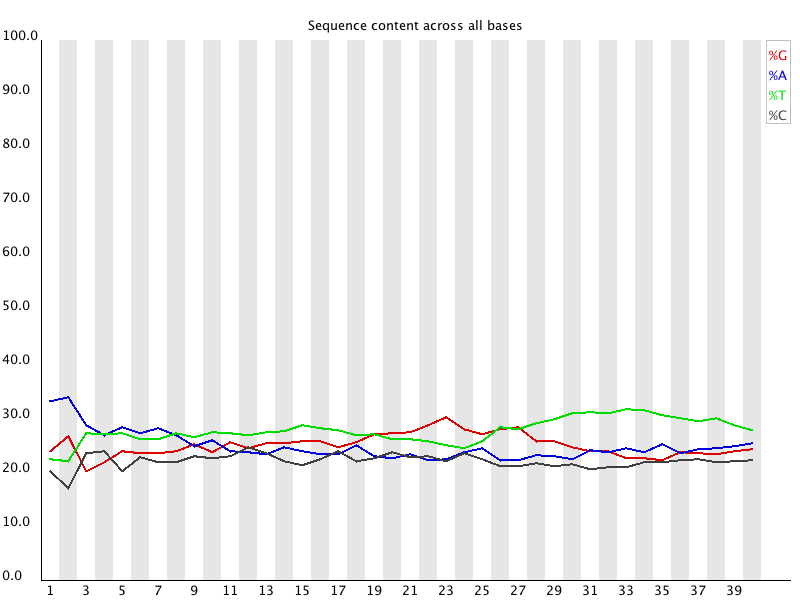
Shows the proportion of A, C, G, and T at each cycle. For genomic resequencing, all four lines should be close to 25 percent. RNA-seq usually shows imbalanced composition in early cycles due to biased priming and transcript composition. Mild imbalance at the start of the read is normal and does not require trimming.
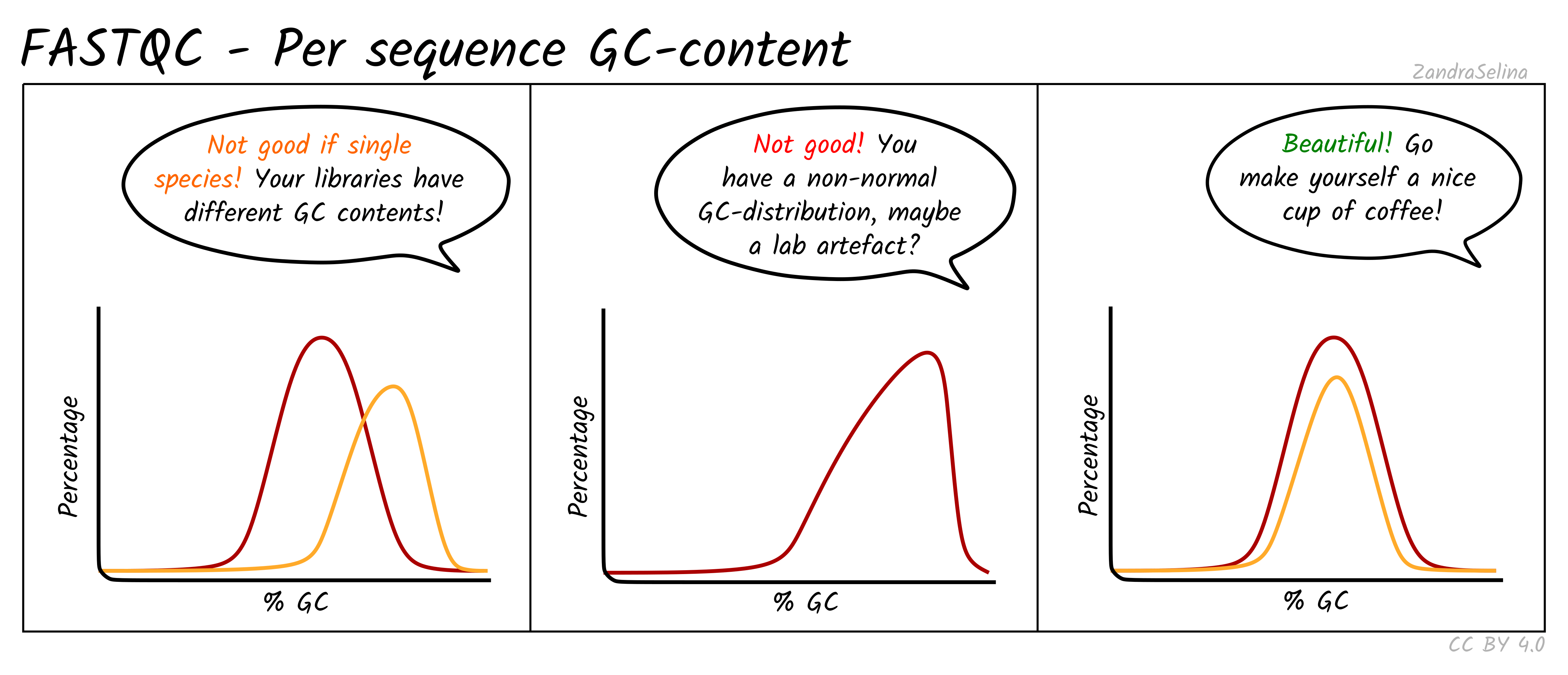
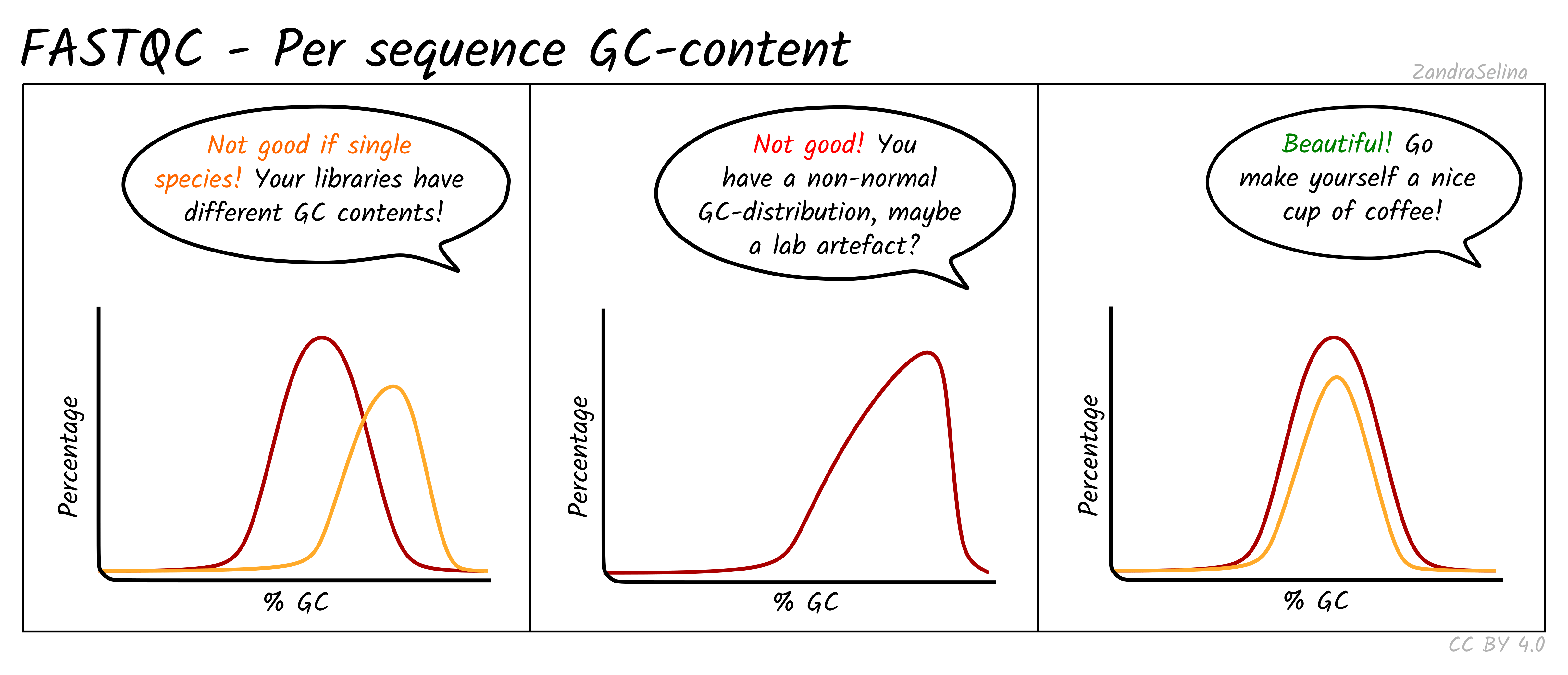
Per sequence GC content
Shows the GC distribution across all reads. RNA-seq often fails this test because expressed transcripts are not GC neutral. Only pronounced multi-modal or extremely shifted distributions are concerning, for example when contamination from another organism is suspected.
Per base N content
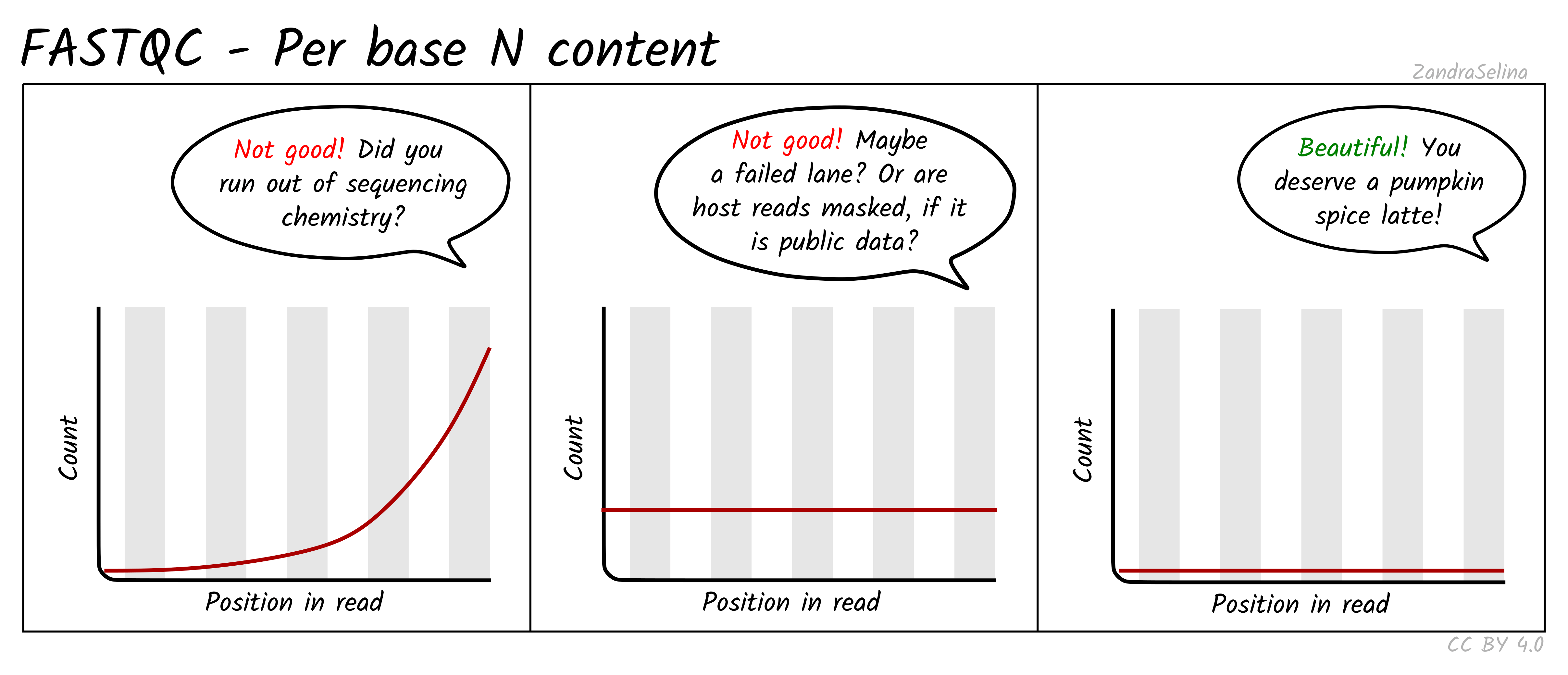
Reports the percentage of unidentified bases (N) at each position. This should be near zero for modern Illumina runs. High N content indicates failed cycles or poor sequencing chemistry.
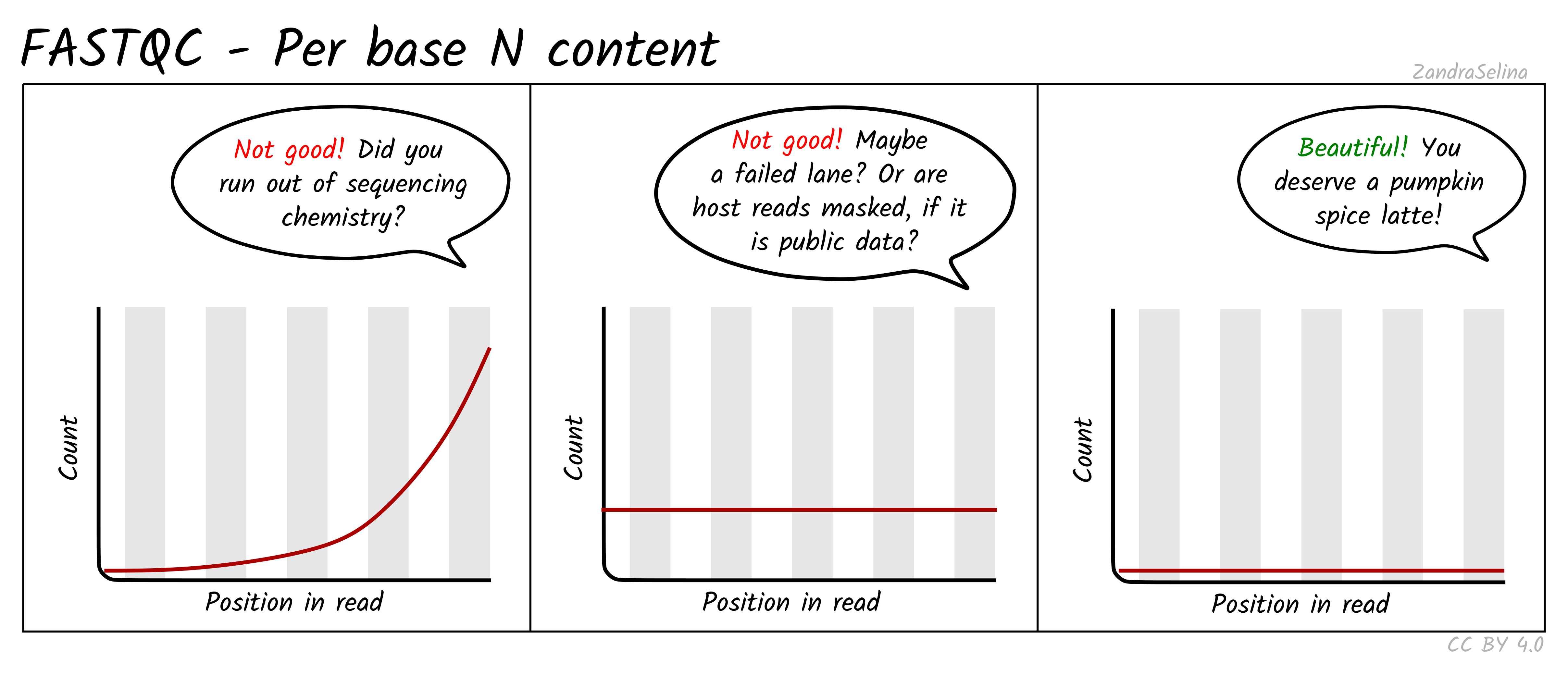
In the workshop data, the R1 files from flowcell C1PF5ACXX have 38 to 44 percent N bases at the last cycle, their R2 files 13 to 22 percent at one early cycle, and IR_rep4 R2 52 percent at cycle 27. These are failed cycles on the sequencer, not a property of the libraries.
Sequence length distribution
Shows the distribution of read lengths. Standard RNA-seq libraries should have a narrow peak at the expected read length. Variable lengths usually appear after trimming or for specialized protocols such as small RNA.
Sequence duplication levels
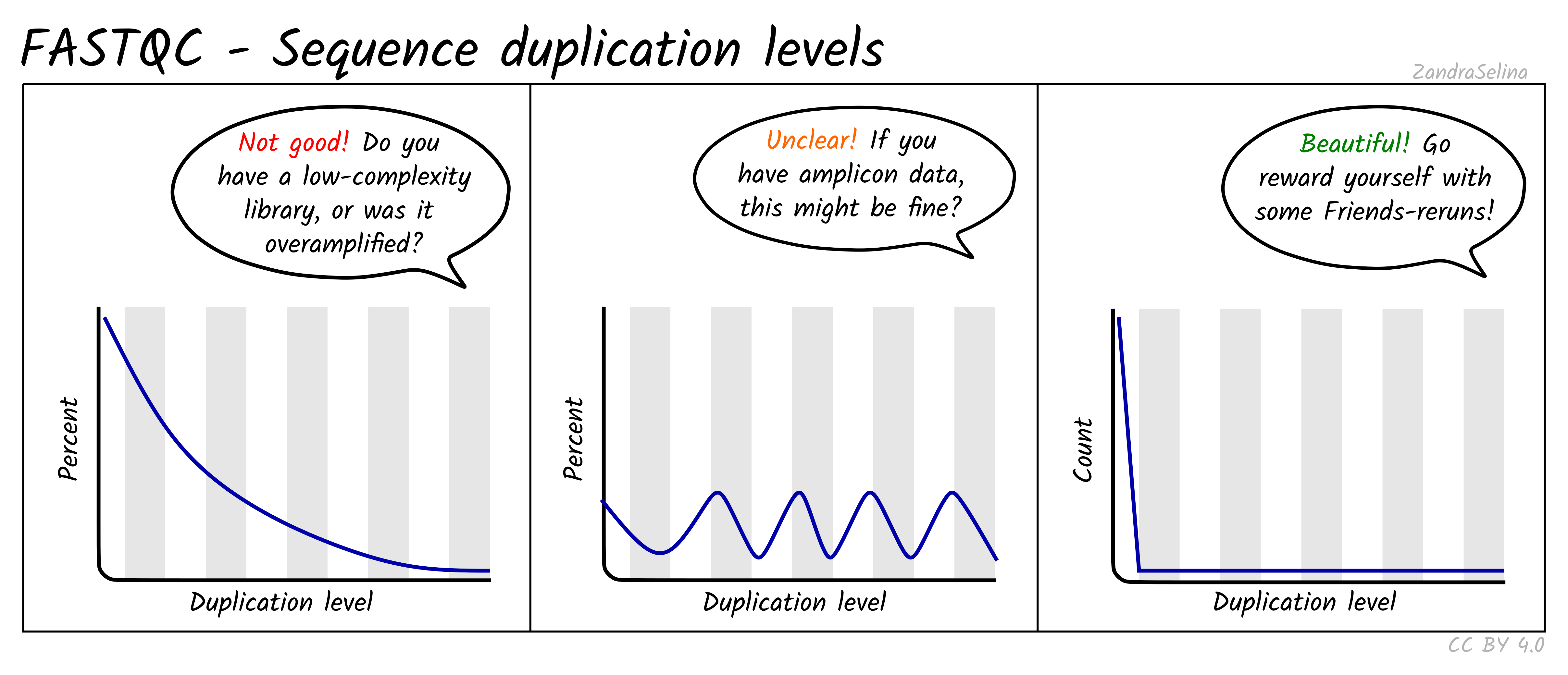
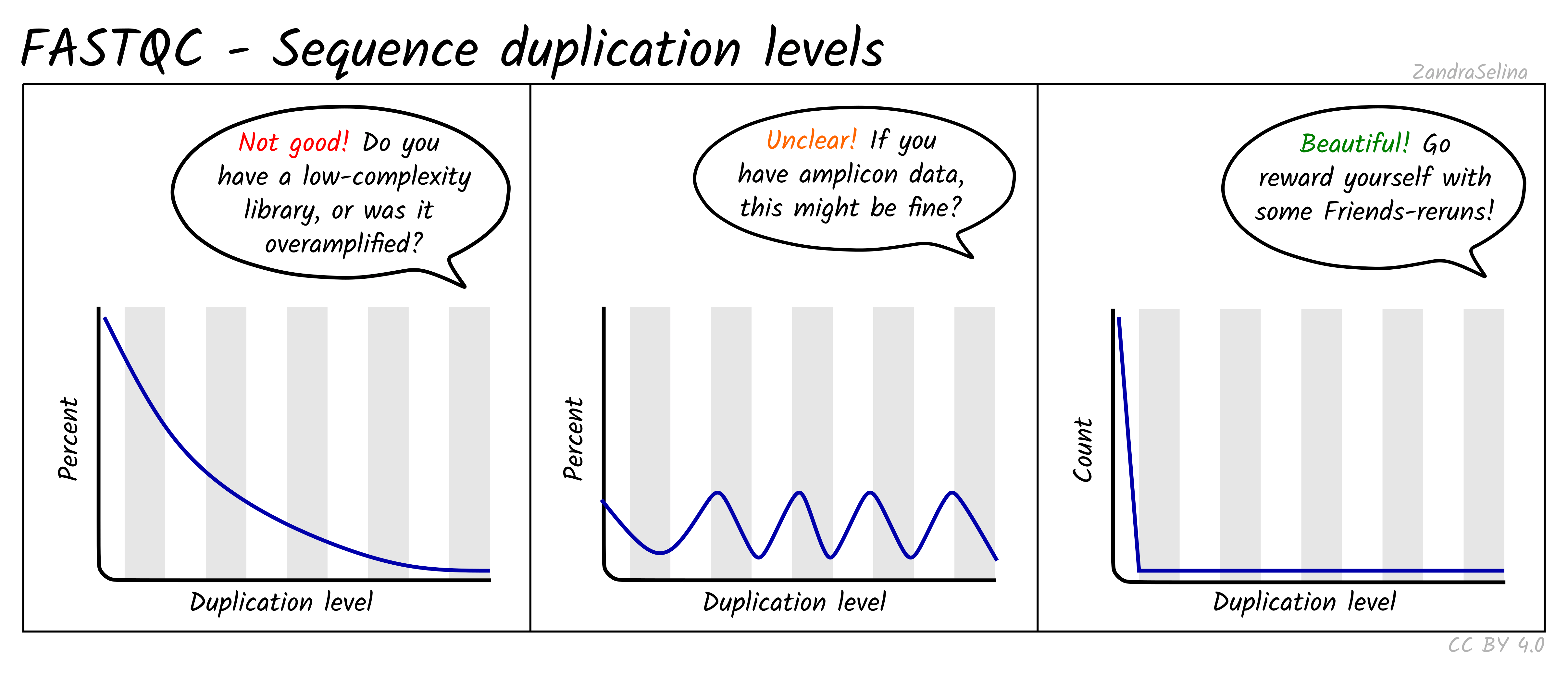
Reports how many reads are exact duplicates. Some duplication is normal in RNA-seq because highly expressed genes produce many identical fragments. Very high duplication, especially combined with low library size, can indicate low library complexity or overamplification.
Overrepresented sequences
Lists specific sequences that occur more often than expected. Common sources include ribosomal RNA fragments, poly A tails, adapter sequence, or reads from highly expressed transcripts. Some overrepresented sequences are expected, but very high levels may indicate contamination or poor rRNA depletion.
Adapter content
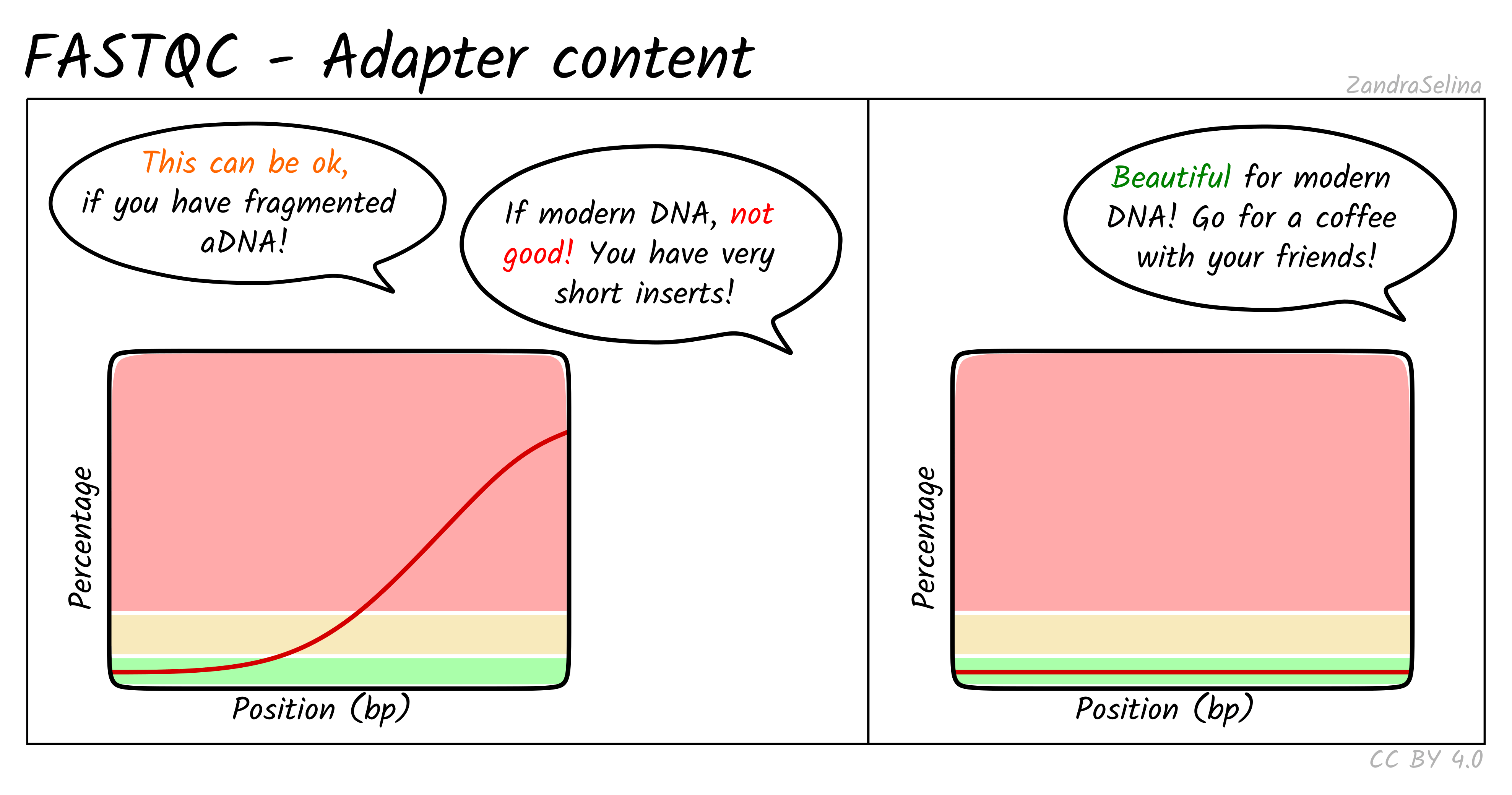
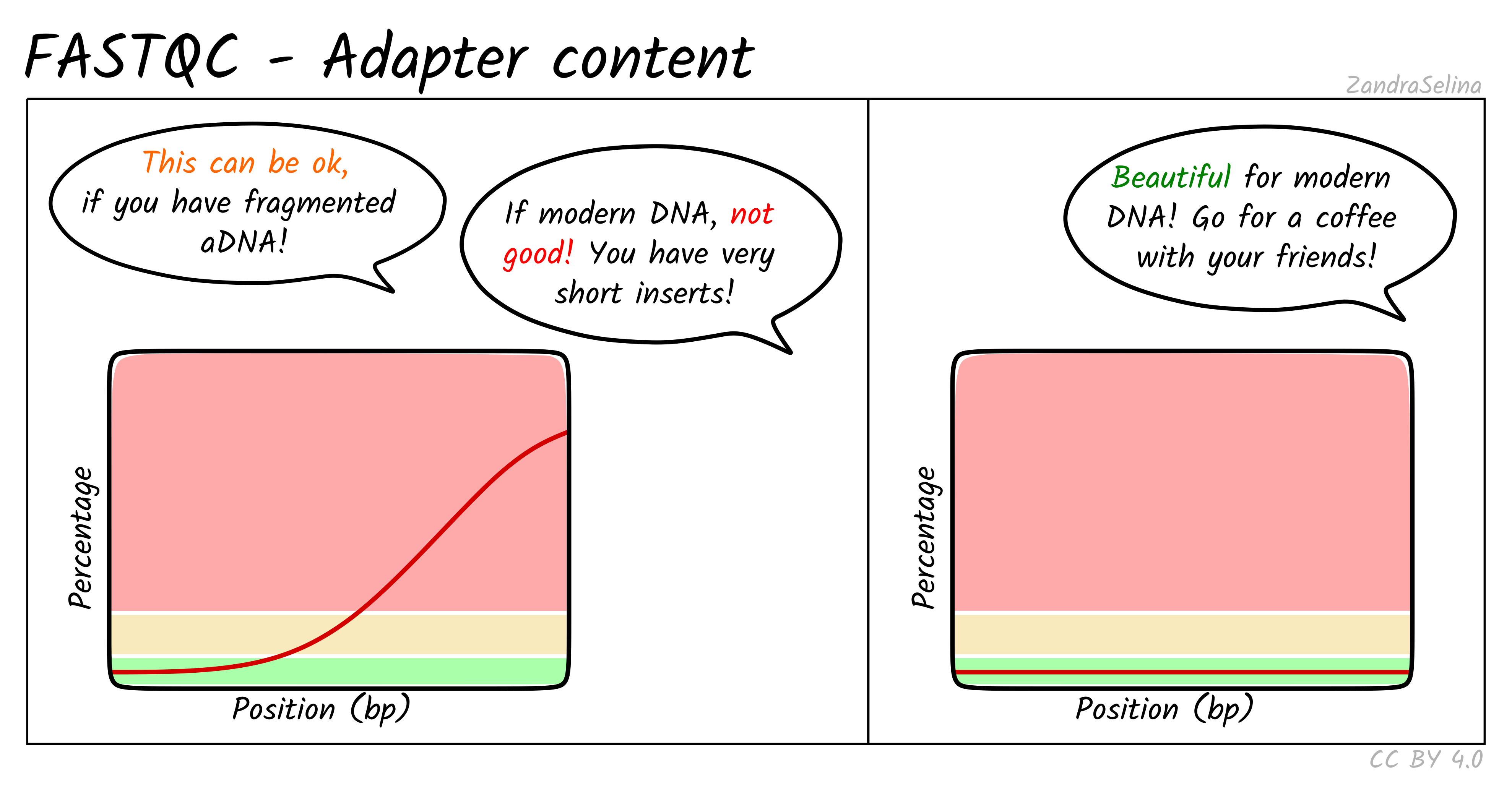
Shows whether any read cycles contain adapter sequences. Small amounts at the extreme ends are common and usually harmless. Consistently high adapter content across many cycles suggests short inserts or poorly prepared libraries.
Aggregating reports with MultiQC
FastQC generates a separate HTML file per sample. MultiQC consolidates all reports and allows easy comparison of replicates.
Run MultiQC on the FastQC outputs
Generate a single combined report using MultiQC.
BASH
module load biocontainers
module load multiqc

cd $SCRATCH/rnaseq-workshop
multiqc results/qc_fastq/ -o results/qc_fastq/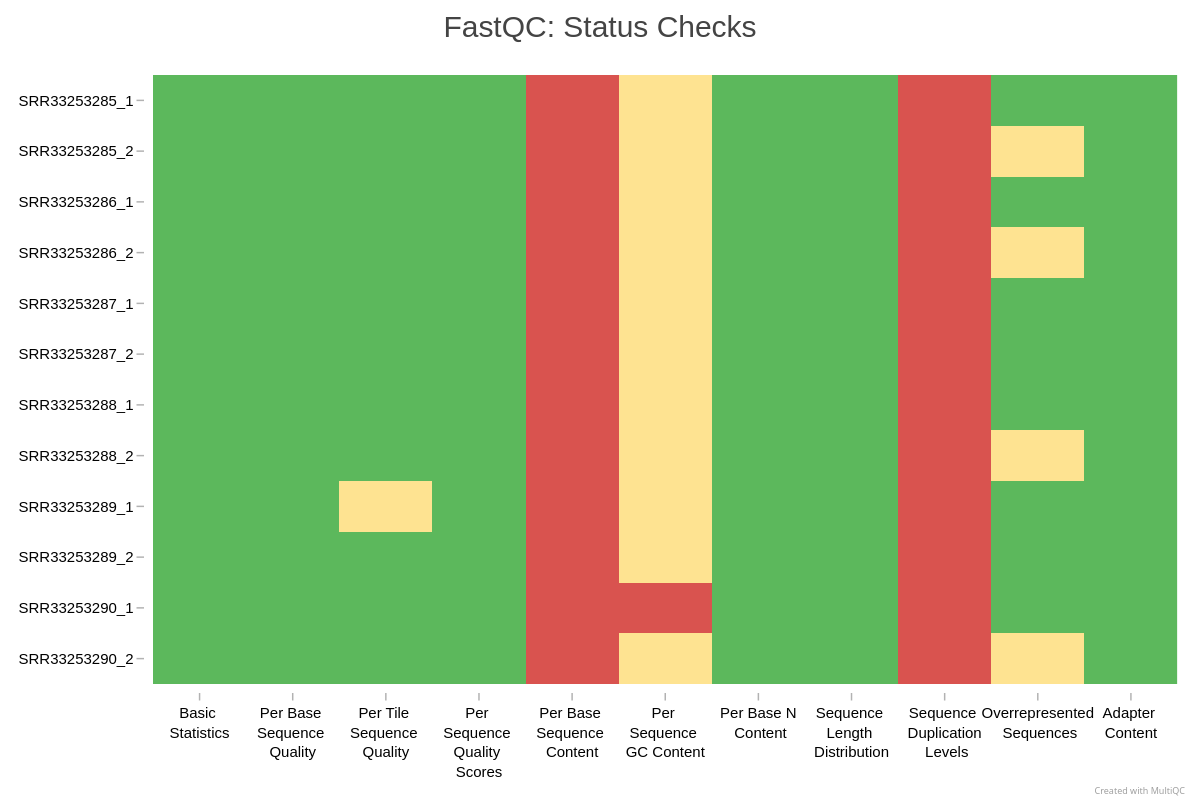
Trimming adapter sequences
Before deciding whether to trim reads, it is essential to understand what adapters are and why they appear in sequencing data.
Adapters are short synthetic DNA sequences ligated to both ends of each fragment during library preparation. They provide primer binding sites needed for cluster amplification and sequencing. Ideally, the sequenced fragment is long enough that the machine reads only biological DNA. However, when the insert is shorter than the read length, the sequencer runs into the adapter sequence, which produces adapter contamination at the ends of reads.
Many users assume that adapters must always be trimmed, but this is not true for typical RNA-seq workflows.
Do we need to trim reads for standard RNA-seq workflows?
For alignment based RNA-seq, adapter trimming is usually not required. Modern aligners such as HISAT2 and STAR detect and soft clip adapter sequence automatically. Soft-clipped bases do not contribute to mismatches or mapping penalties, so adapters generally do not harm alignment quality.
In contrast, unnecessary trimming can introduce new problems:
- shorter reads and lower mapping power
- uneven trimming across samples and artificial differences
- reduction in read complexity
- broken read pairing for paired-end sequencing
- more parameters to track for reproducibility
Trimming is recommended only in specific situations:
- very short inserts, for example degraded RNA or ancient DNA
- adapter sequence dominating read tails, for example more than 10-15 percent adapter content
- transcript assembly workflows such as StringTie or Scallop, which benefit from uniform read lengths
- small RNA or miRNA libraries, where inserts are intentionally very short and adapter presence is guaranteed
Exercise: evaluate the QC results
Inspect your MultiQC report
Using the MultiQC HTML report, answer:
- Do all replicates show similar per base sequence quality profiles?
- Is adapter content high enough to impact analysis?
- Is any sample behaving differently from the rest, for example in number of reads, quality, duplication, or GC percentage?
Interpretation for this dataset (compare with your own report):
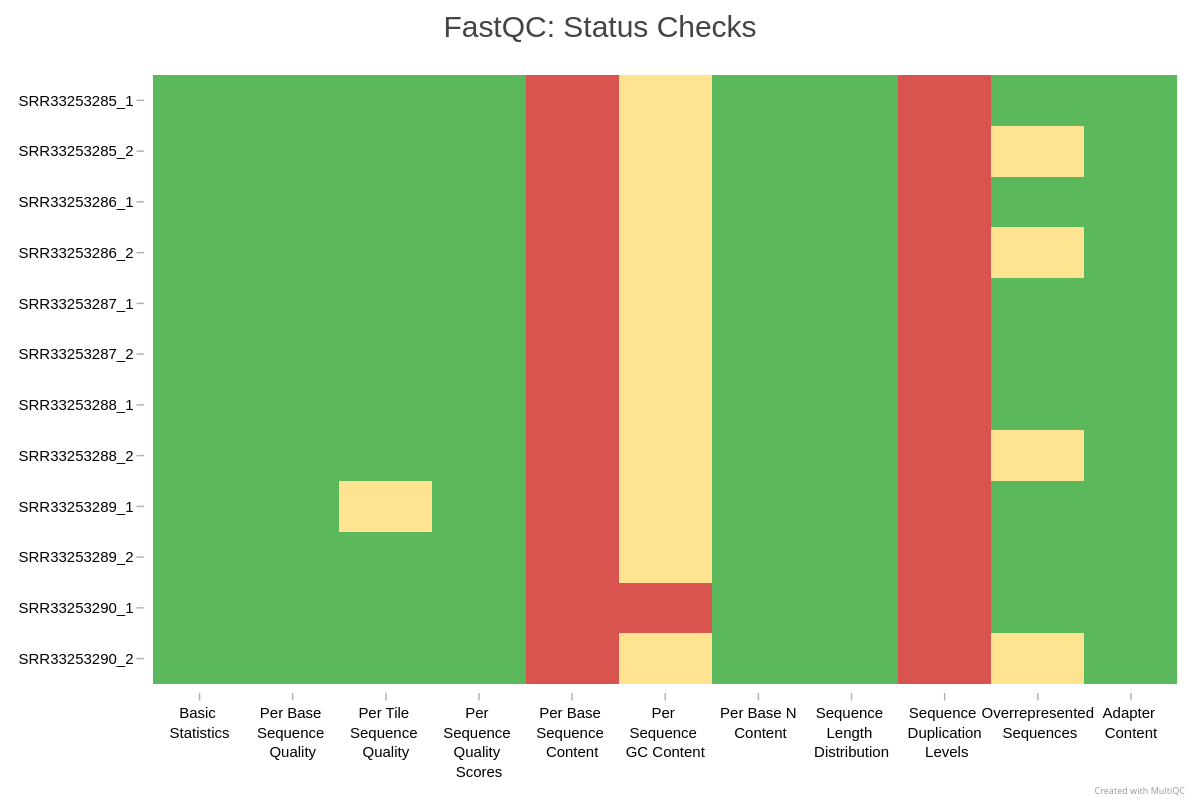
- No. The samples fall into two groups. IR_rep3, IR_rep4, and mock_rep4 have good quality along most of the read (mean about Q33 to Q35), apart from one cycle in IR_rep4 R2 that is about half N bases and a weak last cycle in mock_rep4 R1. The other five samples are lower (mean about Q26 to Q31), their last cycle collapses (the lower quartile drops to Q2 at position 51, with 38 to 44 percent N bases in R1), and their R2 files have 13 to 22 percent N at one early cycle. FastQC fails per base sequence quality in 12 of 16 files, per tile sequence quality in 12 of 16, and per base N content in 7 of 16. These five samples were sequenced on one flowcell (C1PF5ACXX, visible in the read names) and the clean three on two others, so these are problems of that sequencing run, not of the libraries. They show up again in Episode 4A: the three clean samples have the highest STAR mapping rates.
- No. Adapter content passes in all 16 files; with 51 bp reads, very few inserts are shorter than the read.
- Besides the quality groups, duplication differs: IR_rep2 and mock_rep3 are about 96 percent unique (FastQC “deduplicated percentage”), the other samples 53 to 79 percent. This is worth recording, but it is not a reason to drop a sample at this stage. Per sequence GC content fails in 8 of 16 files, which is common for RNA-seq, as explained above.
Trimming is not needed for this dataset: adapters are absent and the aligner handles low quality read ends.
Optional reference: how to trim adapters with fastp
(not part of the hands-on)
Sometimes you may encounter datasets where trimming is appropriate, for example short inserts, small RNA, or visibly high adapter content in QC. Although we will not trim reads in this workshop, here is a minimal example you can use in your own projects if trimming becomes necessary.
fastp is a fast, widely used tool that can automatically
detect adapters, trim them, filter low quality reads, and generate QC
reports.
Summary
- FastQC and MultiQC provide essential diagnostics for RNA-seq data.
- Some FastQC warnings are normal for RNA-seq and do not indicate problems.
- Aligners soft clip adapters, so trimming is usually unnecessary for alignment based RNA-seq.
- QC helps detect outliers before alignment and quantification.
Content from 4A. Genome-based quantification (STAR + featureCounts)
Last updated on 2026-11-10 | Edit this page
Overview
Questions
- How do we map RNA-seq reads to a reference genome?
- How do we determine library strandness before alignment?
- How do we quantify reads per gene using featureCounts?
- How do we submit mapping jobs on RCAC clusters with SLURM?
Objectives
- Check RNA-seq library strandness using Salmon.
- Index a reference genome for STAR.
- Map reads to the genome using STAR.
- Quantify gene level counts with featureCounts.
- Interpret basic alignment and counting statistics.
Introduction
In this episode we move from raw FASTQ files to genome based gene
counts.
This workflow has three major steps:
- Determine library strandness: STAR does not infer strandness
automatically.
featureCountsrequires the correct setting. - Map reads to the genome using STAR: STAR is a splice aware aligner designed for RNA-seq data.
- Count mapped reads per gene using
featureCounts
This represents one of the two standard quantification strategies in
RNA-seq.
The alternative method (B. transcript based quantification with Salmon
or Kallisto) will be covered in Episode 4B.
Step 1: Checking RNA-seq library strandness
Why strandness matters
RNA-seq libraries can be:
- unstranded
- stranded forward
- stranded reverse
Stranded protocols are common in modern kits, but old GEO and SRA
datasets are often unstranded.
featureCounts must be given the correct strand setting. If a stranded
library is counted with the wrong direction, most reads land on the
strand opposite their gene and are left unassigned (or counted to an
antisense gene), so the assignment rate collapses. Counting a stranded
library as unstranded loses less, but reads where genes on opposite
strands overlap can no longer be assigned.
STAR does not infer strandness automatically, so we must determine it before alignment.
Animation (80 seconds): stranded vs unstranded RNA-seq. In a dUTP
library, read 2 matches the RNA strand; Salmon reports this as
ISR and featureCounts calls it -s 2. Our
dataset turns out to be unstranded, so we count with -s 0,
and reads where genes on opposite strands overlap end up among the
Unassigned_Ambiguity reads in the featureCounts
summary. Press Play to start, or
open
it in a new tab.
Detecting strandness with Salmon
Salmon can infer strandness directly from raw FASTQ files without any
alignment.
We run Salmon with -l A, which tells it to explore all
library types.
BASH
sinteractive -A rcac-rnaseq -q standby -p cpu -N 1 -n 4 --time=2:00:00

cd $SCRATCH/rnaseq-workshop
mkdir -p results/strand_check

module load biocontainers
module load salmon

salmon index --transcripts data/gencode.vM38.transcripts-clean.fa \
             --index data/salmon_index \
             --threads 4

salmon quant --index data/salmon_index \
             --libType A \
             --mates1 data/WT_Bcell_mock_rep1_R1.fastq.gz \
             --mates2 data/WT_Bcell_mock_rep1_R2.fastq.gz \
             --output results/strand_check \
             --threads 4
Building the Salmon index and running the check takes about 8 minutes
on 4 cores. The important output is in
results/strand_check/lib_format_counts.json:
JSON
{
    "read_files": "[ data/WT_Bcell_mock_rep1_R1.fastq.gz, data/WT_Bcell_mock_rep1_R2.fastq.gz]",
    "expected_format": "IU",
    "compatible_fragment_ratio": 1.0,
    "num_compatible_fragments": 11994681,
    "num_assigned_fragments": 11994681,
    "num_frags_with_concordant_consistent_mappings": 10472924,
    "num_frags_with_inconsistent_or_orphan_mappings": 2280227,
    "strand_mapping_bias": 0.5082214861866657,
    "MSF": 0,
    "OSF": 0,
    "ISF": 5322565,
    "MSR": 0,
    "OSR": 0,
    "ISR": 5150359,
    "SF": 1149290,
    "SR": 1130937,
    "MU": 0,
    "OU": 0,
    "IU": 0,
    "U": 0
}
Interpreting
lib_format_counts.jsonThis JSON file reports Salmon’s automatic library type detection.
"expected_format": "IU": This is Salmon’s conclusion. “I” means Inward (correct for paired-end reads) and “U” means Unstranded."strand_mapping_bias"(0.508 here): This is the key evidence. A value near 0.5 (50%) indicates that reads mapped equally to both the sense and antisense strands, the definitive sign of an unstranded library."ISF"and"ISR": These are the counts of inward-facing fragments whose first read maps to the forward strand of the transcript (ISF) or to the reverse strand (ISR): 5.3 and 5.2 million here. Because these values are almost equal, they confirm the ~50/50 split seen in the strand bias.
Common results:
| Code | Meaning |
|---|---|
| IU | unstranded |
| ISR | stranded reverse (paired end) |
| ISF | stranded forward (paired end) |
| SR | stranded reverse (single end) |
| SF | stranded forward (single end) |
Conclusion: The data is unstranded. We will record this and supply it to STAR/featureCounts.
Step 2: Preparing the reference genome for alignment
STAR requires a genome index. Indexing builds a searchable data structure that speeds up alignment.
Required input:
- genome FASTA file
- annotation file (GTF or GFF3)
- output directory for the index
Optionally, annotation improves splice junction detection and yields better alignments.
Why STAR?
- Splice-aware
- Extremely fast
- Produces high-quality alignments
- Well supported and widely used
- Compatible with downstream tools such as featureCounts, StringTie, and RSEM
Optional alternatives include HISAT2 and Bowtie2, but STAR remains the standard for high-depth Illumina RNA-seq.
Exercise: Read the STAR manual
Check the “Generating genome indexes” section of
the
STAR
manual
Which options are required for indexing?
Key options:
-
--runMode genomeGenerate
-
--genomeDirdirectory to store the index
-
--genomeFastaFilesthe FASTA file
-
--sjdbGTFfileannotation (recommended)
-
--runThreadNnumber of threads
-
--sjdbOverhangread length minus one (100 is a safe default)
Indexing the Genome with STAR
Below is a minimal SLURM job script for building the STAR genome
index. Create a file named index_genome.sh in
$SCRATCH/rnaseq-workshop/scripts with this content:
BASH
#!/bin/bash
#SBATCH --nodes=1
#SBATCH --ntasks=1
#SBATCH --cpus-per-task=48
#SBATCH --account=rcac-rnaseq
#SBATCH --qos=standby
#SBATCH --partition=cpu
#SBATCH --time=2:00:00
#SBATCH --job-name=star_index
#SBATCH --output=cluster-%x.%j.out
#SBATCH --error=cluster-%x.%j.err

module load biocontainers
module load star

data_dir="${SCRATCH}/rnaseq-workshop/data"
genome="${data_dir}/GRCm39.primary_assembly.genome.fa"
gtf="${data_dir}/gencode.vM38.primary_assembly.basic.annotation.gtf"
indexdir="${data_dir}/star_index"

STAR \
    --runMode genomeGenerate \
    --runThreadN ${SLURM_CPUS_ON_NODE} \
    --genomeDir ${indexdir} \
    --genomeFastaFiles ${genome} \
    --sjdbGTFfile ${gtf}
Submit the job from the scripts directory:
Indexing takes about 15 minutes and needs about 30 GB of memory. On
Negishi, memory comes with the cores you request (there is no separate
memory request), so the script asks for 48 cores to get enough memory
for indexing a mammalian genome. Check progress with
squeue -u $USER; the job log is written to
cluster-star_index.<jobid>.out in the
scripts directory.
Short on time during the workshop?
If your index job is still waiting in the queue when we reach the mapping step, use the prebuilt index from the completed results copy instead of your own:
BASH
ln -s /depot/workshop/data/rnaseq-workshop_results/data/star_index $SCRATCH/rnaseq-workshop/data/star_indexRun this only if
$SCRATCH/rnaseq-workshop/data/star_index does not exist yet
(cancel your index job first with scancel <jobid>).
The mapping script below works the same with either index.
The index directory is now ready for use in mapping and should have
contents like this: Location: $SCRATCH/rnaseq-workshop/data
Contents of star_index/:
chrLength.txt
chrNameLength.txt
chrName.txt
chrStart.txt
exonGeTrInfo.tab
exonInfo.tab
geneInfo.tab
Genome
genomeParameters.txt
Log.out
SA
SAindex
sjdbInfo.txt
sjdbList.fromGTF.out.tab
sjdbList.out.tab
transcriptInfo.tabDo I need the GTF for indexing?
No, but it is strongly recommended.
Including it improves splice junction detection and increases mapping
accuracy.
Step 3: Mapping reads with STAR
Once the genome index is ready, we can align reads.
For aligning reads, important STAR options are:
--runThreadN--genomeDir--readFilesIn-
--readFilesCommand zcatfor gzipped FASTQ files --outSAMtype BAM SortedByCoordinate--outSAMunmapped Within
STAR’s defaults are tuned for mammalian genomes. If working with plants, fungi, or repetitive genomes, additional tuning may be required.
Exercise: Write a STAR alignment command
Write a basic STAR alignment command using your genome index and paired FASTQ files.
Mapping many FASTQ files with a SLURM array
When having multiple samples, array jobs simplify submission.
First, we will create samples.txt file with just the
sample names
BASH
cd $SCRATCH/rnaseq-workshop/data
ls *_R1.fastq.gz | sed 's/_R1.fastq.gz//' > ${SCRATCH}/rnaseq-workshop/scripts/samples.txt
Save the array job below as
$SCRATCH/rnaseq-workshop/scripts/map_reads.sh. Each array
task reads its sample name from line ${SLURM_ARRAY_TASK_ID}
of samples.txt, which the script looks for in the directory
you submit from, so always submit it from scripts/.
BASH
#!/bin/bash
#SBATCH --nodes=1
#SBATCH --ntasks=1
#SBATCH --cpus-per-task=20
#SBATCH --account=rcac-rnaseq
#SBATCH --qos=standby
#SBATCH --partition=cpu
#SBATCH --time=1:00:00
#SBATCH --job-name=read_mapping
#SBATCH --array=1-8
#SBATCH --output=cluster-%x.%j.out
#SBATCH --error=cluster-%x.%j.err

module load biocontainers
module load star

FASTQ_DIR="$SCRATCH/rnaseq-workshop/data"
GENOME_INDEX="$SCRATCH/rnaseq-workshop/data/star_index"
OUTDIR="$SCRATCH/rnaseq-workshop/results/mapping"

mkdir -p $OUTDIR

SAMPLE=$(sed -n "${SLURM_ARRAY_TASK_ID}p" samples.txt)

R1=${FASTQ_DIR}/${SAMPLE}_R1.fastq.gz
R2=${FASTQ_DIR}/${SAMPLE}_R2.fastq.gz

STAR \
    --runThreadN ${SLURM_CPUS_ON_NODE} \
    --genomeDir $GENOME_INDEX \
    --readFilesIn $R1 $R2 \
    --readFilesCommand zcat \
    --outFileNamePrefix $OUTDIR/$SAMPLE \
    --outSAMunmapped Within \
    --outSAMtype BAM SortedByCoordinate
Submit from the scripts directory:
Each sample takes about 2 to 3 minutes on 20 cores and up to 28 GB of memory. The eight tasks run in parallel when the queue allows.
Why use an array job?
Think about this:
- We have eight samples, each with two FASTQ files
- Having eight separate slurm jobs means:
- Copy-pasting the same command eight times
- Higher chance of typos or mistakes
- if mapping with single slurm file, sequential execution = slower
- Samples can run independently
Why is a job array a good choice?
Arrays allow us to run identical commands across many inputs:
- All samples are processed the same way
- Runs in parallel
- Simplifies submission
- Reduces copy-paste errors
- Minimizes runtime cost on the cluster
Step 4: Assessing alignment quality
STAR produces several useful files, particularly:
Log.final.out
Contains mapping statistics, including % uniquely mapped.Aligned.sortedByCoord.out.bam
Ready for downstream quantification.
To summarize alignment statistics across samples, we use MultiQC:
BASH
cd $SCRATCH/rnaseq-workshop
module load biocontainers
module load multiqc

multiqc results/mapping -o results/qc_alignment
Key metrics to review
-
Uniquely mapped reads — typically 60–90% is
good
-
Multi-mapped reads — depends on genome, but >20%
is concerning
-
Unmapped reads — check reasons (mismatches? too
short?)
- Mismatch rate — high values indicate quality or contamination issues
Exercise: Examine your alignment metrics
Using your MultiQC alignment report:
- Which sample has the highest uniquely mapped percentage?
- Are any samples clear outliers?
- Does mapped/unmapped reads appear consistent across samples?
Interpretation for this dataset:
- Uniquely mapped reads range from about 62 to 83 percent; mock_rep4 has the highest (83 percent).
- IR_rep1 and IR_rep2 are lowest (62 and 64 percent), and IR_rep3, IR_rep4, and mock_rep4 highest (77 to 83 percent): the same split as the read quality groups in Episode 3. The two conditions map about equally well on average (70 percent for IR, 73 percent for mock). These rates are within the 60 to 90 percent range given above, so no sample fails, but the spread is worth recording. When one condition maps systematically worse, check whether the difference also shows up in the PCA in Episode 5A.
- Most unmapped reads are classified as “too short” (1.4 to 4.6 million pairs per sample): STAR could align only part of the read pair. With 51 bp reads this usually reflects low quality read ends (see the FastQC report in Episode 3), rRNA or other sequence absent from the primary assembly, and reads spanning unannotated junctions.
Step 5: Quantifying gene counts with featureCounts
Once the reads have been aligned and sorted, we can quantify how many
read pairs (fragments) map to each gene. This gives us gene-level counts
that we will later use for differential expression. For alignment-based
RNA-seq workflows, featureCounts is the recommended tool
because it is fast, robust, and compatible with most gene annotation
formats.
featureCounts uses two inputs:
- A set of aligned BAM files (sorted by coordinate)
- A GTF annotation file describing gene models
It assigns each read (or read pair) to a gene based on the exon boundaries.
Important: stranded or unstranded?
featureCounts needs to know whether your dataset is
stranded.
-
-s 0unstranded -
-s 1stranded forward -
-s 2stranded reverse
From our Salmon strandness check, this dataset behaves as
unstranded, so we will use -s 0.
Counting reads or read pairs?
With paired-end data, each fragment produces two reads. Counting
fragments (read pairs) counts each cDNA molecule once; counting reads
counts most fragments twice and makes the counts look larger and more
precise than they are. -p tells featureCounts that the BAM
files are paired-end. In Subread 2.0.1, the version on Negishi,
-p alone counts fragments. From Subread 2.0.2 onward,
-p alone counts reads, and you must add
--countReadPairs to count fragments; check your version
with featureCounts -v before reusing this script
elsewhere.
Running featureCounts
We will create a new directory for count output:
Below is an example SLURM script to count all BAM files at once. Save
it as
$SCRATCH/rnaseq-workshop/scripts/count_features.sh.
BASH
#!/bin/bash
#SBATCH --nodes=1
#SBATCH --ntasks=1
#SBATCH --cpus-per-task=16
#SBATCH --account=rcac-rnaseq
#SBATCH --qos=standby
#SBATCH --partition=cpu
#SBATCH --time=0:30:00
#SBATCH --job-name=featurecounts
#SBATCH --output=cluster-%x.%j.out
#SBATCH --error=cluster-%x.%j.err

module load biocontainers
module load subread

GTF="$SCRATCH/rnaseq-workshop/data/gencode.vM38.primary_assembly.basic.annotation.gtf"
BAMS="$SCRATCH/rnaseq-workshop/results/mapping/*.bam"
output_dir="$SCRATCH/rnaseq-workshop/results/counts"

featureCounts \
  -T ${SLURM_CPUS_PER_TASK} \
  -p \
  -s 0 \
  -t exon \
  -g gene_id \
  -a ${GTF} \
  -o ${output_dir}/gene_counts.txt \
  ${BAMS}
Submit the job from the scripts directory (the previous
block left you there):
Counting all eight BAM files takes about 7 minutes.
gene_counts.txt will contain:
- one row per gene
- one column per sample
Step 6: QC on counts
Before proceeding to differential expression, it is good practice to perform some QC on the count data. We can again use MultiQC to summarize featureCounts statistics:
BASH
cd $SCRATCH/rnaseq-workshop
mkdir -p results/qc_counts
module load biocontainers
module load multiqc
multiqc results/counts -o results/qc_countsExercise: Examine your counting metrics
Using your MultiQC featureCounts report:
- Which sample has the lowest percent assigned, and what are common reasons for lower assignment?
- Which unassigned category is the largest, and what does it indicate?
- Does the sample with the most assigned reads also have the highest percent assigned?
- What does “Unassigned: No Features” mean, and why might it occur?
- Are multi-mapped reads a concern for RNA-seq differential expression?
Interpretation for this dataset. Assigned fragments are about 32 to
40 percent of the total. This looks low, but the total in the
featureCounts summary includes every record in the BAM file: STAR kept
unmapped pairs (--outSAMunmapped Within) and multimapping
pairs, and featureCounts reports both as unassigned. Measured against
uniquely mapped pairs only, the assignment rate is much higher.
- The sample with the lowest assignment rate here is mock_rep2 (32 percent). Causes include low complexity, incomplete annotation, or more intronic reads.
- It differs between samples: Unmapped is largest for IR_rep1 and IR_rep2 (about 25 percent), MultiMapping for IR_rep3, IR_rep4, and mock_rep3 (24 to 26 percent), and No Features for mock_rep1, mock_rep2, and mock_rep4 (23 to 35 percent). Unmapped pairs did not align at all; No Features pairs aligned outside annotated exons; MultiMapping pairs aligned to several loci and are not counted by default.
- Here it does: IR_rep4 has both the most assigned pairs (9.6 million) and the highest percentage (40 percent). In general they need not agree: total assigned reads depend on sequencing depth, while percent assigned reflects library and mapping quality.
- Reads mapped outside annotated exons, often from intronic regions, unannotated transcripts, or incomplete annotation.
- Multi-mapping is expected for paralogs and repeats. It is usually fine as long as the rate is consistent across samples.
Summary
- STAR is a fast splice-aware aligner widely used for RNA-seq.
- Genome indexing requires FASTA and optionally GTF for improved splice detection.
- Mapping is efficiently performed using SLURM array jobs.
- Alignment statistics (from
Log.final.out+ MultiQC) must be reviewed. - Strandness should be determined before counting; Salmon infers it directly from a sample of FASTQ reads.
- Final BAM files are ready for downstream counting.
-
featureCountsis used to obtain gene-level counts for differential expression. - Exons are counted and summed per gene.
- The output is a simple matrix for downstream statistical analysis.
Content from 4B. Transcript-based quantification (Kallisto)
Last updated on 2026-11-10 | Edit this page
Overview
Questions
- How do we quantify expression without genome alignment?
- What inputs does Kallisto require?
- How do we run Kallisto for paired-end RNA-seq data?
- How do we interpret transcript-level outputs (TPM, est_counts)?
- How do we summarize transcripts to gene-level counts using tximport?
Objectives
- Build a transcriptome index for Kallisto.
- Quantify transcript abundance directly from FASTQ files.
- Understand key Kallisto output files.
- Summarize transcript-level estimates to gene-level counts.
- Prepare counts for downstream differential expression.
Introduction
In the previous episode, we mapped reads to the genome using STAR and generated gene-level counts with featureCounts.
In this episode, we use an alternative quantification strategy:
- Build a transcriptome index
- Quantify expression directly from FASTQ files using Kallisto (without alignment)
- Summarize transcript estimates back to gene-level counts
This workflow is faster, uses less storage, and models transcript-level uncertainty.
Why Kallisto?
Kallisto uses pseudo-alignment to rapidly quantify transcript abundances without traditional read mapping. Key advantages include:
- Speed: Kallisto is fast; on this dataset one sample takes 1 to 2 minutes on 16 cores (without bootstraps).
- Accuracy: Comparable accuracy to alignment-based methods for quantification.
- Bootstrap support: Optional uncertainty estimation via bootstraps (needed for sleuth, not for DESeq2).
- Low resource usage: No large BAM files generated, minimal storage requirements.
Kallisto is ideal when you do not need alignment files, want fast quantification, or plan to use sleuth for differential transcript analysis.
When should I use transcript-based quantification?
Kallisto is ideal when:
- You do not need alignment files.
- You want transcript-level TPMs.
- You want fast quantification.
- Storage is limited (no BAM files generated).
- You plan to use sleuth for differential transcript expression.
It is not ideal if you need splice junctions, variant calling, or visualization in IGV (all those depend on alignment files).
Step 1: Preparing the transcriptome reference
Kallisto requires a transcriptome FASTA file (all
annotated transcripts). We previously downloaded the transcripts file
from GENCODE for this purpose
(gencode.vM38.transcripts-clean.fa).
Why transcriptome choice matters
Transcript-level quantification inherits all assumptions of the annotation. Missing or incorrect transcripts → biased TPM estimates.
Building the Kallisto index
Building the index for the mouse transcriptome needs more memory than
a small job provides, so we run it as a batch job, like the STAR index
in Episode 4A. This version of Kallisto builds the index with a single
thread, but on Negishi memory comes with the cores you request, so the
script asks for 48 cores. Save it as
$SCRATCH/rnaseq-workshop/scripts/index_kallisto.sh:
BASH
#!/bin/bash
#SBATCH --nodes=1
#SBATCH --ntasks=1
#SBATCH --cpus-per-task=48
#SBATCH --account=rcac-rnaseq
#SBATCH --qos=standby
#SBATCH --partition=cpu
#SBATCH --time=2:00:00
#SBATCH --job-name=kallisto_index
#SBATCH --output=cluster-%x.%j.out
#SBATCH --error=cluster-%x.%j.err

module load biocontainers
module load kallisto

cd $SCRATCH/rnaseq-workshop
mkdir -p data/kallisto_index

kallisto index \
    -i data/kallisto_index/transcripts.idx \
    data/gencode.vM38.transcripts-clean.fa
Submit it from the scripts directory:
This creates an index file that Kallisto uses for pseudo-alignment.
Building it for the GENCODE mouse transcriptome takes about 5 minutes
and about 7.5 GB of memory. In our tests a 4-core job, which gets about
the same amount of memory on Negishi, was killed for running out of it.
Check progress with squeue -u $USER; the log is written to
cluster-kallisto_index.<jobid>.out in the
scripts directory. Wait for the job to finish before
quantifying.
Kallisto vs Salmon index
Note that Kallisto and Salmon indices are not interchangeable. Each tool has its own index format:
- Kallisto: Single
.idxfile - Salmon: Directory with multiple files
You must build a separate index for each tool.
Step 2: Quantifying transcript abundances
The core Kallisto command is kallisto quant. We use the
transcript index and paired-end FASTQ files.
For one sample, the command looks like this. You do not need to run it yourself: the array job in Step 3 runs it for every sample.
BASH
kallisto quant \
    -i data/kallisto_index/transcripts.idx \
    -o results/kallisto_quant/WT_Bcell_mock_rep1 \
    -b 0 \
    -t 16 \
    data/WT_Bcell_mock_rep1_R1.fastq.gz \
    data/WT_Bcell_mock_rep1_R2.fastq.gz
Important flags:
-
-i→ path to the Kallisto index -
-o→ output directory for this sample -
-b 0→ number of bootstrap samples (none here; see the callout below) -
-t 16→ number of threads to use (the array job uses the cores it requests,${SLURM_CPUS_ON_NODE})
Strand-specific libraries
For strand-specific libraries, add the appropriate flag:
-
--rf-strandedfor reverse-stranded libraries (e.g., Illumina TruSeq stranded) -
--fr-strandedfor forward-stranded libraries
Our dataset is unstranded (Salmon reported
IU in Episode 4A), so we omit these flags.
Do you need bootstraps?
-b N makes Kallisto repeat the quantification on N
resampled versions of the reads. The spread of the N estimates measures
how uncertain each transcript’s abundance is, which matters mostly when
reads are shared between similar isoforms.
- Needed for sleuth, which uses the bootstrap variance in its model of transcript-level differential expression, and for other tools that model quantification uncertainty (for example fishpond/swish).
- Not needed for tximport plus DESeq2, as in this lesson. tximport sums transcripts to genes, where isoform ambiguity largely cancels out, and DESeq2 estimates variability from biological replicates and ignores bootstraps.
Each bootstrap round repeats the expectation-maximization step, so
-b 100 makes every sample several times slower and can push
a job past its time limit on standby. We use
-b 0. Use -b 30 to -b 100 if you
plan a sleuth analysis.
Step 3: Running Kallisto for many samples
We use a SLURM array job for efficiency and consistency.
First, create a sample list (or reuse the one from Episode 4A):
BASH
cd $SCRATCH/rnaseq-workshop/data
ls *_R1.fastq.gz | sed 's/_R1.fastq.gz//' > $SCRATCH/rnaseq-workshop/scripts/samples.txt
Save the array job below as
$SCRATCH/rnaseq-workshop/scripts/quant_kallisto.sh. Like
map_reads.sh in Episode 4A, it reads
samples.txt from the directory you submit from.
BASH
#!/bin/bash
#SBATCH --nodes=1
#SBATCH --ntasks=1
#SBATCH --cpus-per-task=16
#SBATCH --account=rcac-rnaseq
#SBATCH --qos=standby
#SBATCH --partition=cpu
#SBATCH --time=1:00:00
#SBATCH --job-name=kallisto_quant
#SBATCH --array=1-8
#SBATCH --output=cluster-%x.%j.out
#SBATCH --error=cluster-%x.%j.err

module load biocontainers
module load kallisto

DATA="$SCRATCH/rnaseq-workshop/data"
INDEX="$SCRATCH/rnaseq-workshop/data/kallisto_index/transcripts.idx"
OUT="$SCRATCH/rnaseq-workshop/results/kallisto_quant"

SAMPLE=$(sed -n "${SLURM_ARRAY_TASK_ID}p" samples.txt)

mkdir -p ${OUT}/${SAMPLE}

R1=${DATA}/${SAMPLE}_R1.fastq.gz
R2=${DATA}/${SAMPLE}_R2.fastq.gz

kallisto quant \
    -i $INDEX \
    -o $OUT/$SAMPLE \
    -b 0 \
    -t ${SLURM_CPUS_ON_NODE} \
    $R1 $R2 &> $OUT/$SAMPLE/${SAMPLE}.log
Submit from the scripts directory:
Each sample takes 1 to 2 minutes on 16 cores.
Why use an array job here?
Kallisto runs very quickly and produces small output. The advantage of array jobs is consistency: all samples are quantified with identical parameters and metadata. This ensures that transcript-level TPM and count estimates are directly comparable across samples.
Inspect results
After Kallisto finishes, each sample directory contains a small set
of output files (plus the .log file that our array script
writes):
abundance.h5
abundance.tsv
run_info.json
WT_Bcell_mock_rep1.log
What is inside abundance.tsv?
This file contains the transcript-level quantification results:
- target_id: transcript ID
- length: transcript length
- eff_length: effective length adjusted for fragment distribution
- est_counts: estimated number of reads assigned to that transcript
- tpm: within-sample normalized abundance (Transcripts Per Million)
Example:
target_id	length	eff_length	est_counts	tpm
ENSMUST00000193812.2	1070	902.888	0	0
ENSMUST00000082908.3	110	10.4106	0	0
ENSMUST00000162897.2	4153	3985.89	0	0
ENSMUST00000159265.2	2989	2821.89	1	0.0101594
ENSMUST00000070533.5	3634	3466.89	0	0
Key QC metrics to review
Open run_info.json and check:
- n_processed: total number of reads processed
- n_pseudoaligned: number of reads that pseudoaligned to transcripts
- p_pseudoaligned: proportion of reads pseudoaligned (mapping rate)
These metrics provide a first-pass sanity check before summarizing the results to gene-level counts.
What does Kallisto count?
est_counts is a model-based estimate, not raw counts of
reads. TPM values are within-sample normalized and should not
be directly compared across samples for statistical testing.
Step 4: Summarizing to gene-level counts
(tximport)
Most differential expression tools (DESeq2, edgeR) require gene-level counts. We convert transcript estimates → gene-level matrix.
Prepare tx2gene mapping
We need a mapping file that links transcript IDs to gene IDs. It must cover every transcript in the Kallisto index, so we build it from the headers of the same transcript FASTA: field 1 is the transcript ID and field 2 the gene ID. The basic GTF lists only 127,934 of these 278,396 transcripts (46 percent) (the transcript FASTA is the comprehensive set, with extra isoforms); with a GTF-based map, tximport would silently drop the rest, together with the reads Kallisto assigned to them.
BASH
cd $SCRATCH/rnaseq-workshop/data
grep ">" gencode.vM38.transcripts.fa | cut -c2- | cut -d "|" -f 1,2 | tr "|" "\t" > tx2gene.tsv
head -3 tx2gene.tsv
ENSMUST00000193812.2 ENSMUSG00000102693.2
ENSMUST00000082908.3 ENSMUSG00000064842.3
ENSMUST00000162897.2 ENSMUSG00000051951.6Next, we process this mapping in R. Reading eight Kallisto results takes a few GB of memory, more than a login node allows, so start a short interactive session, then load the modules and start R:
BASH
sinteractive -A rcac-rnaseq -q standby -p cpu -N 1 -n 4 --time=1:00:00
module load biocontainers
module load r-rnaseq
R
In the R session, read in the tx2gene mapping and run
tximport:
R
setwd(paste0(Sys.getenv("SCRATCH"), "/rnaseq-workshop"))
library(readr)
library(tximport)

tx2gene <- read_tsv("data/tx2gene.tsv", col_types = "cc", col_names = FALSE)
samples <- read_tsv("scripts/samples.txt", col_names = FALSE)
files <- file.path("results/kallisto_quant", samples$X1, "abundance.h5")
names(files) <- samples$X1

txi <- tximport(files,
                type = "kallisto",
                tx2gene = tx2gene)
saveRDS(txi, file = "results/kallisto_quant/txi.rds")
txi$counts now contains gene-level counts suitable for
DESeq2.
R
head(txi$counts)
                      WT_Bcell_IR_rep1 WT_Bcell_IR_rep2 WT_Bcell_IR_rep3
ENSMUSG00000000001.5         387.39815        329.43564        737.97318
ENSMUSG00000000003.16          0.00000          1.00000          0.00000
ENSMUSG00000000028.16         37.73844         23.20617         39.45979
ENSMUSG00000000031.20          2.00000          1.00000          1.00000
ENSMUSG00000000037.18          2.00000          4.00000          3.00000
ENSMUSG00000000049.12          0.00000          0.00000          1.00000
                      WT_Bcell_IR_rep4 WT_Bcell_mock_rep1 WT_Bcell_mock_rep2
ENSMUSG00000000001.5         654.17550           687.1189          620.35065
ENSMUSG00000000003.16          0.00000             0.0000            0.00000
ENSMUSG00000000028.16         29.71743            55.0000           39.20456
ENSMUSG00000000031.20          0.00000             0.0000            0.00000
ENSMUSG00000000037.18          8.00000             1.0000            1.00000
ENSMUSG00000000049.12          0.00000             0.0000            2.00000
                      WT_Bcell_mock_rep3 WT_Bcell_mock_rep4
ENSMUSG00000000001.5            661.3541          704.88506
ENSMUSG00000000003.16             0.0000            0.00000
ENSMUSG00000000028.16            40.0984           41.44387
ENSMUSG00000000031.20             0.0000            0.00000
ENSMUSG00000000037.18             2.0000            1.00000
ENSMUSG00000000049.12 0.0000 1.00000Why use the default countsFromAbundance setting?
We use the default countsFromAbundance = "no" because
DESeqDataSetFromTximport() (used in Episode 5B)
automatically incorporates the txi$length matrix to correct
for transcript length bias.
Using "lengthScaledTPM" would apply length correction
twice—once in tximport and again in DESeq2—potentially introducing bias.
The default preserves Kallisto’s original estimated counts while letting
DESeq2 handle length normalization correctly.
Note: If you plan to use edgeR instead of DESeq2,
you may want countsFromAbundance = "lengthScaledTPM" since
edgeR’s DGEList doesn’t automatically use the length
matrix.
Using abundance.h5 vs abundance.tsv
tximport can read either format:
- abundance.h5: HDF5 format, includes bootstrap information, faster to read
- abundance.tsv: Plain text, easier to inspect manually
We use the .h5 files here because they load faster.
Reading them requires the rhdf5 package, which the
r-rnaseq module provides. With -b 0 the
.h5 and .tsv files hold the same estimates, so
either works.
Step 5: QC of quantification metrics
Use MultiQC to aggregate Kallisto results:
BASH
cd $SCRATCH/rnaseq-workshop
module load biocontainers
module load multiqc

multiqc results/kallisto_quant -o results/qc_kallisto
Inspect:
- pseudoalignment rates
- fragment length distributions
- consistency across samples
Exercise: examine your Kallisto outputs
Using your MultiQC summary and Kallisto outputs:
- What is the percent pseudoaligned for each sample, and are any samples outliers?
- Are the pseudoalignment rates consistent across samples?
- How similar are the fragment length distributions across samples?
- Check
run_info.jsonfor one sample - what parameters were used?
Interpretation for this dataset:
- Pseudoalignment rates range from about 51 to 64 percent; none is an outlier. That is lower than the 80 to 90 percent often quoted for well-annotated transcriptomes: Kallisto only counts reads compatible with annotated mature transcripts, so reads from introns (pre-mRNA), intergenic regions, and rRNA not in the transcript FASTA are not pseudoaligned. Compare with the STAR unique mapping rates from Episode 4A, which include intronic reads.
- Reasonably consistent: they span about 14 percentage points (standard deviation about 5), from mock_rep2 (51 percent) to IR_rep3 and IR_rep4 (64 percent). Every sample had 20 million read pairs processed.
- The estimated mean fragment length is 159 to 168 bp in the mock samples and 181 to 201 bp in the IR samples. Within a group the samples agree, but the groups differ. This may reflect library preparation done in separate batches. Note such differences: when they line up with the experimental groups, their effect cannot be separated from the treatment.
-
run_info.jsonrecords the Kallisto and index versions,n_bootstraps(0 here),n_processed,n_pseudoaligned,p_pseudoaligned, and the exact command line incall.
Summary
- Kallisto performs fast, alignment-free transcript quantification.
- Salmon is used for strand detection before running Kallisto.
- A transcriptome FASTA is required for building the Kallisto index.
-
kallisto quantuses FASTQ files directly for pseudo-alignment. - Transcript-level outputs include TPM and estimated counts.
-
tximportconverts transcript estimates to gene-level counts withtype = "kallisto". - Gene-level counts from Kallisto are suitable for DESeq2.
Content from 5A. Gene-level QC and differential expression (DESeq2)
Last updated on 2026-11-10 | Edit this page
Overview
Questions
- How do we explore RNA seq count data before running DESeq2.
- How do we restrict analysis to protein coding genes.
- How do we perform differential expression with DESeq2.
- How do we visualize sample relationships and DE genes.
- How do we save a useful DE results table with annotation and expression values.
Objectives
- Import count and sample metadata into R.
- Attach biotype and gene symbol annotation to Ensembl gene IDs.
- Explore library sizes, variance stabilizing transforms, distances, and PCA.
- Run DESeq2 for a two group comparison.
- Create a volcano plot with gene symbols.
- Export joined DE results including normalized counts and annotation.
Introduction
In this episode we move from count matrices to differential expression analysis and visualization.
The workflow has four parts:
- Import counts and sample metadata.
- Exploratory analysis on protein coding genes (quality checks).
- Differential expression analysis with DESeq2.
- Visualization and export of annotated DE results.
What you need for this episode
-
gene_counts_clean.txtgenerated from featureCounts
- a
samples.csvfile describing the experimental groups
- RStudio session on Negishi using Open OnDemand
While we created the count matrix in the previous episode, we still
need to create a sample metadata file. This file should contain at least
two columns: sample names matching the count matrix column names, and
the experimental condition (e.g., control vs treatment). Simply
copy/paste the following into a text file and save it in your
scripts directory as samples.csv:
sample,condition
WT_Bcell_mock_rep1,WT_mock
WT_Bcell_mock_rep2,WT_mock
WT_Bcell_mock_rep3,WT_mock
WT_Bcell_mock_rep4,WT_mock
WT_Bcell_IR_rep1,WT_IR
WT_Bcell_IR_rep2,WT_IR
WT_Bcell_IR_rep3,WT_IR
WT_Bcell_IR_rep4,WT_IR
The R code below creates the results/deseq2 directory
for the output.
All analyses are performed in R through Open OnDemand
Step 1: Start Open OnDemand R session and prepare data
Start RStudio on Negishi’s Open OnDemand portal, gateway.negishi.rcac.purdue.edu,
exactly as described in Starting RStudio on
Open OnDemand on the Setup page: Interactive Apps >
RStudio (bioconductor), partition cpu, account
rcac-rnaseq, QoS standby, 4 hours, 4 cores, R
version 4.4.0-bioconductor. Once the job is running, click
Connect to RStudio Server.
Once in RStudio, load the necessary libraries:
Setup: load packages and data
R
library(RColorBrewer)
library(tidyverse)
library(DESeq2)
library(ggplot2)
library(pheatmap)
library(readr)
library(dplyr)
library(ggrepel)
library(vsn)
# Construct the path dynamically
work_dir <- file.path("/scratch/negishi", Sys.getenv("USER"), "rnaseq-workshop")
setwd(work_dir)
# output directory for this episode
dir.create("results/deseq2", recursive = TRUE, showWarnings = FALSE)

countsFile <- "results/counts/gene_counts_clean.txt"
# prepare this file first!
groupFile  <- "scripts/samples.csv"

coldata <-
  read.csv(
    groupFile,
    row.names = 1,
    header = TRUE,
    stringsAsFactors = TRUE
  )
coldata$condition <- as.factor(coldata$condition)
# make WT_mock the reference (denominator) level; see "Name your contrast" below
coldata$condition <- relevel(coldata$condition, ref = "WT_mock")

cts <- as.matrix(read.delim(countsFile, row.names = 1, header = TRUE))
We also load gene level annotation tables that were prepared for the
workshop and copied with the data (data/mart.tsv and
data/annot.tsv). The spoiler below shows how they were made
with biomaRt.
R
mart <-
  read.csv(
    "data/mart.tsv",
    sep = "\t",
    header = TRUE
  )

annot <-
  read.csv(
    "data/annot.tsv",
    sep = "\t",
    header = TRUE
  )
Since the gene IDs in the count matrix are Ensembl IDs, it will be
hard to interpret the results without annotation. We query Ensembl
BioMart with the biomaRt package for gene symbols,
biotypes, and descriptions. Run this after the setup block above, so
that cts exists. It writes to
data/mart_biomart.tsv and
data/annot_biomart.tsv, so it does not overwrite the
workshop copies.
R
library(biomaRt)
library(tidyverse)
# select Mart
ensembl = useMart("ENSEMBL_MART_ENSEMBL")
# we need to use the correct dataset for mouse
# we will query the available datasets and filter for mouse (GRCm39)
listDatasets(ensembl) %>%
  filter(str_detect(description, "GRCm39"))
# we can use the dataset name to set the dataset
ensembl = useDataset("mmusculus_gene_ensembl", mart = ensembl)
# our counts have Ensembl gene IDs with version numbers
# lets find how it is referred in biomaRt
listFilters(ensembl) %>%
  filter(str_detect(name, "ensembl"))
# so we will now set the filter type accordingly
filterType <- "ensembl_gene_id_version"
# from our counts data, get the list of gene IDs
filterValues <- rownames(cts)
# take a look at the available attributes (first 20)
listAttributes(ensembl) %>%
     head(20)
# we will retrieve ensembl gene id, ensembl gene id with version and external gene name
attributeNames <- c('ensembl_gene_id',
                    'ensembl_gene_id_version',
                    'external_gene_name',
                    'gene_biotype',
                    'description')
# get the annotation
mart <- getBM(
  attributes = attributeNames,
  filters = filterType,
  values = filterValues,
  mart = ensembl
)
saveRDS(mart, file = "results/counts/gene_annotation.rds")
# also save as tsv for future use
write.table(
  mart,
  file = "data/mart_biomart.tsv",
  sep = "\t",
  quote = FALSE,
  row.names = FALSE
)
# save a simplified annotation table with only the identifier columns
annot <- mart %>%
  dplyr::select(ensembl_gene_id, ensembl_gene_id_version, external_gene_name)
write.table(
  annot,
  file = "data/annot_biomart.tsv",
  sep = "\t",
  quote = FALSE,
  row.names = FALSE
)
mart from this query has the same columns as
data/mart.tsv (ensembl_gene_id,
ensembl_gene_id_version, external_gene_name,
gene_biotype, description), so the rest of the
episode runs the same with either source.
The objects loaded here form the foundation for the entire workflow.
cts contains raw gene counts from featureCounts.
coldata contains the metadata that describes each sample
and defines the comparison groups. mart and
annot contain functional information for each gene so we
can attach gene symbols and biotypes later in the analysis.
Sample metadata and design
coldata must have row names that match the count matrix
column names. The condition column defines the groups for
DESeq2 (WT_mock vs WT_IR).
Exploratory analysis
Attach annotation and filter to protein coding genes
We first join counts with biotype information from mart
and filter to protein coding genes.
R
cts_tbl <- cts %>%
  as.data.frame() %>%
  rownames_to_column("ensembl_gene_id_version")

cts_annot <- cts_tbl %>%
  left_join(mart, by = "ensembl_gene_id_version")

sum(is.na(cts_annot$gene_biotype))
Output:
[1] 0Joining annotation allows us to move beyond raw Ensembl IDs. This step attaches gene symbols, biotypes, and descriptions so that later plots and tables are interpretable. At this point the dataset is still large and includes many noncoding genes, pseudogenes, and biotypes we won’t analyze further.
Summarize gene biotypes:
R
biotype_df <- cts_annot %>%
  filter(rowSums(dplyr::select(., starts_with("WT_Bcell"))) > 10) %>%
  dplyr::count(gene_biotype, name = "n") %>%
  arrange(desc(n))

ggplot(biotype_df, aes(x = reorder(gene_biotype, n), y = n)) +
  geom_col(fill = "steelblue") +
  coord_flip() +
  theme_minimal() +
  labs(
    x = "Gene biotype",
    y = "Number of genes",
    title = "Distribution of expressed gene biotypes (Total Counts > 10)"
  )
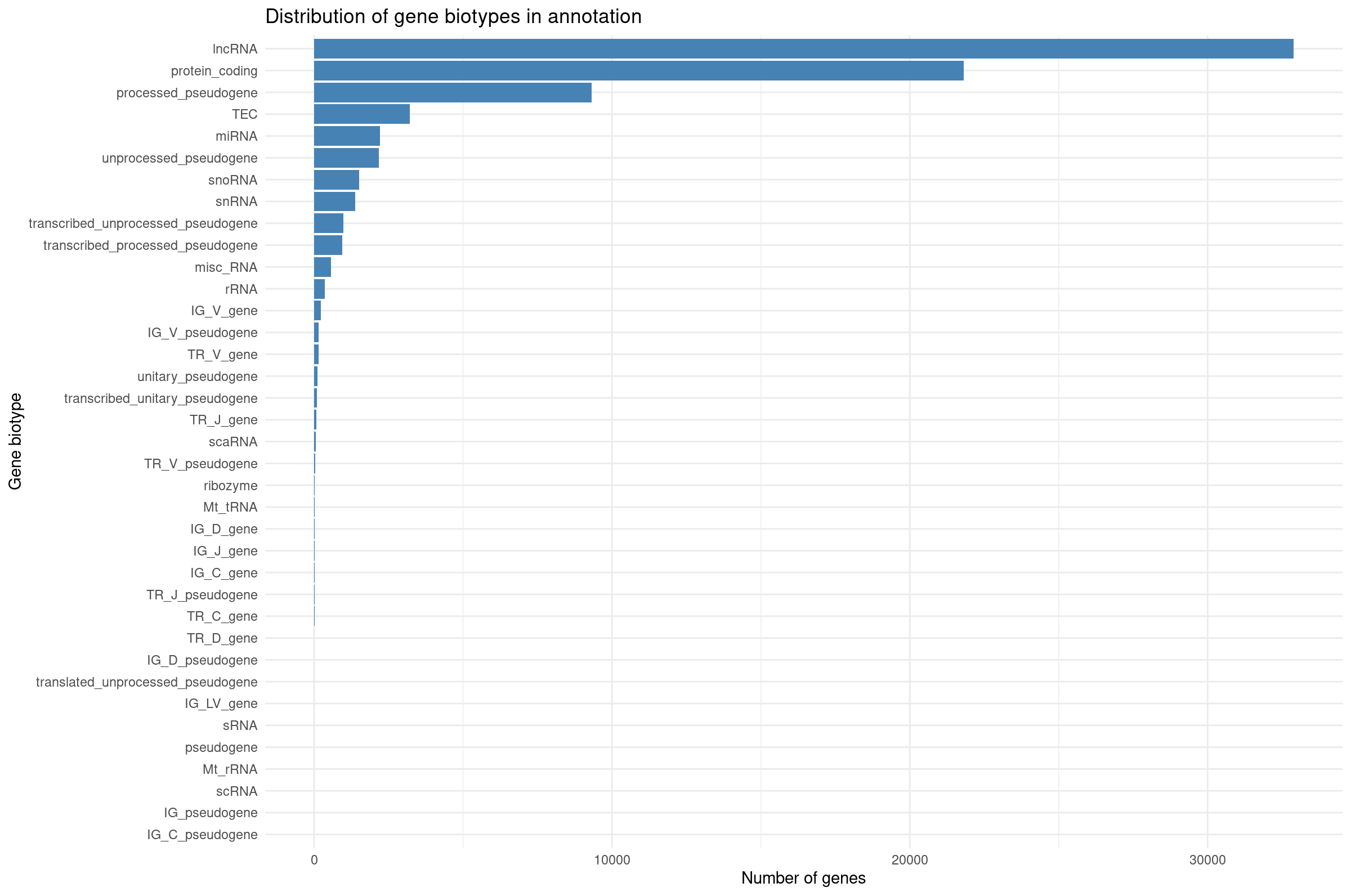
Visualizing biotype composition gives a sense of how many genes belong to each functional class. RNA-seq quantifies all transcribed loci, but many biotypes (snRNA, TEC, pseudogenes) are not suitable for differential expression with DESeq2 because they tend to be lowly expressed or unstable. This motivates filtering to protein-coding genes for QC and visualization.
Filter to protein coding genes and apply group-aware expression filtering:
R
# Filter to protein-coding genes
cts_pc <- cts_annot %>%
    filter(gene_biotype == "protein_coding") %>%
    dplyr::select(ensembl_gene_id_version, all_of(rownames(coldata)))

# Group-aware filtering: keep genes with >= 10 counts in at least 4 samples
# (the size of the smallest experimental group)
min_samples <- 4
min_counts <- 10

cts_coding <- cts_pc %>%
    filter(rowSums(across(all_of(rownames(coldata)), ~ . >= min_counts)) >= min_samples) %>%
    column_to_rownames("ensembl_gene_id_version")

dim(cts_coding)
[1] 11330 8Why use group-aware filtering?
A simple sum filter (e.g., rowSums > 5) can be
problematic:
- A gene with 10 total counts across 8 samples averages ~1.25 counts/sample—often too noisy.
- It may inadvertently remove genes expressed in only one condition.
Group-aware filtering ensures:
- Each kept gene has meaningful expression in at least one experimental group.
- Genes with condition-specific expression are retained.
- The threshold is interpretable (“at least 10 counts in at least 4 samples”).
For exploratory analysis, we also restrict to protein-coding genes to focus on the most interpretable features.
Library size differences
We summarize total counts per sample for protein coding genes.
R
libSize <- colSums(cts_coding) %>%
  as.data.frame() %>%
  rownames_to_column("sample") %>%
  dplyr::rename(total_counts = 2) %>%
  mutate(total_millions = total_counts / 1e6)

ggplot(libSize, aes(x = sample, y = total_counts)) +
  geom_col(fill = "steelblue") +
  theme_minimal() +
  labs(
    x = "Sample",
    y = "Total assigned reads",
    title = "Total reads per sample"
  ) +
  theme(
    axis.text.x = element_text(angle = 45, hjust = 1)
  )
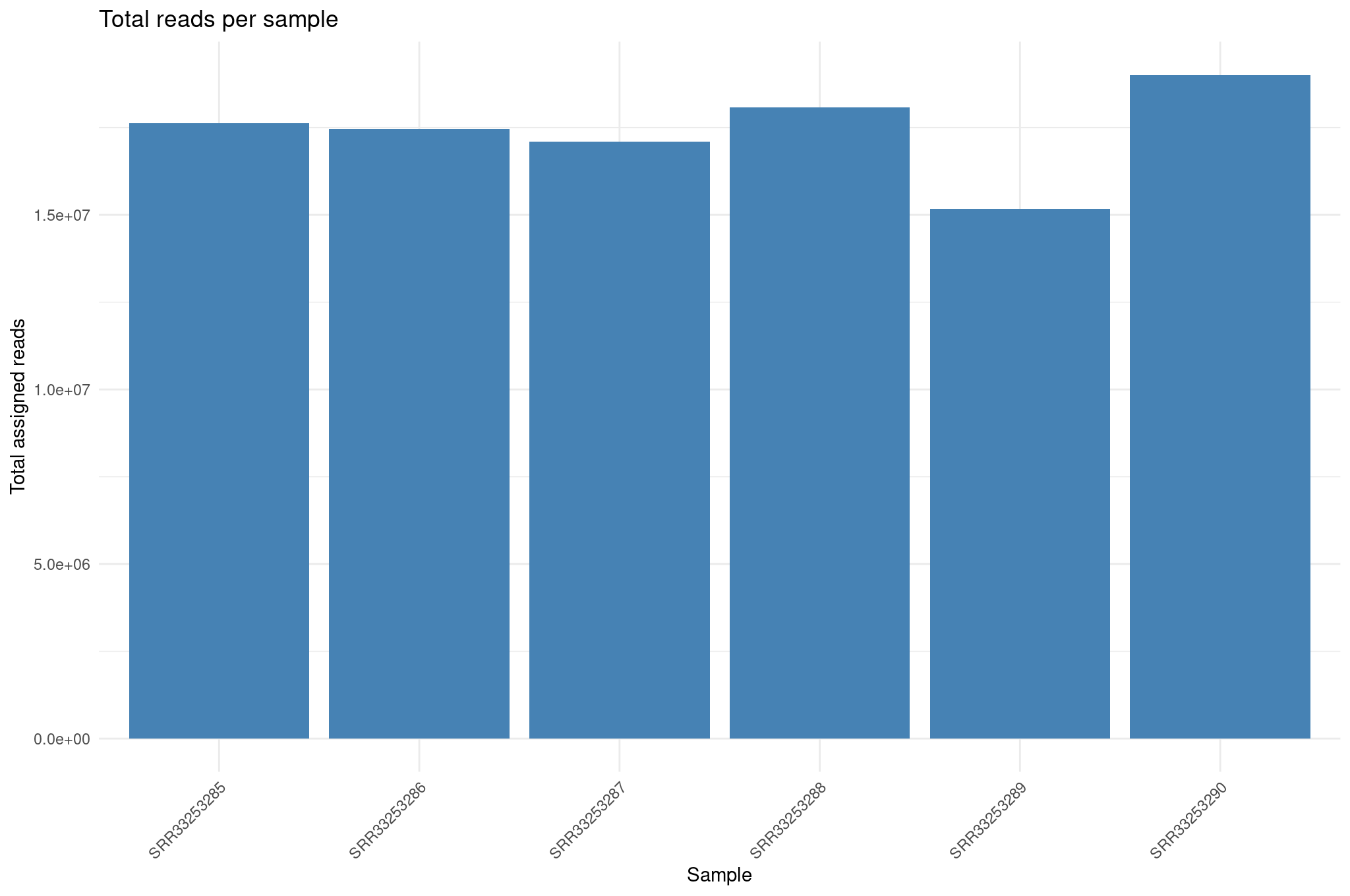
Library size differences affect normalization. Although DESeq2 corrects for this through size factors, inspecting raw library sizes ensures no sample has abnormally low sequencing depth, which could compromise downstream analyses.
Create DESeq2 object for exploratory plots
R
dds <- DESeqDataSetFromMatrix(
  countData = cts_coding,
  colData   = coldata,
  design    = ~ condition
)

dds <- estimateSizeFactors(dds)
Inspect size factors vs library size:
R
ggplot(
  data.frame(
    libSize    = colSums(assay(dds)),
    sizeFactor = sizeFactors(dds),
    Group      = dds$condition
  ),
  aes(x = libSize, y = sizeFactor, col = Group)
) +
  geom_point(size = 5) +
  theme_bw() +
  labs(x = "Library size", y = "Size factor")
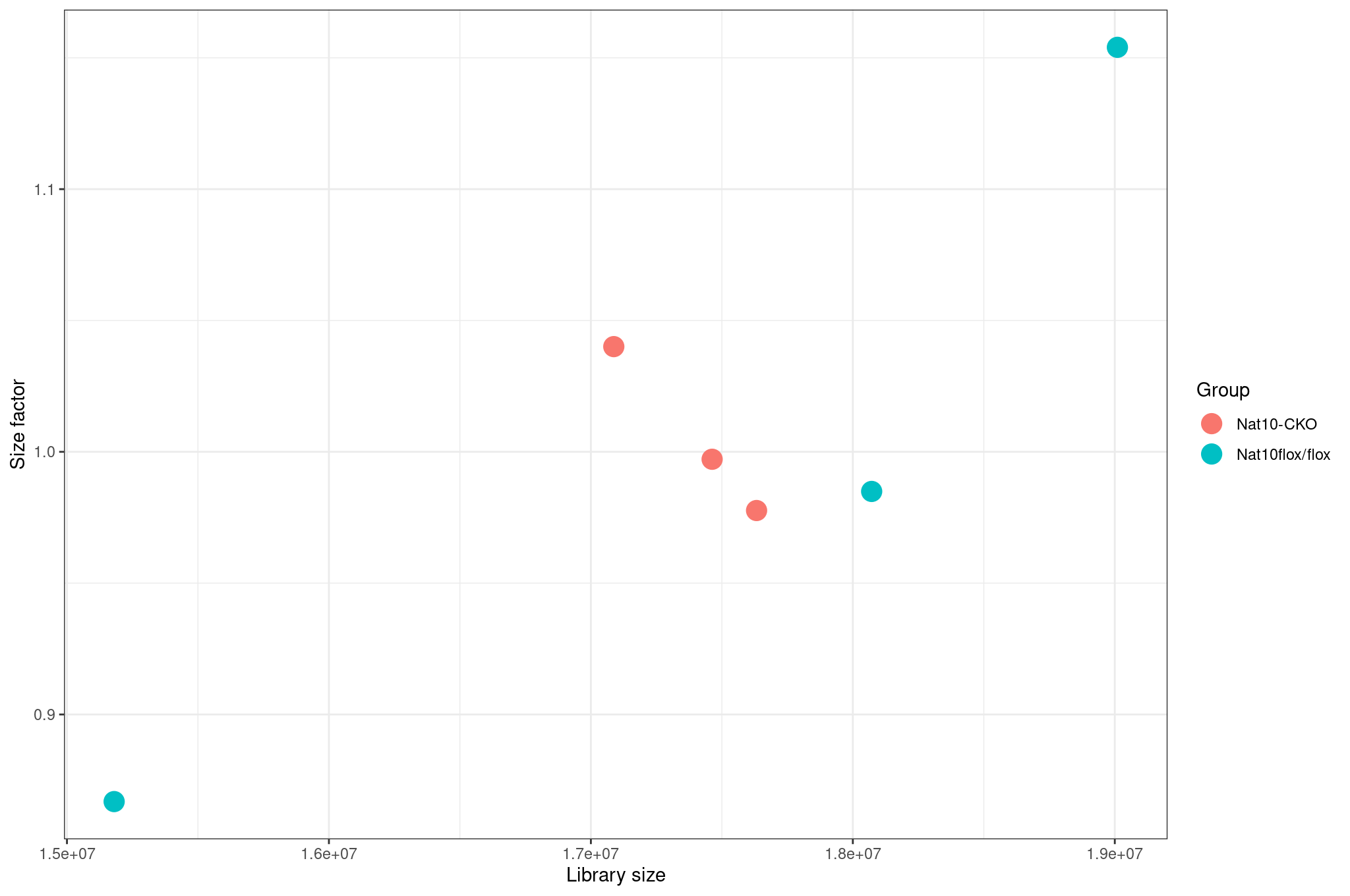
Variance stabilization and mean SD plots
Raw count data have a strong mean–variance dependency: low count genes have high variance, and high count genes show lower relative variability. This makes Euclidean distance and PCA misleading on raw counts. VST removes this dependency so that downstream clustering is biologically meaningful rather than driven by count scale.
Inspect mean vs standard deviation plot before transformation:
R
meanSdPlot(assay(dds), ranks = FALSE)
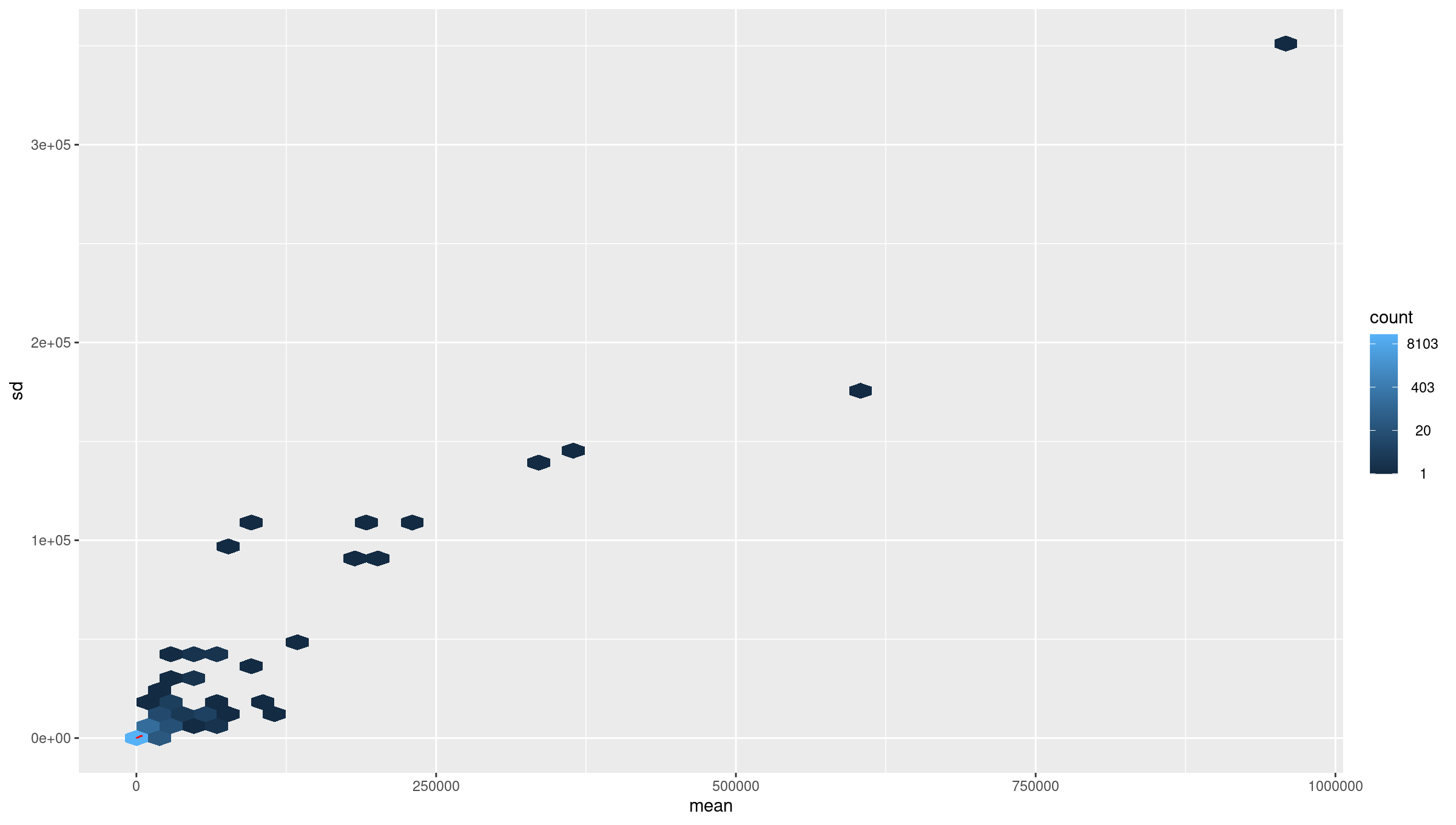
Deprecation warnings from packages
meanSdPlot() may print a warning such as
`aes_string()` was deprecated in ggplot2 3.0.0. It comes
from code inside the vsn package, not from your commands, and does not
change the plot. You will see similar warnings from enrichplot in
Episode 6. Warnings are worth reading, but this kind can be ignored.
Apply variance stabilizing transform (VST):
R
vsd <- DESeq2::vst(dds, blind = TRUE)
meanSdPlot(assay(vsd), ranks = FALSE)
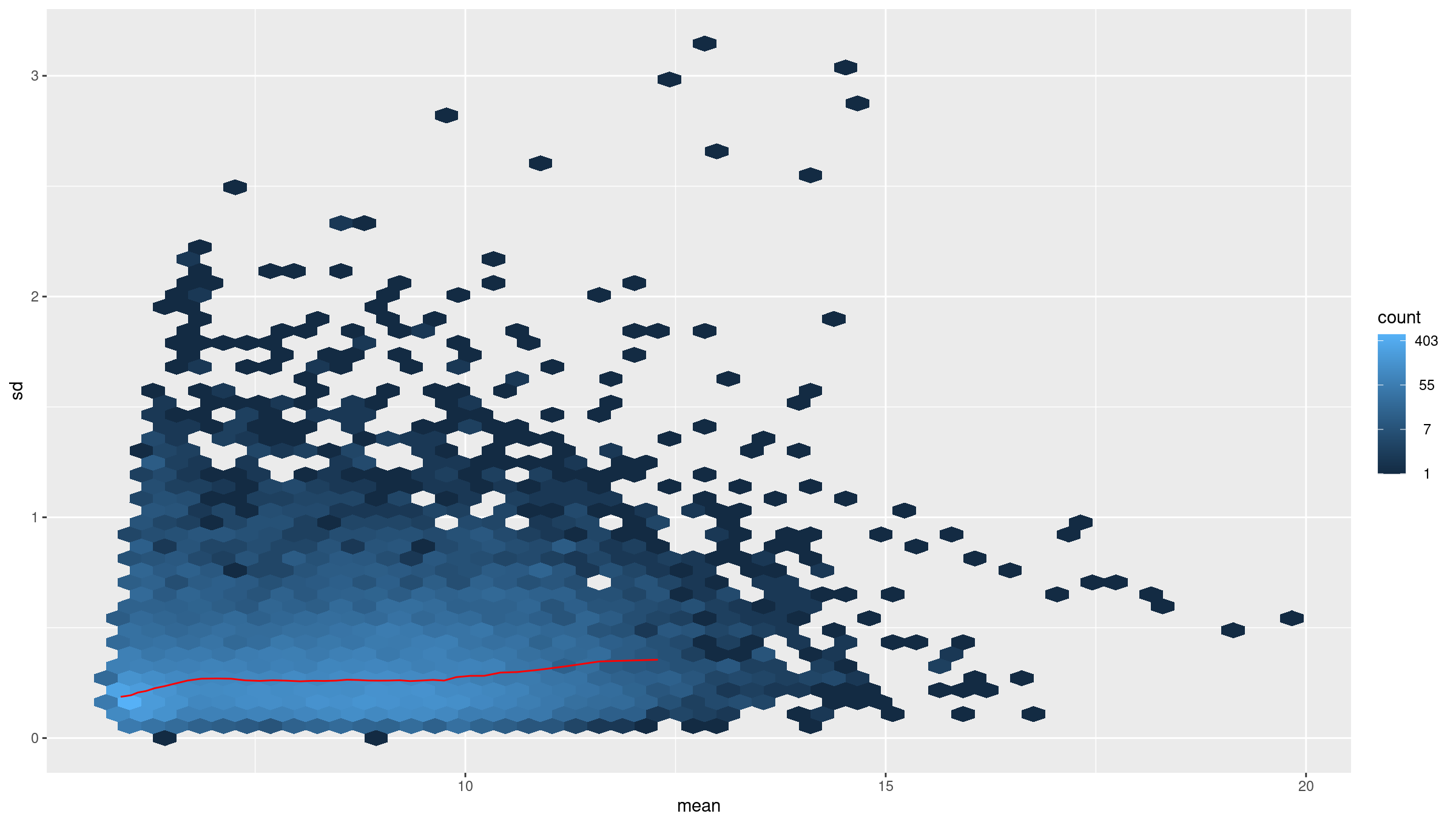
Why use VST
Counts have mean dependent variance. Variance stabilizing transform (VST) makes the variance roughly constant across the range, which improves distance based methods and PCA.
Sample to sample distances
The distance heatmap helps answer a key question: Do samples group by biological condition or by an unwanted variable (batch, sequencing run, contamination)? This is one of the fastest ways to detect outliers.
R
sampleDists       <- dist(t(assay(vsd)))
sampleDistMatrix  <- as.matrix(sampleDists)
rownames(sampleDistMatrix) <- colnames(vsd)
colnames(sampleDistMatrix) <- NULL
colors <- colorRampPalette(rev(brewer.pal(9, "Blues")))(255)

pheatmap(
  sampleDistMatrix,
  clustering_distance_rows = sampleDists,
  clustering_distance_cols = sampleDists,
  col                      = colors
)
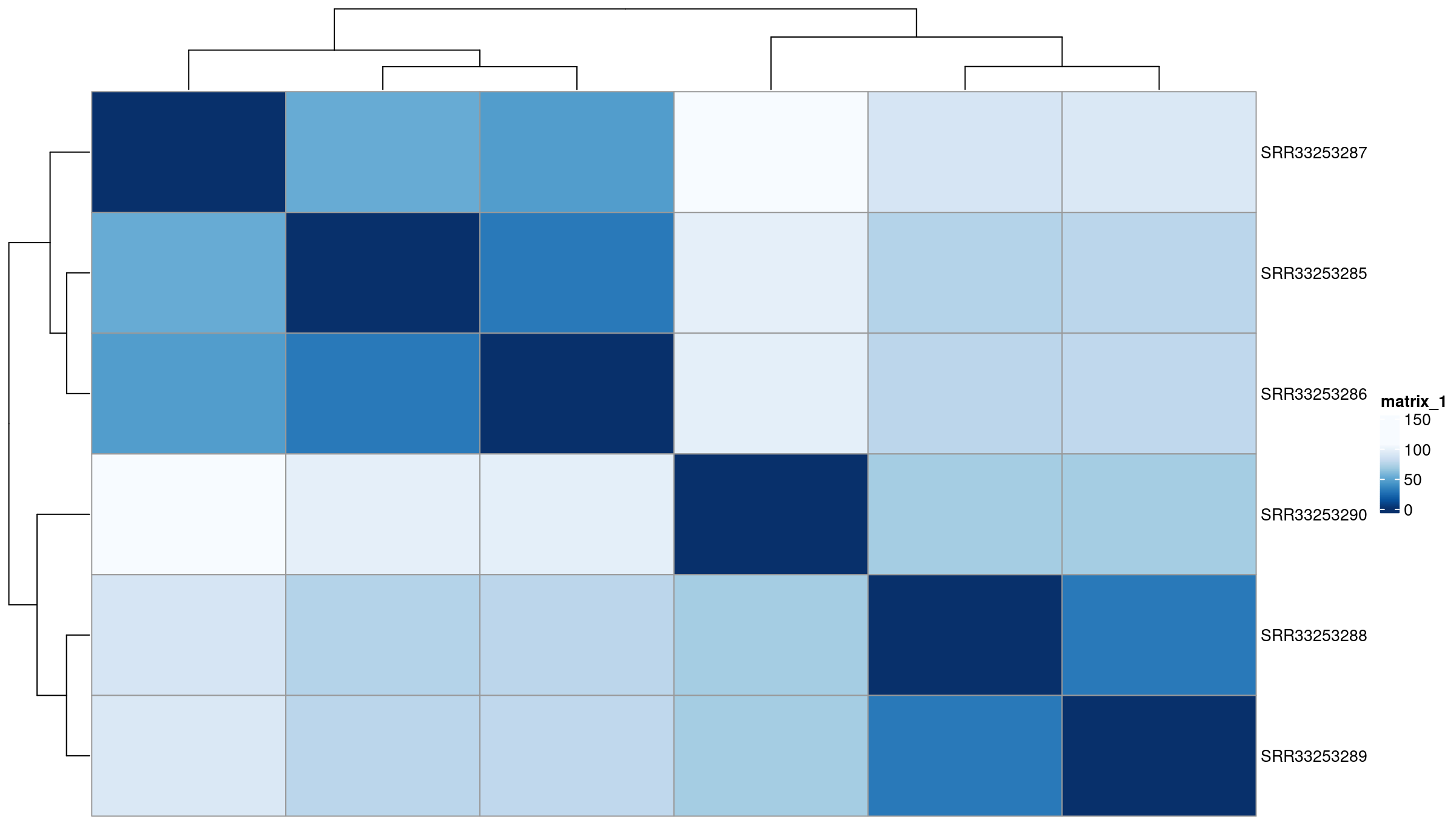
PCA on top variable genes
PCA projects samples into low-dimensional space and reveals dominant sources of variation. Ideally, samples separate by biological condition along one of the top PCs. If not, the signal from the condition may be weak or confounded by other factors.
R
rv <- rowVars(assay(vsd))
select <- order(rv, decreasing = TRUE)[seq_len(min(500, length(rv)))]

pca <- prcomp(t(assay(vsd)[select, ]))
percentVar <- pca$sdev ^ 2 / sum(pca$sdev ^ 2)

intgroup    <- "condition"
intgroup.df <- as.data.frame(colData(vsd)[, intgroup, drop = FALSE])

group <- if (length(intgroup) == 1) {
  factor(apply(intgroup.df, 1, paste, collapse = " : "))
}

d <- data.frame(
  PC1 = pca$x[, 1],
  PC2 = pca$x[, 2],
  intgroup.df,
  name = colnames(vsd)
)

ggplot(d, aes(PC1, PC2, color = condition)) +
  scale_shape_manual(values = 1:12) +
  scale_color_manual(values = c(
    "WT_mock" = "#00b462",
    "WT_IR"   = "#980c80"
  )) +
  theme_bw() +
  theme(legend.title = element_blank()) +
  geom_point(size = 2, stroke = 2) +
  geom_text_repel(aes(label = name)) +
  xlab(paste("PC1", round(percentVar[1] * 100, 2), "% variance")) +
  ylab(paste("PC2", round(percentVar[2] * 100, 2), "% variance"))
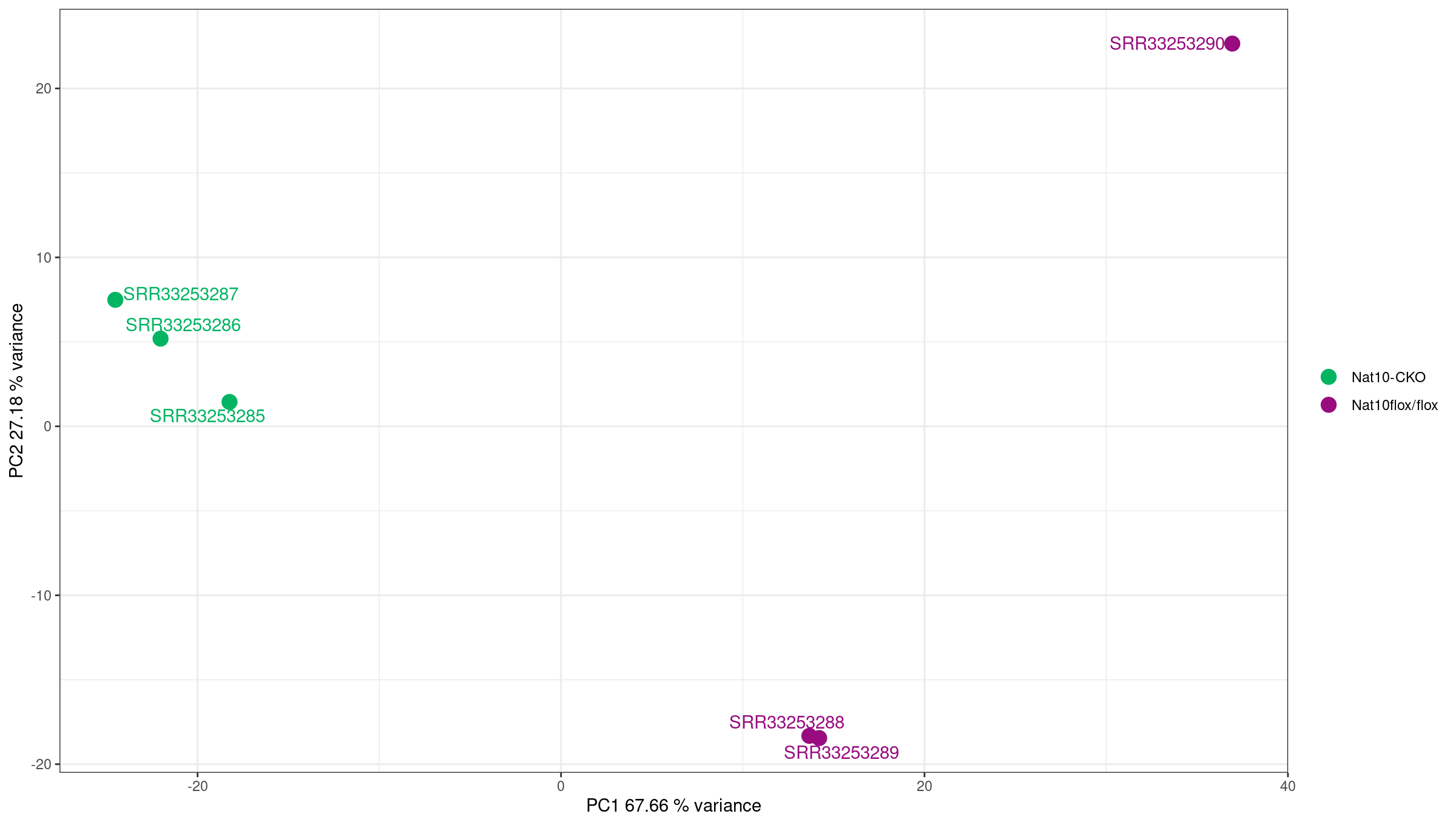
Using PCA to detect batch effects
PCA is one of the most powerful tools for detecting batch effects—unwanted technical variation from sample processing, sequencing runs, or other non-biological factors.
What to look for:
- Good: Samples separate primarily by biological condition (treatment, genotype).
- Concerning: Samples cluster by processing date, sequencing lane, or technician instead of biology.
- Red flag: PC1 captures technical variation rather than the condition of interest.
If you detect batch effects:
-
Include batch in the design formula if batch is known:
R
design = ~ batch + condition Use batch correction tools like
ComBat-seqorsvafor complex batch structures.Never simply remove batch-affected samples without understanding the underlying cause.
In this dataset, PC1 (95 percent of the variance) separates the IR samples from the mock samples. A much smaller pattern within the groups follows read quality, as the exercise below shows.
Exercise: interpret exploratory plots
Using the library size, distance heatmap, and PCA:
- Are there any obvious outlier samples?
- Do replicates from the same condition cluster together?
- Does any sample look inconsistent with its metadata label?
- Is there evidence of batch effects (samples clustering by non-biological factors)?
Interpretation for this dataset:
- No. Library sizes (assigned read pairs on protein-coding genes) range from 3.4 to 5.1 million, and the size factors from 0.78 to 1.19, so no sample has abnormally low depth.
- Yes. The distance heatmap splits the samples into a mock and an IR cluster, and PC1, which explains 95 percent of the variance, separates the two conditions.
- No. Every sample is closest to the other samples with its own label.
- Not one that matters here. The condition dominates, but within each group there is a small, consistent pattern: IR_rep3 and IR_rep4 pair up apart from IR_rep1 and IR_rep2, and mock_rep4 sits apart from the other mock samples on PC2 (under 2 percent of the variance). These are the samples with the cleanest reads in Episode 3, so this is a technical effect of read quality. It is small next to the treatment effect and does not need correction in this analysis, but it is worth recording.
Differential gene expression analysis
For DE testing we use the same filtered protein-coding matrix
(cts_coding) as for the exploratory plots. This keeps the
analysis focused on the genes we inspected above and avoids testing
thousands of barely expressed noncoding features.
R
dds <- DESeqDataSetFromMatrix(
  countData = cts_coding,
  colData   = coldata,
  design    = ~ condition
)
You can either run the individual DESeq2 steps:
R
dds <- estimateSizeFactors(dds)
dds <- estimateDispersions(dds)
dds <- nbinomWaldTest(dds)
Above three steps can be run together using the DESeq
function:
R
dds <- DESeq(dds)
using pre-existing size factors
estimating dispersions
found already estimated dispersions, replacing these
gene-wise dispersion estimates
mean-dispersion relationship
final dispersion estimates
fitting model and testing
Because the three steps above already ran on dds,
DESeq() reuses the size factors and replaces the
dispersions, as its messages say. On a new object it estimates both
itself.
Inspect dispersion estimates:
R
plotDispEsts(dds)
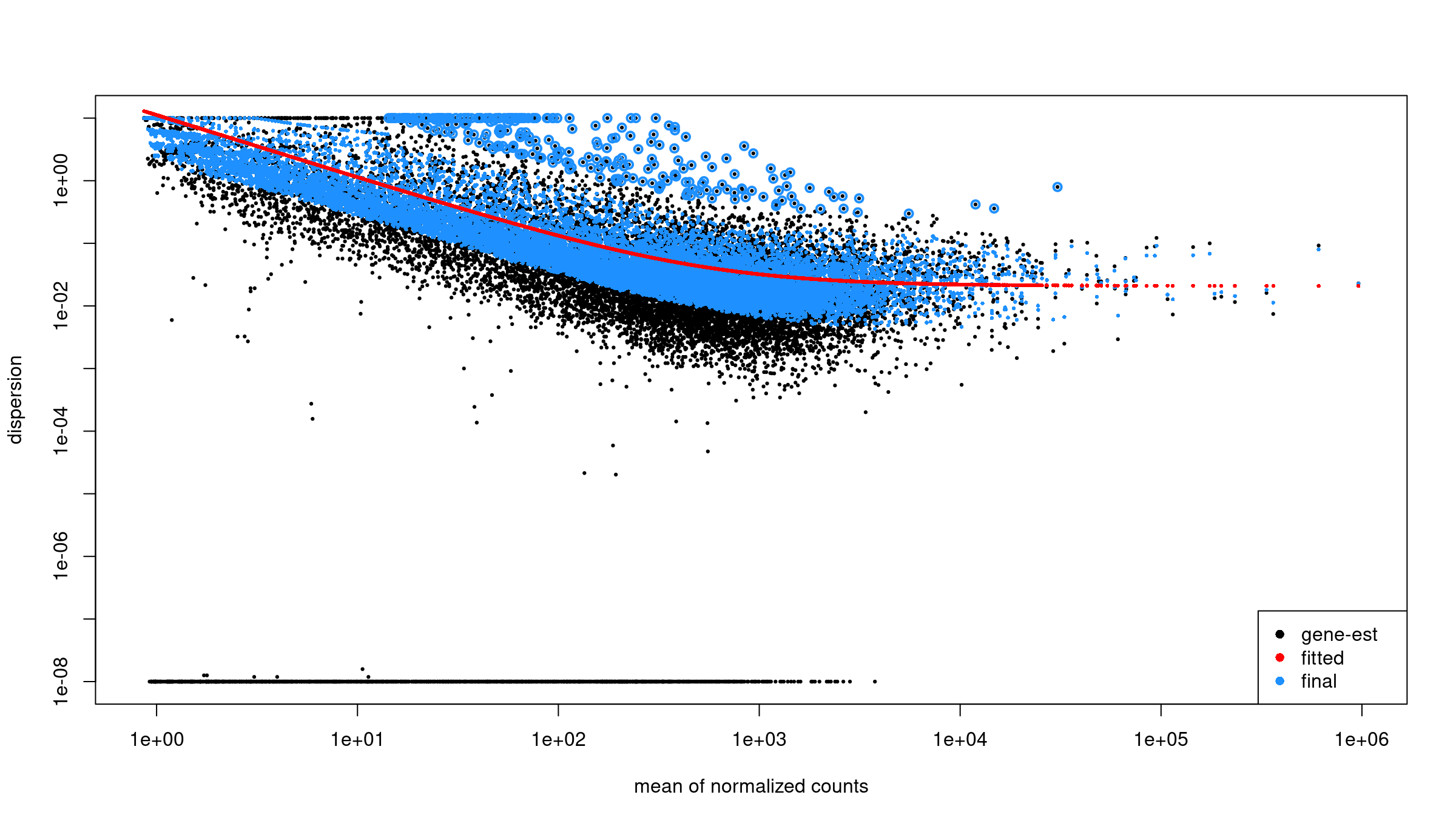
Obtain results for the contrast of interest. The
contrast argument names the factor, then the numerator
level, then the denominator level, so positive log2 fold changes mean
higher in WT_IR than in WT_mock:
R
res <-
  results(
    dds,
    contrast = c(
      "condition",
      "WT_IR",
      "WT_mock"
    )
  )

summary(res)
out of 11330 with nonzero total read count
adjusted p-value < 0.1
LFC > 0 (up)       : 3317, 29%
LFC < 0 (down)     : 3260, 29%
outliers [1]       : 0, 0%
low counts [2]     : 0, 0%
(mean count < 7)
[1] see 'cooksCutoff' argument of ?results
[2] see 'independentFiltering' argument of ?resultsName your contrast
DESeq2 compares factor levels, and R orders levels alphabetically
unless told otherwise. Here that puts WT_IR before
WT_mock, so by default WT_IR would be the
reference level and any result taken from the second model coefficient
would be mock vs IR: every fold change would have the
opposite sign, p53 targets would look downregulated, and the volcano
plot and enrichment results would be mirrored.
Two habits prevent this:
- Pass an explicit
contrast = c("condition", "WT_IR", "WT_mock")toresults(). The direction is then stated in the code and does not depend on level order. - When a function needs a coefficient name instead (as
lfcShrink(type = "apeglm")does below), set the reference level withrelevel()and checkresultsNames(dds)before using it. The coefficientcondition_WT_IR_vs_WT_mockexists only if the levels are set up the way you intend; if they are not, the call fails instead of silently returning flipped results.
The first line of a printed results table,
log2 fold change (MLE): condition WT_IR vs WT_mock,
confirms the direction.
Order the results by p value to see the top DE genes:
R
head(res[order(res$pvalue), ])
log2 fold change (MLE): condition WT_IR vs WT_mock
Wald test p-value: condition WT IR vs WT mock
DataFrame with 6 rows and 6 columns
                       baseMean log2FoldChange     lfcSE      stat       pvalue
                      <numeric>      <numeric> <numeric> <numeric>    <numeric>
ENSMUSG00000026581.15  2412.406       -2.80863 0.0812517  -34.5671 7.89921e-262
ENSMUSG00000021668.16   869.712        3.75461 0.1109288   33.8470 4.01297e-251
ENSMUSG00000075122.6    614.418        4.47065 0.1336974   33.4386 3.77513e-245
ENSMUSG00000004085.15   833.506        4.21081 0.1293034   32.5654 1.26912e-232
ENSMUSG00000020184.16  1619.577        2.82923 0.0906311   31.2170 6.26176e-214
ENSMUSG00000072825.13   724.296        4.73072 0.1518464   31.1546 4.39168e-213
                              padj
                         <numeric>
ENSMUSG00000026581.15 8.94981e-258
ENSMUSG00000021668.16 2.27335e-247
ENSMUSG00000075122.6  1.42574e-241
ENSMUSG00000004085.15 3.59478e-229
ENSMUSG00000020184.16 1.41891e-210
ENSMUSG00000072825.13 8.29296e-210
Each row represents one gene. Key columns: baseMean:
average normalized count across all samples log2FoldChange:
direction and magnitude of change between groups pvalue /
padj: statistical significance after multiple testing
correction Genes with NA values often have too few reads to
estimate dispersion and should not be interpreted.
Apply log fold change shrinkage
The raw log2 fold change estimates from DESeq2 can be noisy for genes with low counts. Shrinkage improves these estimates.
First, check the available coefficient names:
R
resultsNames(dds)
[1] "Intercept" "condition_WT_IR_vs_WT_mock"Apply shrinkage using apeglm (recommended for standard
two-group comparisons):
R
res_shrunk <- lfcShrink(
    dds,
    coef = "condition_WT_IR_vs_WT_mock",
    type = "apeglm"
)

summary(res_shrunk)
using 'apeglm' for LFC shrinkage. If used in published research, please cite:
    Zhu, A., Ibrahim, J.G., Love, M.I. (2018) Heavy-tailed prior distributions for
    sequence count data: removing the noise and preserving large differences.
    Bioinformatics. https://doi.org/10.1093/bioinformatics/bty895

out of 11330 with nonzero total read count
adjusted p-value < 0.1
LFC > 0 (up)       : 3317, 29%
LFC < 0 (down)     : 3260, 29%
outliers [1]       : 0, 0%
low counts [2]     : 0, 0%
(mean count < 7)
[1] see 'cooksCutoff' argument of ?results
[2] see 'independentFiltering' argument of ?resultsWhy shrink log fold changes?
Genes with low counts can have unreliably large fold changes. Shrinkage:
- Reduces noise in LFC estimates for lowly-expressed genes.
- Improves gene ranking for downstream analyses (e.g., GSEA).
- Does not affect p-values or significance calls.
Choosing a shrinkage method:
-
apeglm(recommended): Fast, well-calibrated, uses coefficient name (coef). -
ashr: Required for complex contrasts that can’t be specified withcoef. -
normal: Legacy method, generally not recommended.
For downstream analyses, we’ll use the shrunken results:
R
res <- res_shrunk
Create a summary table:
R
log2fc_cut <- log2(1.5)

res_df <- as.data.frame(res)

summary_table <- tibble(
    total_genes = nrow(res_df),
    sig = sum(res_df$padj < 0.05, na.rm = TRUE),
    up  = sum(res_df$padj < 0.05 & res_df$log2FoldChange >  log2fc_cut, na.rm = TRUE),
    down= sum(res_df$padj < 0.05 & res_df$log2FoldChange < -log2fc_cut, na.rm = TRUE)
)
print(summary_table)
Output:
# A tibble: 1 × 4
  total_genes   sig    up  down
        <int> <int> <int> <int>
1       11330  5967  1797  1801
Keep gene IDs:
R
res_df <- as.data.frame(res)
res_df$ensembl_gene_id_version <- rownames(res_df)
Joining results with expression and annotation
Get normalized counts:
R
norm_counts    <- counts(dds, normalized = TRUE)
norm_counts_df <- as.data.frame(norm_counts)
norm_counts_df$ensembl_gene_id_version <- rownames(norm_counts_df)
Join DE results, normalized counts, and annotation:
R
res_annot <- res_df %>%
  dplyr::left_join(norm_counts_df,
                   by = "ensembl_gene_id_version") %>%
  dplyr::left_join(mart,
                   by = "ensembl_gene_id_version")
Joining normalized counts and annotation makes the output
biologically interpretable. The final table becomes a comprehensive
results object containing: - gene identifiers -
gene symbols - functional descriptions -
differential expression statistics -
normalized expression values This is the format most
researchers expect when examining results or importing them into
downstream tools.
Define significance labels for plotting:
R
log2fc_cut <- log2(1.5)

res_annot <- res_annot %>%
  dplyr::mutate(
    label = dplyr::coalesce(external_gene_name, ensembl_gene_id_version),
    sig = dplyr::case_when(
      padj <= 0.05 & log2FoldChange >=  log2fc_cut ~ "up",
      padj <= 0.05 & log2FoldChange <= -log2fc_cut ~ "down",
      TRUE ~ "ns"
    )
  )
Visualization: volcano plot
The volcano plot summarizes statistical significance
(padj) and effect size (log2FoldChange)
simultaneously. Genes far left or right show strong expression
differences. Genes high on the plot pass stringent significance
thresholds. Labels help identify the most biologically meaningful
genes.
R
ggplot(
  res_annot,
  aes(
    x     = log2FoldChange,
    y     = -log10(padj),
    col   = sig,
    label = label
  )
) +
  geom_point(alpha = 0.6) +
  scale_color_manual(values = c(
    "up"   = "firebrick",
    "down" = "dodgerblue3",
    "ns"   = "grey70"
  )) +
  geom_text_repel(
    data = dplyr::filter(res_annot, sig != "ns"),
    max.overlaps       = 12,
    min.segment.length = Inf,
    box.padding        = 0.3,
    seed               = 42,
    show.legend        = FALSE
  ) +
  theme_classic() +
  xlab("log2 fold change") +
  ylab("-log10 adjusted p value") +
  ggtitle("Volcano plot: WT_IR vs WT_mock")
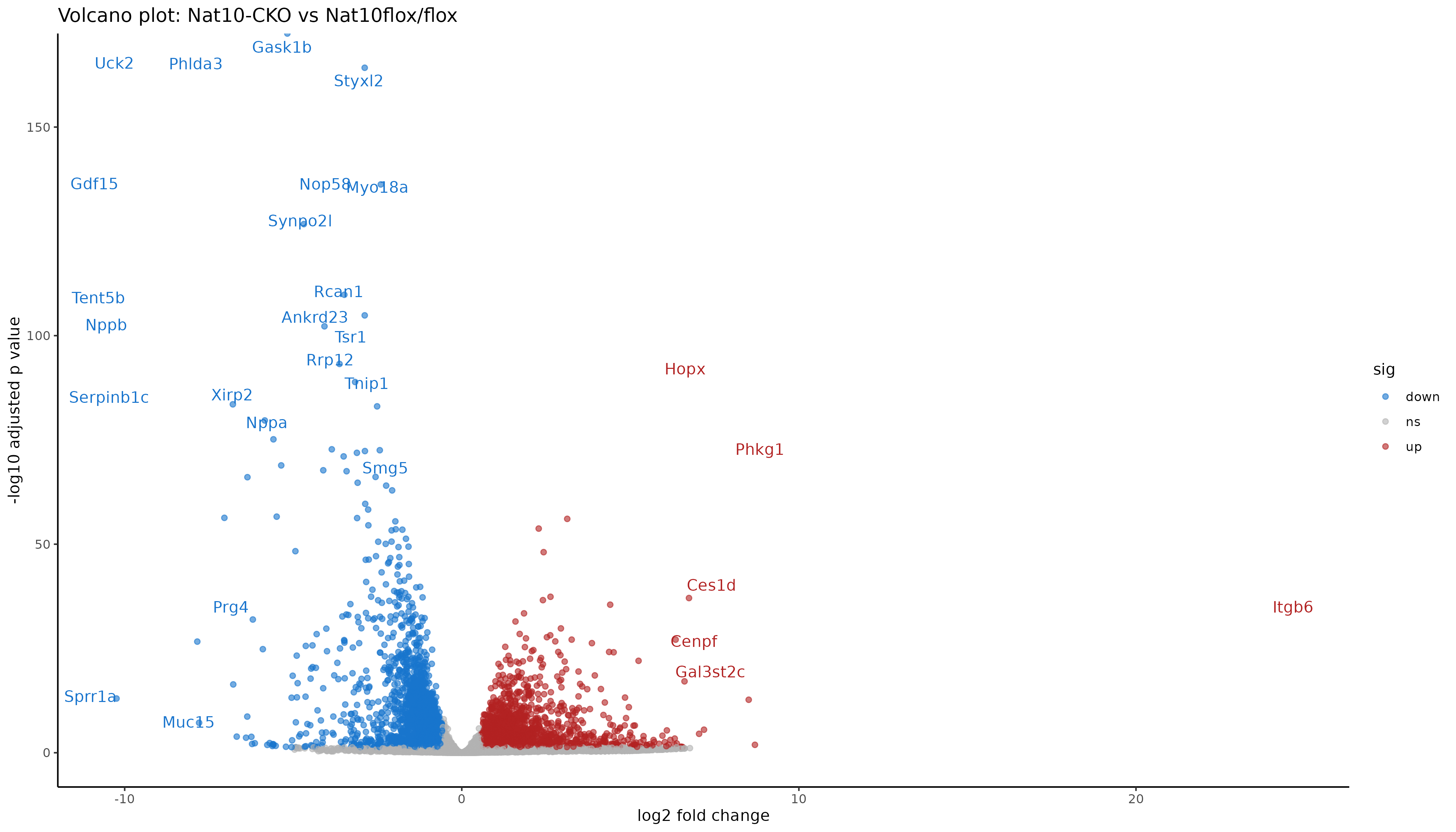
Interpreting the volcano
Points to the right are higher in IR-treated samples (upregulated by radiation), to the left are higher in mock (downregulated by radiation). Points near the top have stronger statistical support (small adjusted p values). Colored points mark genes that pass both fold change and padj thresholds.
Saving results
Saving both the full table and the significant subset allows flexibility: - The full table is needed for pathway analyses and reproducibility. - The subset table focuses on interpretable and biologically meaningful DE genes.
R
readr::write_tsv(
  res_annot,
  "results/deseq2/DESeq2_results_joined.tsv"
)
Filter to significant genes (padj ≤ 0.05 and fold change ≥ 1.5):
R
sig_res <- res_annot %>%
  dplyr::filter(
    padj <= 0.05,
    abs(log2FoldChange) >= log2fc_cut
  )

readr::write_tsv(
  sig_res,
  "results/deseq2/DESeq2_results_sig.tsv"
)
Save the DESeq2 object for downstream analysis:
R
saveRDS(dds, "results/deseq2/dds_featurecounts.rds")
Exercise: explore top DE genes
Using sig_res:
- Which genes have the largest positive log2 fold change.
- Which genes have the largest negative log2 fold change.
- Are any of the top genes known p53 targets or DNA damage response genes.
Interpretation for this dataset:
- The largest positive fold changes (log2 fold change 7.4 to 9.7) are Ddit4l, Ckmt1, Syt12, Plb1, Celf5, Phlda3, Pierce1, Tnfsf4, Eda2r, and Cdkn1a; Phlda3, Eda2r, and Cdkn1a are well-known p53 targets. Canonical p53 targets are strongly upregulated after IR: Cdkn1a (p21), Mdm2, Bax, Bbc3 (Puma), and Pmaip1 (Noxa).
- The largest negative fold changes (log2 fold change -3.3 to -4.5) are Rag1, Car1, Crisp3, Sele, Serpinb1a, Itih5, Hba-a1, Spns2, Loxl1, and S1pr3. Downregulation is weaker than upregulation, consistent with a response driven mainly by p53, a transcriptional activator.
-
Gadd45a, a DNA damage response gene, goes up slightly after
IR (log2 fold change 0.45) but is not significant here (padj 0.07), so
it is not in
sig_res. Look it up withdplyr::filter(res_annot, external_gene_name == "Gadd45a"). With 4 replicates and 20 million read pairs per sample, a small change in a modestly expressed gene can miss the cutoff; that is a statement about power, not evidence that the gene does not respond. - Finding the known p53 targets among the top upregulated genes is a positive control: it confirms the contrast direction and the analysis are correct.
Summary
- Counts and sample metadata must be aligned before building DESeq2 objects.
- Biotype annotation allows restriction to protein coding genes for exploratory QC.
- Variance stabilizing transform, distance heatmaps, and PCA help detect outliers and batch effects.
- DESeq2 provides a complete pipeline from raw counts to differential expression.
- Joining DE results with normalized counts and gene annotation yields a useful final table.
- Volcano plots summarize differential expression using fold change and adjusted p values.
Content from 5B. Differential expression using DESeq2 (Kallisto pathway)
Last updated on 2026-11-10 | Edit this page
Overview
Questions
- How do we import transcript-level quantification from Kallisto into DESeq2?
- What exploratory analyses should we perform before differential expression testing?
- How do we perform differential expression analysis with DESeq2 using tximport data?
- How do we visualize and interpret DE results from transcript-based quantification?
- What are the key differences between genome-based and transcript-based DE workflows?
Objectives
- Load tximport data from Kallisto quantification into DESeq2.
- Perform quality control visualizations (boxplots, density plots, PCA).
- Apply variance stabilizing transformation for exploratory analysis.
- Run differential expression analysis with appropriate contrasts.
- Create volcano plots to visualize DE results.
- Export annotated DE results for downstream analysis.
Attribution
This section is adapted from materials developed by Michael Gribskov, Professor of Computational Genomics & Systems Biology at Purdue University.
Original and related materials are available via the CGSB Wiki: https://cgsb.miraheze.org/wiki/Main_Page
Introduction
In Episode 4B, we quantified transcript expression using Kallisto and summarized the results to gene-level counts using tximport. In this episode, we use those gene-level estimates for differential expression analysis with DESeq2.
The workflow follows the same general pattern as Episode 5A (genome-based), but with important differences:
-
Input data: We use the
txiobject from tximport rather than raw counts from featureCounts. -
Count handling: Kallisto estimates are model-based
(not integer counts), and DESeq2 handles this appropriately via
DESeqDataSetFromTximport(). -
Bootstrap support: if you run Kallisto with
bootstraps (
-b), the uncertainty estimates can be used with sleuth for transcript-level DE. DESeq2 does not use them, which is why Episode 4B runs with-b 0.
When to use this pathway
Use this transcript-based workflow when:
- You quantified with Salmon, Kallisto, or similar tools.
- You want to leverage transcript-level bias corrections.
- You did not generate BAM files and cannot use featureCounts.
The genome-based workflow (Episode 5A) is preferred when you have BAM files and need splice junction information or plan to visualize alignments.
What you need for this episode
-
txi.rdsfile generated from tximport in Episode 4B - A
samples.csvfile describing the experimental groups - RStudio session via Open OnDemand
If you haven’t created the sample metadata file, create
scripts/samples.csv with:
sample,condition
WT_Bcell_mock_rep1,WT_mock
WT_Bcell_mock_rep2,WT_mock
WT_Bcell_mock_rep3,WT_mock
WT_Bcell_mock_rep4,WT_mock
WT_Bcell_IR_rep1,WT_IR
WT_Bcell_IR_rep2,WT_IR
WT_Bcell_IR_rep3,WT_IR
WT_Bcell_IR_rep4,WT_IR
The R code below creates the results/deseq2_kallisto
directory for the output.
Step 1: Load packages and data
Start your RStudio session via Open OnDemand as described in Episode 5A, then load the required packages:
R
library(DESeq2)
library(ggplot2)
library(reshape2)
library(pheatmap)
library(RColorBrewer)
library(ggrepel)
library(readr)
library(dplyr)
# Construct the path dynamically
work_dir <- file.path("/scratch/negishi", Sys.getenv("USER"), "rnaseq-workshop")
setwd(work_dir)
# output directory for this episode
dir.create("results/deseq2_kallisto", recursive = TRUE, showWarnings = FALSE)
Load the tximport object created in Episode 4B:
R
txi <- readRDS("results/kallisto_quant/txi.rds")
Examine the structure of the tximport object:
R
names(txi)
[1] "abundance"           "counts"              "length"
[4] "countsFromAbundance"
R
head(txi$counts)
                      WT_Bcell_IR_rep1 WT_Bcell_IR_rep2 WT_Bcell_IR_rep3
ENSMUSG00000000001.5         387.39815        329.43564        737.97318
ENSMUSG00000000003.16          0.00000          1.00000          0.00000
ENSMUSG00000000028.16         37.73844         23.20617         39.45979
ENSMUSG00000000031.20          2.00000          1.00000          1.00000
ENSMUSG00000000037.18          2.00000          4.00000          3.00000
ENSMUSG00000000049.12          0.00000          0.00000          1.00000
                      WT_Bcell_IR_rep4 WT_Bcell_mock_rep1 WT_Bcell_mock_rep2
ENSMUSG00000000001.5         654.17550           687.1189          620.35065
ENSMUSG00000000003.16          0.00000             0.0000            0.00000
ENSMUSG00000000028.16         29.71743            55.0000           39.20456
ENSMUSG00000000031.20          0.00000             0.0000            0.00000
ENSMUSG00000000037.18          8.00000             1.0000            1.00000
ENSMUSG00000000049.12          0.00000             0.0000            2.00000
                      WT_Bcell_mock_rep3 WT_Bcell_mock_rep4
ENSMUSG00000000001.5            661.3541          704.88506
ENSMUSG00000000003.16             0.0000            0.00000
ENSMUSG00000000028.16            40.0984           41.44387
ENSMUSG00000000031.20             0.0000            0.00000
ENSMUSG00000000037.18             2.0000            1.00000
ENSMUSG00000000049.12 0.0000 1.00000Understanding the tximport object
The txi object contains several components:
- counts: Gene-level estimated counts (used by DESeq2).
- abundance: Gene-level TPM values (within-sample normalized).
- length: Average transcript length per gene (used for length bias correction).
-
countsFromAbundance: Method used to generate counts
(default:
"no").
When using DESeqDataSetFromTximport(), the
length matrix is automatically used to correct for
gene-length bias during normalization. This is why we use the default
countsFromAbundance = "no" in Episode 4B—DESeq2 handles
length correction internally, so pre-scaling counts would apply the
correction twice.
Load sample metadata:
R
coldata <- read.csv(
    "scripts/samples.csv",
    row.names = 1,
    header = TRUE,
    stringsAsFactors = TRUE
)
coldata$condition <- as.factor(coldata$condition)
# make WT_mock the reference (denominator) level, as in Episode 5A
coldata$condition <- relevel(coldata$condition, ref = "WT_mock")
coldata <- coldata[colnames(txi$counts), , drop = FALSE]
coldata
                   condition
WT_Bcell_IR_rep1       WT_IR
WT_Bcell_IR_rep2       WT_IR
WT_Bcell_IR_rep3       WT_IR
WT_Bcell_IR_rep4       WT_IR
WT_Bcell_mock_rep1   WT_mock
WT_Bcell_mock_rep2   WT_mock
WT_Bcell_mock_rep3   WT_mock
WT_Bcell_mock_rep4   WT_mock
Verify that sample names match between tximport and metadata:
R
all(colnames(txi$counts) == rownames(coldata))
[1] TRUEStep 2: Create DESeq2 object from tximport
The key difference from the genome-based workflow is using
DESeqDataSetFromTximport() instead of
DESeqDataSetFromMatrix():
R
dds <- DESeqDataSetFromTximport(
    txi,
    colData = coldata,
    design = ~ condition
)
Why use DESeqDataSetFromTximport?
This function:
- Automatically handles non-integer counts from Salmon/Kallisto.
- Preserves transcript length information for accurate normalization.
- Incorporates the
txi$lengthmatrix to account for gene-length bias.
Using DESeqDataSetFromMatrix() with tximport counts
would lose this information.
Keep protein-coding genes, as in Episode 5A, so that both tracks test the same kind of genes and their results can be compared directly. Load the gene annotation tables copied with the workshop data (the same files as in Episode 5A; its “How were these data prepared?” spoiler shows how they were made):
R
mart <-
  read.csv(
    "data/mart.tsv",
    sep = "\t",
    header = TRUE
  )

annot <-
  read.csv(
    "data/annot.tsv",
    sep = "\t",
    header = TRUE
  )

protein_coding <- mart$ensembl_gene_id_version[mart$gene_biotype == "protein_coding"]
dds <- dds[rownames(dds) %in% protein_coding, ]
Then filter lowly expressed genes using group-aware filtering:
R
# Group-aware filtering: keep genes with >= 10 counts in at least 4 samples
# (the size of the smallest experimental group)
min_samples <- 4
min_counts <- 10
keep <- rowSums(counts(dds) >= min_counts) >= min_samples
dds <- dds[keep, ]
dim(dds)
[1] 12768 8Why use group-aware filtering?
A simple sum filter (rowSums(counts(dds)) >= 10) can
be problematic:
- A gene with 10 total counts across 8 samples averages ~1.25 counts/sample—too low to be informative.
- It may remove genes expressed in only one condition (biologically interesting!).
Group-aware filtering
(rowSums(counts >= threshold) >= min_group_size)
ensures:
- Each kept gene has meaningful expression in at least one experimental group.
- Genes with condition-specific expression are retained.
- The threshold is interpretable (e.g., “at least 10 counts in at least 4 samples”).
Estimate size factors:
R
dds <- estimateSizeFactors(dds)
head(normalizationFactors(dds))
using 'avgTxLength' from assays(dds), correcting for library size
                      WT_Bcell_IR_rep1 WT_Bcell_IR_rep2 WT_Bcell_IR_rep3
ENSMUSG00000000001.5         0.8537247        0.8469403         1.126820
ENSMUSG00000000028.16        0.9221633        0.6861075         1.193100
ENSMUSG00000000056.8         0.9521929        1.0820695         1.132853
ENSMUSG00000000078.8         0.9499078        0.8589537         1.212266
ENSMUSG00000000085.17        0.8137271        0.6687624         1.202663
ENSMUSG00000000088.8         0.8598602        0.9017598         1.051854
                      WT_Bcell_IR_rep4 WT_Bcell_mock_rep1 WT_Bcell_mock_rep2
ENSMUSG00000000001.5          1.168215           1.042938          0.9615182
ENSMUSG00000000028.16         1.145844           1.054745          1.0064376
ENSMUSG00000000056.8          1.148567           1.236721          0.8908183
ENSMUSG00000000078.8          1.177931           1.000095          0.9125703
ENSMUSG00000000085.17         1.255550           1.264048          0.9614268
ENSMUSG00000000088.8          1.116178           1.025893          0.9896438
                      WT_Bcell_mock_rep3 WT_Bcell_mock_rep4
ENSMUSG00000000001.5           0.9378961          1.1170726
ENSMUSG00000000028.16          0.9312717          1.1694632
ENSMUSG00000000056.8           0.7157949          0.9458896
ENSMUSG00000000078.8           0.9205824          1.0215522
ENSMUSG00000000085.17          0.8347515          1.1995943
ENSMUSG00000000088.8           0.9490056          1.1400986
Step 3: Exploratory data analysis
Raw count distributions
Visualize the distribution of raw counts across samples:
R
counts_melted <- melt(
    log10(counts(dds) + 1),
    varnames = c("gene", "sample"),
    value.name = "log10_count"
)

ggplot(counts_melted, aes(x = sample, y = log10_count, fill = sample)) +
    geom_boxplot(show.legend = FALSE) +
    theme_minimal() +
    labs(
        x = "Sample",
        y = "log10(count + 1)",
        title = "Raw count distributions (Kallisto)"
    ) +
    theme(axis.text.x = element_text(angle = 45, hjust = 1))
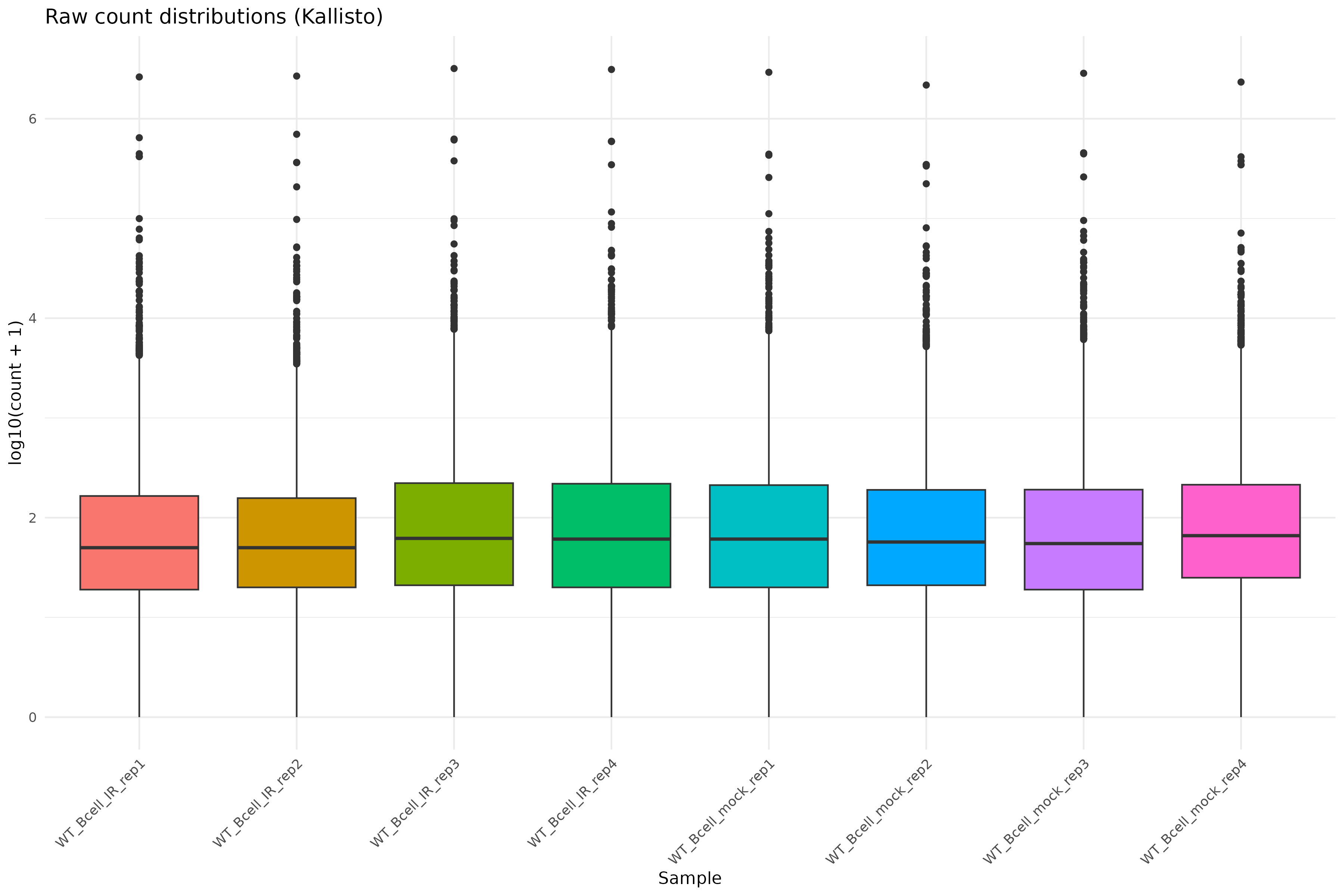
Density plot of raw counts:
R
ggplot(counts_melted, aes(x = log10_count, fill = sample)) +
    geom_density(alpha = 0.3) +
    theme_minimal() +
    labs(
        x = "log10(count + 1)",
        y = "Density",
        title = "Count density distributions"
    )
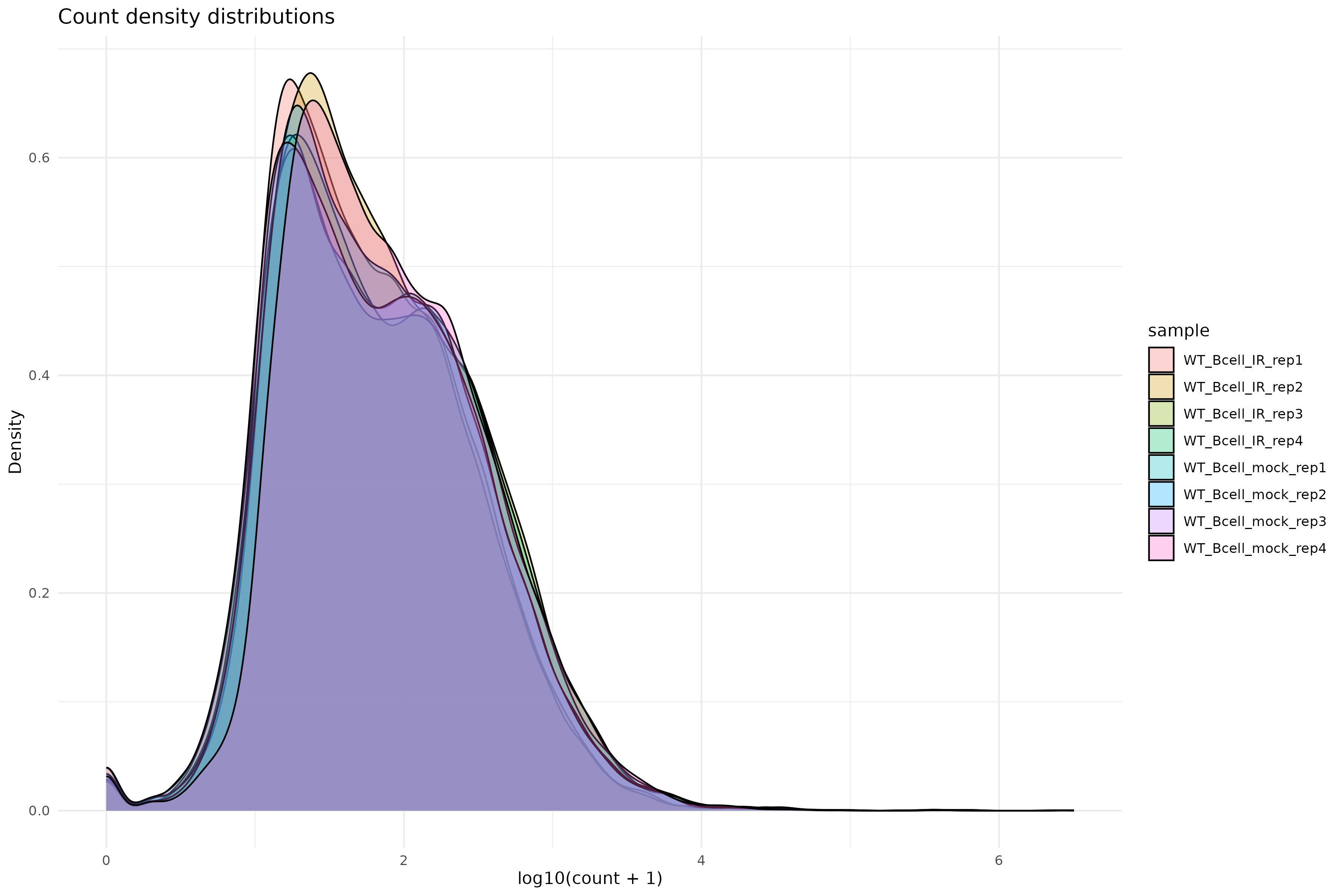
Variance stabilizing transformation
Apply VST for exploratory analysis:
R
vsd <- vst(dds, blind = TRUE)
Why use VST?
Raw counts have a strong mean-variance relationship: highly expressed genes have higher variance. VST removes this dependency, making distance-based methods (PCA, clustering) more reliable.
Setting blind = TRUE ensures the transformation is not
influenced by the experimental design, which is appropriate for quality
control.
Sample-to-sample distances
R
sampleDists <- dist(t(assay(vsd)))
sampleDistMatrix <- as.matrix(sampleDists)
rownames(sampleDistMatrix) <- colnames(vsd)
colnames(sampleDistMatrix) <- NULL
colors <- colorRampPalette(rev(brewer.pal(9, "Blues")))(255)

pheatmap(
    sampleDistMatrix,
    clustering_distance_rows = sampleDists,
    clustering_distance_cols = sampleDists,
    col = colors,
    main = "Sample distance heatmap (Kallisto)"
)
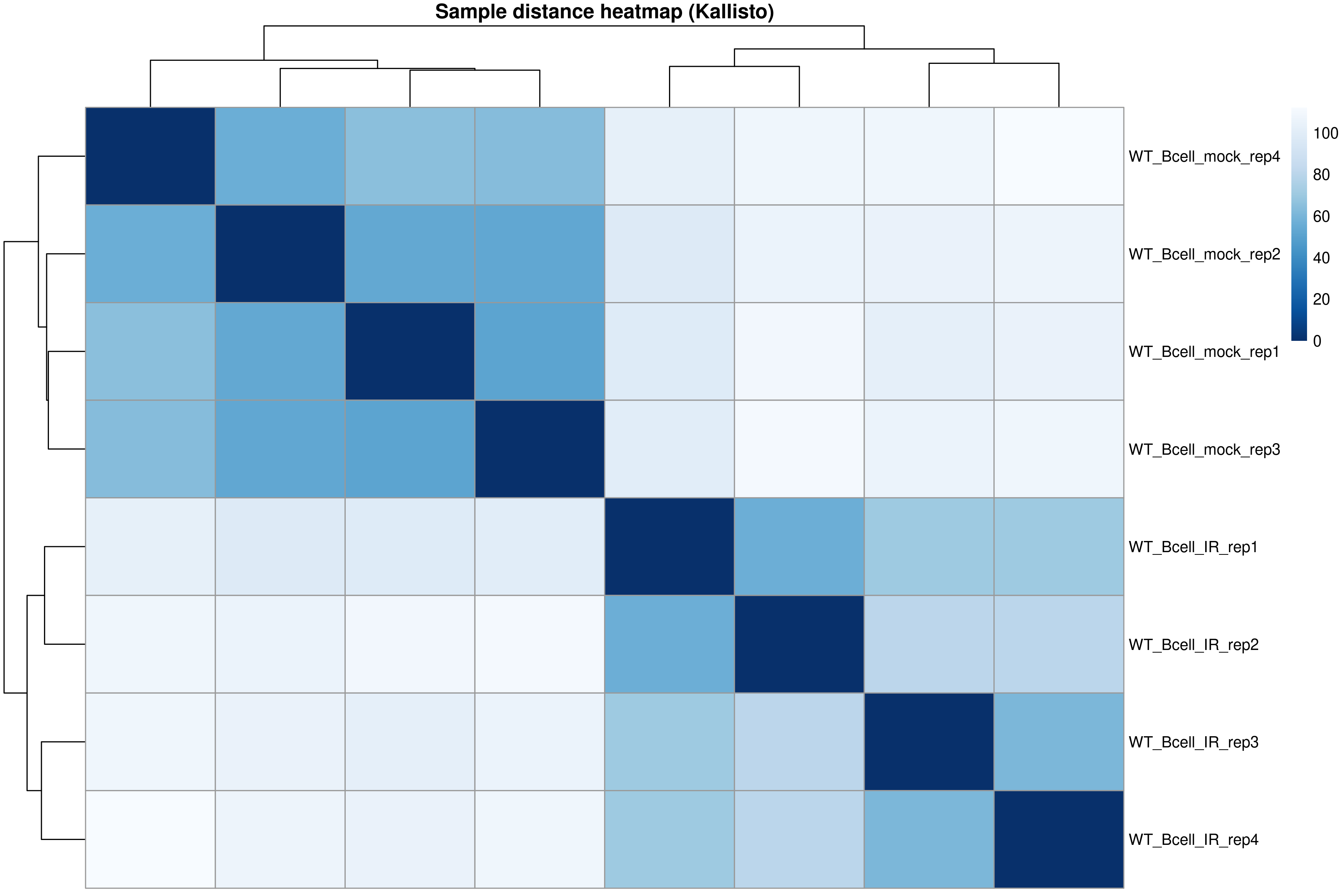
The distance heatmap shows how similar samples are to each other. Samples from the same condition should cluster together.
PCA plot
R
pcaData <- plotPCA(vsd, intgroup = "condition", returnData = TRUE)
percentVar <- round(100 * attr(pcaData, "percentVar"))

ggplot(pcaData, aes(PC1, PC2, color = condition)) +
    geom_point(size = 4) +
    geom_text_repel(aes(label = name)) +
    xlab(paste0("PC1: ", percentVar[1], "% variance")) +
    ylab(paste0("PC2: ", percentVar[2], "% variance")) +
    theme_bw() +
    ggtitle("PCA of Kallisto-quantified samples")
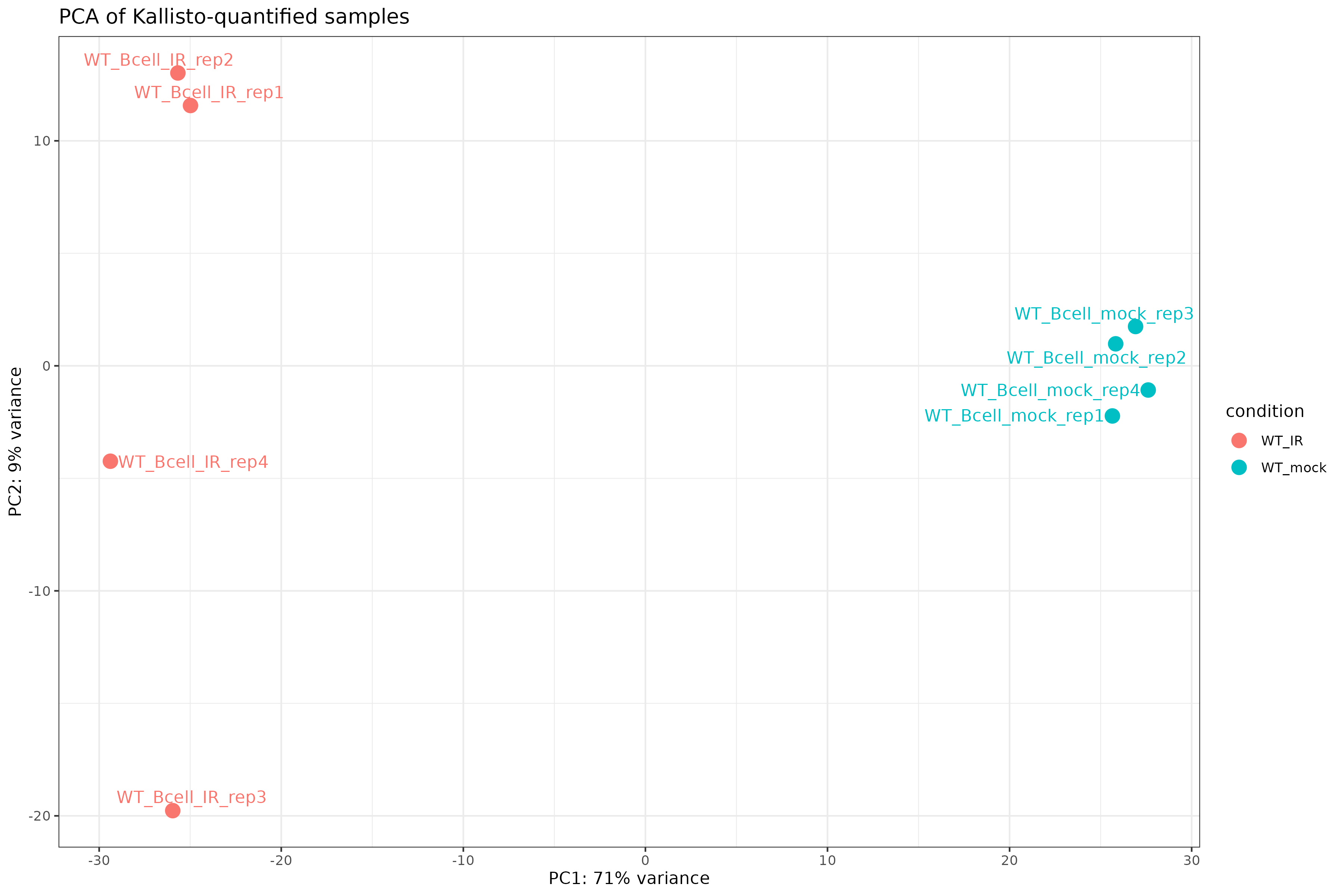
Exercise: Interpret exploratory plots
Using the distance heatmap and PCA plot:
- Do samples cluster by experimental condition?
- Are there any outlier samples that don’t group with their replicates?
- How much variance is explained by PC1? What might this represent biologically?
Interpretation for this dataset:
- Yes. The heatmap and the PCA both separate the mock and IR samples.
- No. Each sample groups with its own condition. Within the IR group, IR_rep3 and IR_rep4 sit apart from IR_rep1 and IR_rep2 on PC2 (3 percent of the variance), the same read-quality pattern seen in Episode 5A.
- PC1 explains 90 percent of the variance and separates IR from mock: the radiation response is by far the largest signal in the data.
Step 4: Differential expression analysis
Run the full DESeq2 pipeline:
R
dds <- DESeq(dds)
using pre-existing normalization factors
estimating dispersions
gene-wise dispersion estimates
mean-dispersion relationship
final dispersion estimates
fitting model and testing
“Using pre-existing normalization factors” refers to the
gene-specific factors that estimateSizeFactors() computed
above from the tximport transcript lengths.
Inspect dispersion estimates:
R
plotDispEsts(dds)
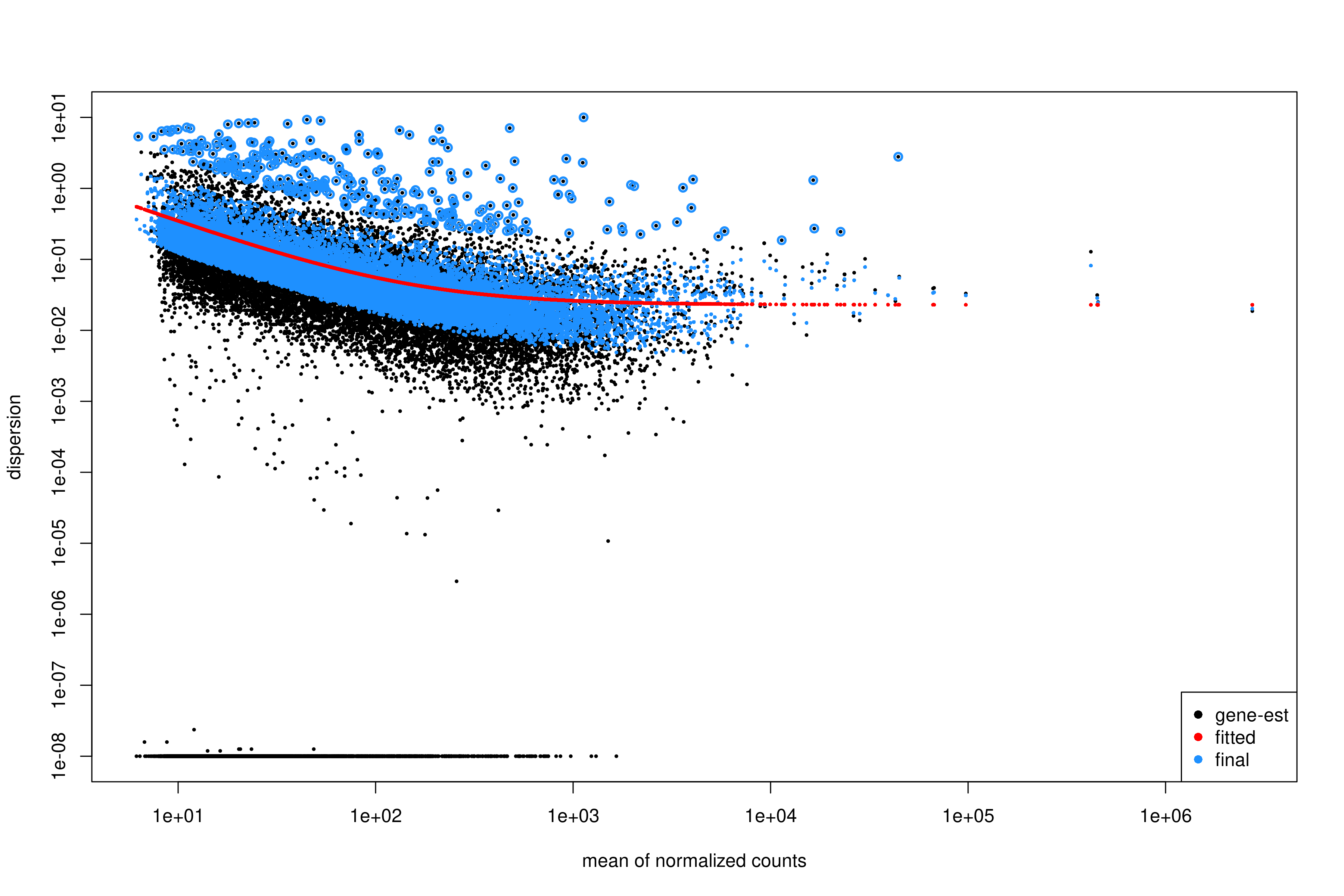
Interpreting the dispersion plot
- Black dots: Gene-wise dispersion estimates.
- Red line: Fitted trend (shrinkage target).
- Blue dots: Final shrunken estimates.
A good fit shows the red line passing through the center of the black cloud, with blue dots closer to the line than the original black dots.
Extract results for the contrast of interest, naming the numerator
(WT_IR) and denominator (WT_mock) explicitly
so that positive log2 fold changes mean higher after IR (see “Name your
contrast” in Episode 5A):
R
res <- results(
    dds,
    contrast = c("condition", "WT_IR", "WT_mock")
)

summary(res)
out of 12768 with nonzero total read count
adjusted p-value < 0.1
LFC > 0 (up)       : 2942, 23%
LFC < 0 (down)     : 2858, 22%
outliers [1]       : 3, 0.023%
low counts [2]     : 0, 0%
(mean count < 7)
[1] see 'cooksCutoff' argument of ?results
[2] see 'independentFiltering' argument of ?results
Order results by adjusted p-value:
R
res_ordered <- res[order(res$padj), ]
head(res_ordered)
Output:
log2 fold change (MLE): condition WT_IR vs WT_mock
Wald test p-value: condition WT IR vs WT mock
DataFrame with 6 rows and 6 columns
                       baseMean log2FoldChange     lfcSE      stat       pvalue
                      <numeric>      <numeric> <numeric> <numeric>    <numeric>
ENSMUSG00000021668.16   969.739        3.93425  0.139284   28.2462 1.58373e-175
ENSMUSG00000030609.19  1614.126        3.93126  0.139829   28.1148 6.45948e-174
ENSMUSG00000021701.9   1025.821        6.35432  0.228657   27.7897 5.77184e-170
ENSMUSG00000020184.16  1787.889        2.94186  0.106658   27.5823 1.81422e-167
ENSMUSG00000048458.9    791.676        5.69856  0.212540   26.8118 2.35666e-158
ENSMUSG00000002083.14   464.032        5.73884  0.217511   26.3842 2.08072e-153
                              padj
                         <numeric>
ENSMUSG00000021668.16 2.02163e-171
ENSMUSG00000030609.19 4.12276e-170
ENSMUSG00000021701.9  2.45592e-166
ENSMUSG00000020184.16 5.78964e-164
ENSMUSG00000048458.9  6.01656e-155
ENSMUSG00000002083.14 4.42674e-150
Apply log fold change shrinkage
LFC shrinkage improves estimates for genes with low counts or high dispersion.
First, check the available coefficients:
R
resultsNames(dds)
[1] "Intercept" "condition_WT_IR_vs_WT_mock"Apply shrinkage using apeglm (recommended for standard
contrasts):
R
res_shrunk <- lfcShrink(
    dds,
    coef = "condition_WT_IR_vs_WT_mock",
    type = "apeglm"
)
Why shrink log fold changes?
Genes with low counts can have unreliably large fold changes. Shrinkage:
- Reduces noise in LFC estimates.
- Improves ranking for downstream analyses (e.g., GSEA).
- Does not affect p-values or significance calls.
Choosing a shrinkage method
-
apeglm(recommended): Fast, well-calibrated, uses coefficient name (coef). -
ashr: Required for complex contrasts that can’t be specified withcoef(e.g., interaction terms). -
normal: Legacy method, generally not recommended.
For simple two-group comparisons like ours, apeglm is
preferred.
Step 5: Summarize and visualize results
Create a summary table:
R
log2fc_cut <- log2(1.5)

res_df <- as.data.frame(res_shrunk)
res_df$ensembl_gene_id_version <- rownames(res_df)

summary_table <- tibble(
    total_genes = nrow(res_df),
    sig = sum(res_df$padj < 0.05, na.rm = TRUE),
    up = sum(res_df$padj < 0.05 & res_df$log2FoldChange > log2fc_cut, na.rm = TRUE),
    down = sum(res_df$padj < 0.05 & res_df$log2FoldChange < -log2fc_cut, na.rm = TRUE)
)

print(summary_table)
output:
# A tibble: 1 × 4
  total_genes   sig    up  down
        <int> <int> <int> <int>
1       12768  5086  1740  1672
We attach the annotation loaded in Step 2 so that results are
interpretable. Join the shrunken DE results (res_df, built
above) with it:
R
res_annot <- res_df %>%
  dplyr::left_join(mart,
                   by = "ensembl_gene_id_version")
Joining the annotation makes the output biologically interpretable. The final table contains:
gene identifiersgene symbolsfunctional descriptionsdifferential expression statistics
This is the format most researchers expect when examining results or importing them into downstream tools.
Define significance labels for plotting:
R
log2fc_cut <- log2(1.5)

res_annot <- res_annot %>%
  dplyr::mutate(
    label = dplyr::coalesce(external_gene_name, ensembl_gene_id_version),
    sig = dplyr::case_when(
      padj <= 0.05 & log2FoldChange >=  log2fc_cut ~ "up",
      padj <= 0.05 & log2FoldChange <= -log2fc_cut ~ "down",
      TRUE ~ "ns"
    )
  )
Volcano plot
R
ggplot(
  res_annot,
  aes(
    x     = log2FoldChange,
    y     = -log10(padj),
    col   = sig,
    label = label
  )
) +
  geom_point(alpha = 0.6) +
  scale_color_manual(values = c(
    "up"   = "firebrick",
    "down" = "dodgerblue3",
    "ns"   = "grey70"
  )) +
  geom_text_repel(
    data = dplyr::filter(res_annot, sig != "ns"),
    max.overlaps       = 12,
    min.segment.length = Inf,
    box.padding        = 0.3,
    seed               = 42,
    show.legend        = FALSE
  ) +
  geom_hline(yintercept = -log10(0.05), linetype = "dashed", color = "grey40") +
  geom_vline(xintercept = c(-log2fc_cut, log2fc_cut), linetype = "dashed", color = "grey40") +
  theme_classic() +
  xlab("log2 fold change") +
  ylab("-log10 adjusted p value") +
  ggtitle("Volcano plot: WT_IR vs WT_mock")
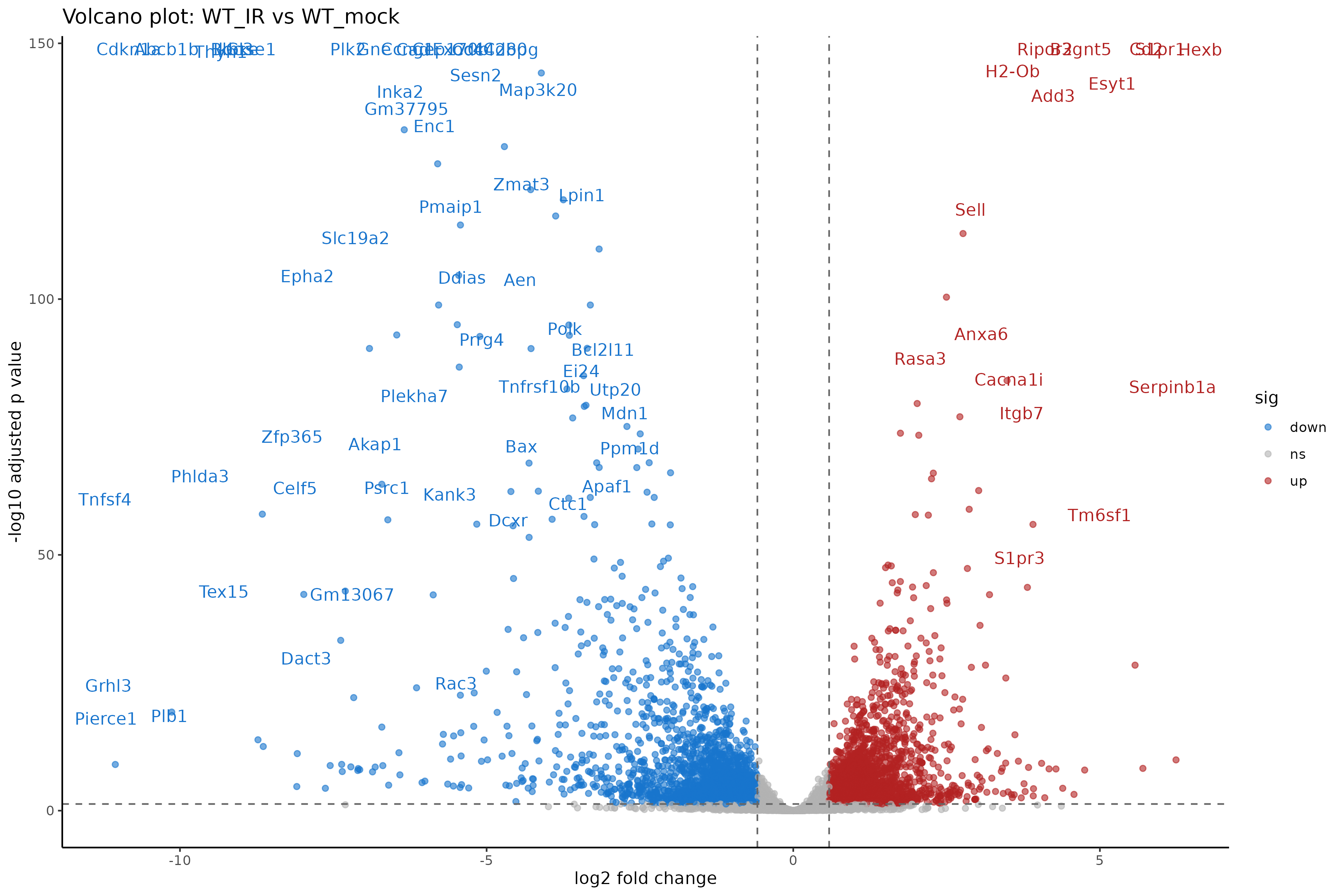
Interpreting the volcano plot
- X-axis: Direction and magnitude of change (positive = higher in WT_IR, i.e., upregulated by radiation).
- Y-axis: Statistical significance (-log10 scale, higher = more significant).
- Colored points: Genes passing both fold change and significance thresholds.
Exercise: Compare with genome-based results
If you also ran Episode 5A (genome-based workflow):
- Are the number of DE genes similar between the two approaches?
- Do the top DE genes overlap?
- Are there systematic differences in fold change estimates?
Observations for this dataset (padj at most 0.05 and fold change at least 1.5):
- Similar: 3,598 significant genes on the genome track and 3,412 on the Kallisto track, 2,795 of them in both.
- Largely: 38 of the 50 genes with the smallest padj are the same on both tracks, and the canonical p53 targets (Cdkn1a, Mdm2, Bax, Bbc3, Pmaip1) are strongly upregulated on both.
- The fold changes agree well (Spearman correlation 0.93 over the 11,289 genes tested on both tracks); the differences come from how each method handles reads shared between genes and isoforms.
Both approaches are valid; consistency between them increases confidence in the results.
Step 6: Save results
Save the full results table:
R
write_tsv(
    res_annot,
    "results/deseq2_kallisto/DESeq2_kallisto_results.tsv"
)
Episode 6 can start from this file instead of the Episode 5A table;
it has the same ensembl_gene_id_version,
log2FoldChange, pvalue, and padj
columns.
Save significant genes only:
R
sig_res <- res_annot %>%
    filter(
        padj <= 0.05,
        abs(log2FoldChange) >= log2fc_cut
    )

write_tsv(
    sig_res,
    "results/deseq2_kallisto/DESeq2_kallisto_sig.tsv"
)
Save the DESeq2 object for downstream analysis:
R
saveRDS(dds, "results/deseq2_kallisto/dds_kallisto.rds")
Genome-based vs. transcript-based: Which to choose?
| Aspect | Genome-based (Ep 5A) | Transcript-based (Ep 5B) |
|---|---|---|
| Input | BAM files | FASTQ files |
| Speed | Slower (alignment + counting) | Faster (pseudo-alignment) |
| Storage | Large (BAM files) | Small (abundance.tsv files) |
| Bias correction | Limited | Sequence + GC bias |
| Novel transcripts | Can detect | Cannot detect |
| Visualization | IGV compatible | No BAM files |
For standard differential expression, both methods produce comparable results. Choose based on your specific needs and available resources.
Summary
- Kallisto output is imported via
tximportand loaded withDESeqDataSetFromTximport(). - The tximport object preserves transcript length information for accurate normalization.
- Exploratory analysis (PCA, distance heatmaps) should precede differential expression testing.
- DESeq2 handles the statistical analysis identically to the genome-based workflow.
- LFC shrinkage improves fold change estimates for low-count genes.
- Results from transcript-based and genome-based workflows should be broadly concordant.
Content from 6. Gene set enrichment analysis
Last updated on 2026-11-10 | Edit this page
Overview
Questions
- What is over-representation analysis and how does it work statistically?
- How do we identify functional pathways and biological themes from DE genes?
- How do we run enrichment analysis for GO, KEGG, and MSigDB gene sets?
- How do we interpret and compare enrichment results across different databases?
- What are the limitations and best practices for enrichment analysis?
Objectives
- Understand the statistical basis of over-representation analysis (ORA).
- Prepare gene lists and background universes from DESeq2 results.
- Run GO enrichment using clusterProfiler and interpret ontology categories.
- Run KEGG pathway enrichment with organism-specific data.
- Perform MSigDB Hallmark enrichment for curated biological signatures.
- Produce and interpret barplots, dotplots, and enrichment maps.
- Compare results across multiple gene set databases.
Introduction
Differential expression analysis identifies individual genes that change between conditions, but interpreting long gene lists is challenging. Gene set enrichment analysis provides biological context by asking: Are genes with specific functions over-represented among the differentially expressed genes?
This episode covers over-representation analysis (ORA), the most common approach for interpreting DE results.
What you need for this episode
- DE results from Episode 5A
(
results/deseq2/DESeq2_results_joined.tsv) or Episode 5B (results/deseq2_kallisto/DESeq2_kallisto_results.tsv) - RStudio session via Open OnDemand
- Internet access from the RStudio session:
enrichKEGG()queries the KEGG REST service, andmsigdbr()downloads the MSigDB gene sets the first time it runs
Background: Understanding over-representation analysis
What is ORA?
ORA tests whether a predefined gene set contains more DE genes than expected by chance. It answers the question: If I randomly selected the same number of genes from my background, how often would I see this many genes from pathway X?
The statistical test
ORA uses the hypergeometric test (equivalent to Fisher’s exact test), which calculates the probability of observing k or more genes from a pathway given:
- N: Total genes in the background (universe)
- K: Genes in the pathway of interest
- n: Total DE genes in your list
- k: DE genes that are in the pathway
                    Pathway genes    Non-pathway genes
DE genes                 k              n - k
Non-DE genes K - k N - K - n + kThe hypergeometric distribution
The p-value represents the probability of drawing k or more pathway genes when randomly selecting n genes from a population of N genes containing K pathway members:
\[P(X \geq k) = \sum_{i=k}^{\min(K,n)} \frac{\binom{K}{i}\binom{N-K}{n-i}}{\binom{N}{n}}\]
This is a one-tailed test asking if the pathway is over-represented (enriched) in your gene list.
Multiple testing correction
With thousands of gene sets tested, many false positives would occur by chance. We apply false discovery rate (FDR) correction using the Benjamini-Hochberg method:
- Rank all p-values from smallest to largest.
- Calculate adjusted p-value: \(p_{adj} = p \times \frac{n}{rank}\)
- Filter results by adjusted p-value threshold (typically 0.05).
Why the universe matters
The background universe should include all genes that could have been detected as DE in your experiment, typically all genes tested by DESeq2.
Common mistakes: - Using the whole genome (inflates significance). - Using only expressed genes (may miss relevant pathways). - Using a different species’ gene list.
The universe defines what “expected by chance” means. An inappropriate universe leads to misleading results.
Gene set databases
Different databases capture different aspects of biology:
| Database | Description | Best for |
|---|---|---|
| GO BP | Biological Process ontology | Functional processes |
| GO MF | Molecular Function ontology | Protein activities |
| GO CC | Cellular Component ontology | Subcellular localization |
| KEGG | Curated pathways | Metabolic/signaling pathways |
| Reactome | Detailed pathway reactions | Mechanistic understanding |
| MSigDB Hallmark | 50 curated signatures | High-level biological states |
| MSigDB C2 | Curated gene sets | Canonical pathways |
Which database should I use?
There’s no single “best” database. Consider:
- GO: Comprehensive but redundant; many overlapping terms.
- KEGG: Well-curated pathways; limited coverage; requires Entrez IDs.
- Hallmark: Reduced redundancy; easier to interpret; may miss specific pathways.
Best practice: Run multiple databases and look for convergent signals across them.
Step 1: Load DE results and prepare gene lists
Start your RStudio session via Open OnDemand as described in Episode 5A, then load the required packages:
Load packages:
R
library(DESeq2)
library(clusterProfiler)
library(org.Mm.eg.db)
library(msigdbr)
library(enrichplot)
library(dplyr)
library(ggplot2)
library(readr)
# Construct the path dynamically
work_dir <- file.path("/scratch/negishi", Sys.getenv("USER"), "rnaseq-workshop")
setwd(work_dir)
Load DESeq2 results from Episode 5A. If you followed the Kallisto track (Episodes 4B and 5B), read the Episode 5B table instead, using the commented line; everything after this step is the same for both tracks.
R
res <- read_tsv("results/deseq2/DESeq2_results_joined.tsv", show_col_types = FALSE)
# Kallisto track (Episode 5B): use this line instead of the one above
# res <- read_tsv("results/deseq2_kallisto/DESeq2_kallisto_results.tsv", show_col_types = FALSE)
head(res)
Output:
# A tibble: 6 × 20
baseMean log2FoldChange lfcSE pvalue padj ensembl_gene_id_vers…¹
<dbl> <dbl> <dbl> <dbl> <dbl> <chr>
1 259. 0.704 0.123 0.00000000431 2.68e-8 ENSMUSG00000033845.14
2 142. -0.244 0.192 0.177 2.56e-1 ENSMUSG00000025903.15
3 305. 0.218 0.121 0.0652 1.11e-1 ENSMUSG00000033813.16
4 241. -0.224 0.129 0.0741 1.23e-1 ENSMUSG00000033793.13
5 773. -0.230 0.0952 0.0140 2.86e-2 ENSMUSG00000025907.15
6 556. -0.126 0.0892 0.152 2.26e-1 ENSMUSG00000051285.18
# ℹ abbreviated name: ¹ensembl_gene_id_version
# ℹ 14 more variables: WT_Bcell_mock_rep1 <dbl>, WT_Bcell_mock_rep2 <dbl>,
# WT_Bcell_mock_rep3 <dbl>, WT_Bcell_mock_rep4 <dbl>, WT_Bcell_IR_rep1 <dbl>,
# WT_Bcell_IR_rep2 <dbl>, WT_Bcell_IR_rep3 <dbl>, WT_Bcell_IR_rep4 <dbl>,
# ensembl_gene_id <chr>, external_gene_name <chr>, gene_biotype <chr>,
# description <chr>, label <chr>, sig <chr>Define the gene lists:
R
# Universe: all genes tested
universe <- res$ensembl_gene_id_version

# Significant genes: padj < 0.05 and |log2FC| > log2(1.5)
log2fc_cut <- log2(1.5)
sig_genes <- res %>%
    filter(padj < 0.05, abs(log2FoldChange) > log2fc_cut) %>%
    pull(ensembl_gene_id_version)

length(universe)
length(sig_genes)
[1] 11330
[1] 3598Choosing significance thresholds
The threshold for “significant” genes affects enrichment results:
- Stringent (padj < 0.01, |LFC| > 1): Fewer genes, clearer signals, may miss subtle effects.
- Lenient (padj < 0.1, no LFC cutoff): More genes, noisier results, higher sensitivity.
There’s no universally correct threshold. Consider your experimental question and validate key findings.
Convert gene IDs
Most enrichment tools require Entrez IDs. Our data uses Ensembl IDs with version numbers, so we need to convert:
R
# Remove version suffix for mapping
universe_clean <- gsub("\\.\\d+$", "", universe)
sig_clean <- gsub("\\.\\d+$", "", sig_genes)

# Map Ensembl to Entrez
id_map <- bitr(
    universe_clean,
    fromType = "ENSEMBL",
    toType = "ENTREZID",
    OrgDb = org.Mm.eg.db
)

head(id_map)
'select()' returned 1:many mapping between keys and columns
Warning message:
0.29% of input gene IDs are fail to map...
             ENSEMBL ENTREZID
1 ENSMUSG00000033845    27395
2 ENSMUSG00000025903    18777
3 ENSMUSG00000033813    21399
4 ENSMUSG00000033793   108664
5 ENSMUSG00000025907    12421
6 ENSMUSG00000051285 319263Gene ID conversion challenges
Not all genes map successfully:
- Some Ensembl IDs lack Entrez equivalents.
- ID mapping databases may be outdated.
- Multi-mapping (one Ensembl → multiple Entrez) can occur.
bitr() warns how many IDs failed to map (“x% of input
gene IDs are fail to map”) and drops them. It can also return more than
one Entrez ID for an Ensembl ID, so count unique Ensembl IDs, not
rows:
R
n_mapped <- length(unique(id_map$ENSEMBL))
message(sprintf("Mapped %d of %d genes (%.1f%%); %d rows in id_map",
    n_mapped, length(universe_clean),
    100 * n_mapped / length(universe_clean), nrow(id_map)))
Output:
Mapped 11297 of 11330 genes (99.7%); 11358 rows in id_mapCreate final gene lists with Entrez IDs:
R
# Universe with Entrez IDs (unique: one Ensembl ID can map to several Entrez IDs)
universe_entrez <- unique(id_map$ENTREZID)

# Significant genes with Entrez IDs
sig_entrez <- id_map %>%
    filter(ENSEMBL %in% sig_clean) %>%
    pull(ENTREZID) %>%
    unique()

length(sig_entrez)
Output:
[1] 3608Exercise: Prepare up-regulated and down-regulated gene lists
Create separate gene lists for: 1. Up-regulated genes (log2FC > 0 and padj < 0.05) 2. Down-regulated genes (log2FC < 0 and padj < 0.05)
Why might analyzing these separately be informative?
R
# Up-regulated genes
up_genes <- res %>%
    filter(padj < 0.05, log2FoldChange > log2fc_cut) %>%
    pull(ensembl_gene_id_version)
up_clean <- gsub("\\.\\d+$", "", up_genes)
up_entrez <- id_map %>%
    filter(ENSEMBL %in% up_clean) %>%
    pull(ENTREZID) %>%
    unique()

# Down-regulated genes
down_genes <- res %>%
    filter(padj < 0.05, log2FoldChange < -log2fc_cut) %>%
    pull(ensembl_gene_id_version)
down_clean <- gsub("\\.\\d+$", "", down_genes)
down_entrez <- id_map %>%
    filter(ENSEMBL %in% down_clean) %>%
    pull(ENTREZID) %>%
    unique()
Check number of genes:
R
length(up_entrez)
[1] 1800R
length(down_entrez)
[1] 1808Analyzing up and down separately can reveal: - Different biological processes activated vs. suppressed. - Clearer signals when combining masks opposing effects. - Direction-specific pathway involvement.
Step 2: GO enrichment analysis
Run GO Biological Process enrichment
R
ego_bp <- enrichGO(
    gene = sig_entrez,
    universe = universe_entrez,
    OrgDb = org.Mm.eg.db,
    ont = "BP",
    pAdjustMethod = "BH",
    pvalueCutoff = 0.05,
    qvalueCutoff = 0.1,
    readable = TRUE
)

head(ego_bp, 10)
Output (columns truncated for brevity):
                   ID                                    Description GeneRatio
GO:0002683 GO:0002683   negative regulation of immune system process  174/3495
GO:0042100 GO:0042100                           B cell proliferation   44/3495
GO:0032943 GO:0032943                 mononuclear cell proliferation  119/3495
GO:0051250 GO:0051250   negative regulation of lymphocyte activation   65/3495
GO:0046651 GO:0046651                       lymphocyte proliferation  115/3495
GO:0002698 GO:0002698 negative regulation of immune effector process   51/3495
GO:0042254 GO:0042254                            ribosome biogenesis  131/3495
GO:0042113 GO:0042113                              B cell activation  107/3495
GO:0006364 GO:0006364                                rRNA processing   95/3495
GO:0002694 GO:0002694             regulation of leukocyte activation  189/3495
             BgRatio RichFactor FoldEnrichment   zScore       pvalue
GO:0002683 405/10989  0.4296296       1.350844 4.912955 1.024580e-06
GO:0042100  77/10989  0.5714286       1.796689 4.790801 3.662826e-06
GO:0032943 266/10989  0.4473684       1.406618 4.584541 5.342254e-06
GO:0051250 130/10989  0.5000000       1.572103 4.481022 1.098366e-05
GO:0046651 260/10989  0.4423077       1.390707 4.353953 1.449475e-05
GO:0002698  97/10989  0.5257732       1.653139 4.412288 1.650933e-05
GO:0042254 304/10989  0.4309211       1.354905 4.285359 1.836995e-05
GO:0042113 241/10989  0.4439834       1.395975 4.244620 2.337432e-05
GO:0006364 210/10989  0.4523810       1.422379 4.220352 2.698814e-05
GO:0002694 466/10989  0.4055794       1.275225 4.146077 2.898551e-05
              p.adjust      qvalue
GO:0002683 0.005355478 0.005053874
GO:0042100 0.009307986 0.008783790
GO:0032943 0.009307986 0.008783790
GO:0051250 0.013011580 0.012278808
GO:0046651 0.013011580 0.012278808
GO:0002698 0.013011580 0.012278808
GO:0042254 0.013011580 0.012278808
GO:0042113 0.013011580 0.012278808
GO:0006364 0.013011580 0.012278808
GO:0002694 0.013011580 0.012278808
           Count
GO:0002683   174
GO:0042100    44
GO:0032943   119
GO:0051250    65
GO:0046651   115
GO:0002698    51
GO:0042254   131
GO:0042113   107
GO:0006364    95
GO:0002694 189Understanding enrichGO output
Key columns in the results:
- ID: GO term identifier (e.g., GO:0006915)
- Description: Human-readable term name
- GeneRatio: DE genes in term / total DE genes with annotation
- BgRatio: Term genes in universe / total annotated genes in universe
- pvalue: Raw hypergeometric p-value
- p.adjust: BH-corrected p-value
- qvalue: Alternative FDR estimate
- geneID: List of DE genes in this term
- Count: Number of DE genes in this term
Visualize GO results
Dotplot showing top enriched terms:
R
dotplot(ego_bp, showCategory = 20) +
    ggtitle("GO Biological Process enrichment")
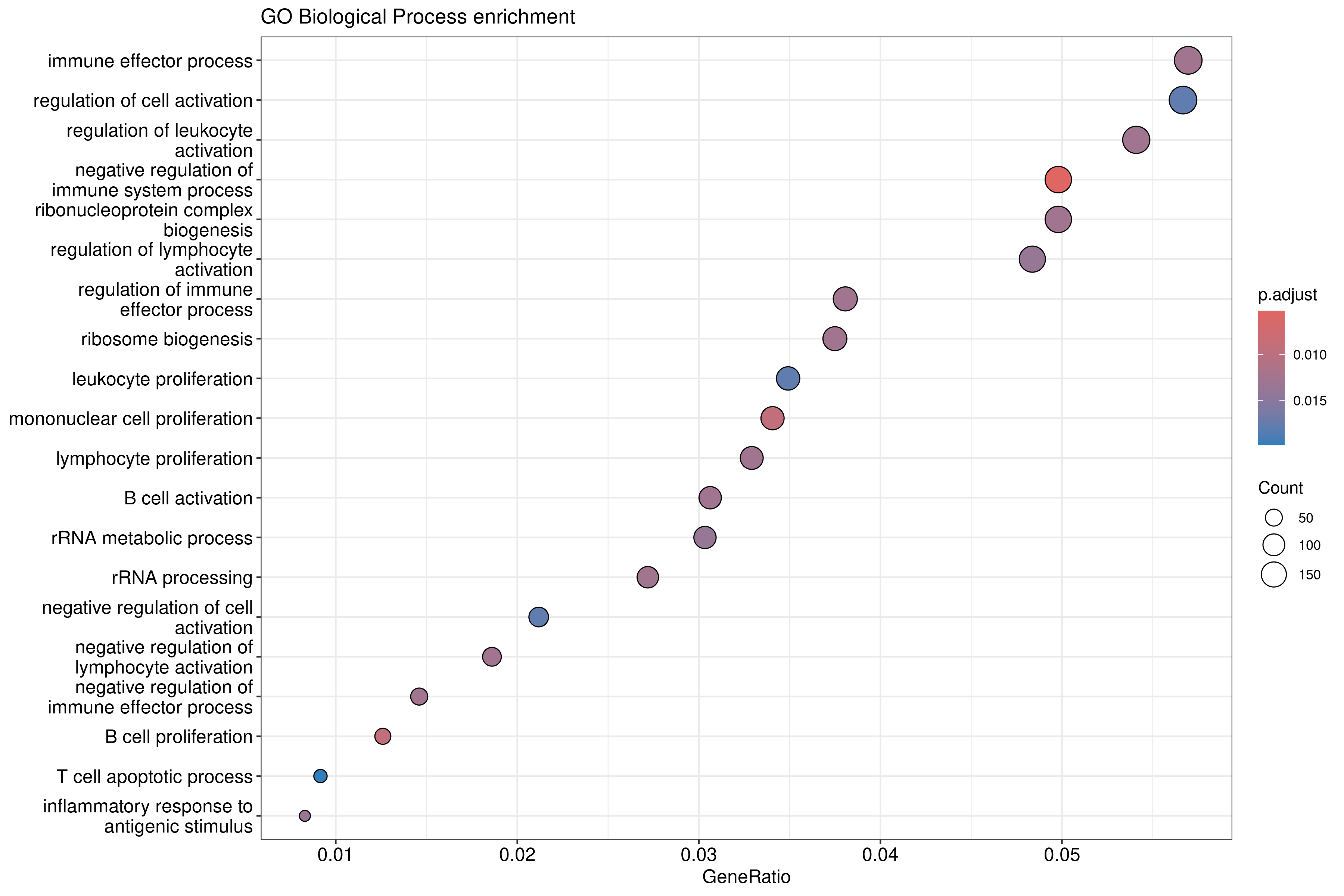
The dotplot shows: - X-axis: Gene ratio (proportion of DE genes in the term) - Y-axis: GO term description - Color: Adjusted p-value - Size: Number of genes
Barplot alternative:
R
barplot(ego_bp, showCategory = 15) +
    ggtitle("GO BP enrichment - Top 15 terms")
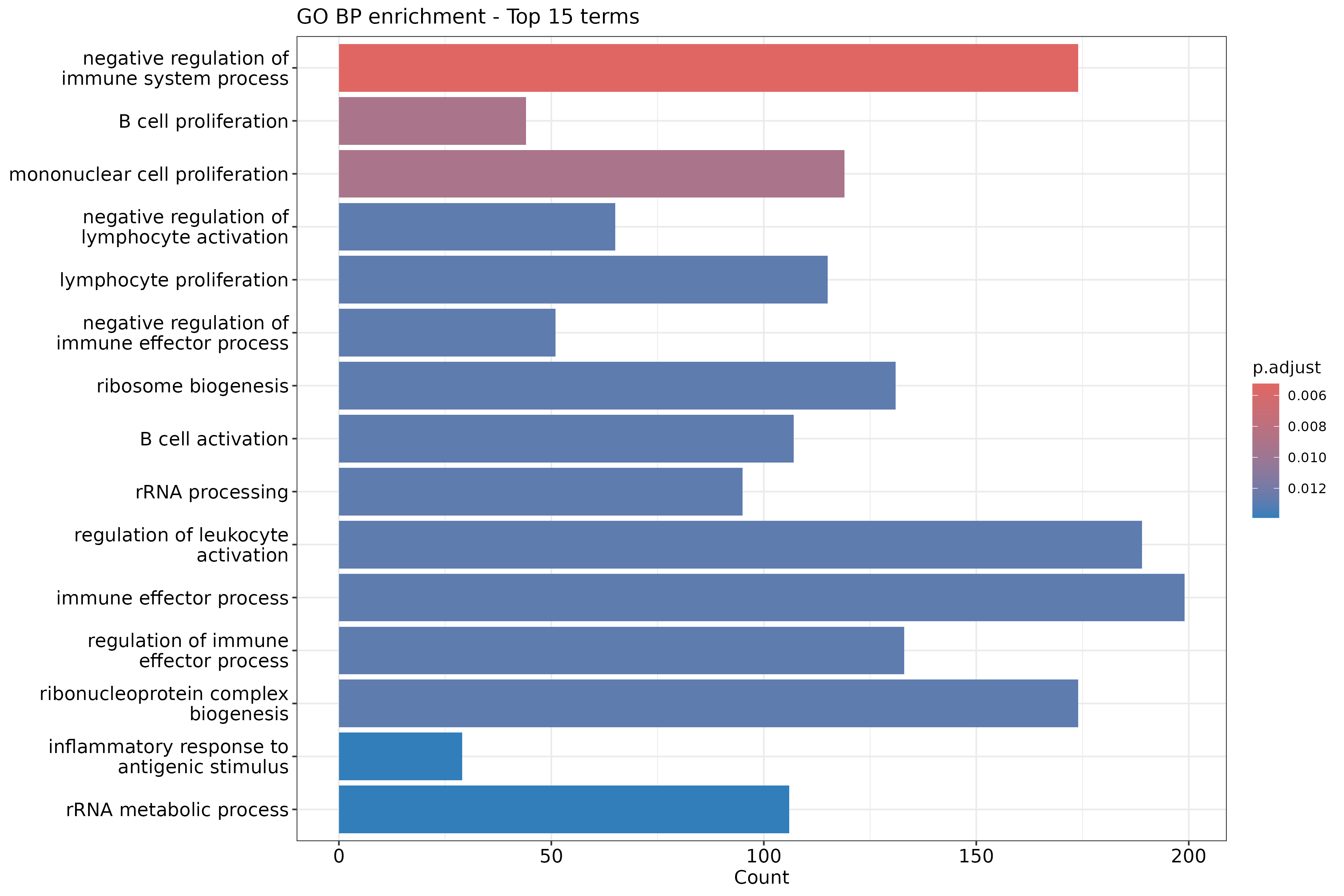
Reduce GO redundancy
GO terms are hierarchical and often redundant. Use
simplify() to remove similar terms:
R
ego_bp_simple <- simplify(
    ego_bp,
    cutoff = 0.7,
    by = "p.adjust",
    select_fun = min
)

dotplot(ego_bp_simple, showCategory = 15) +
    ggtitle("GO BP enrichment (simplified)")
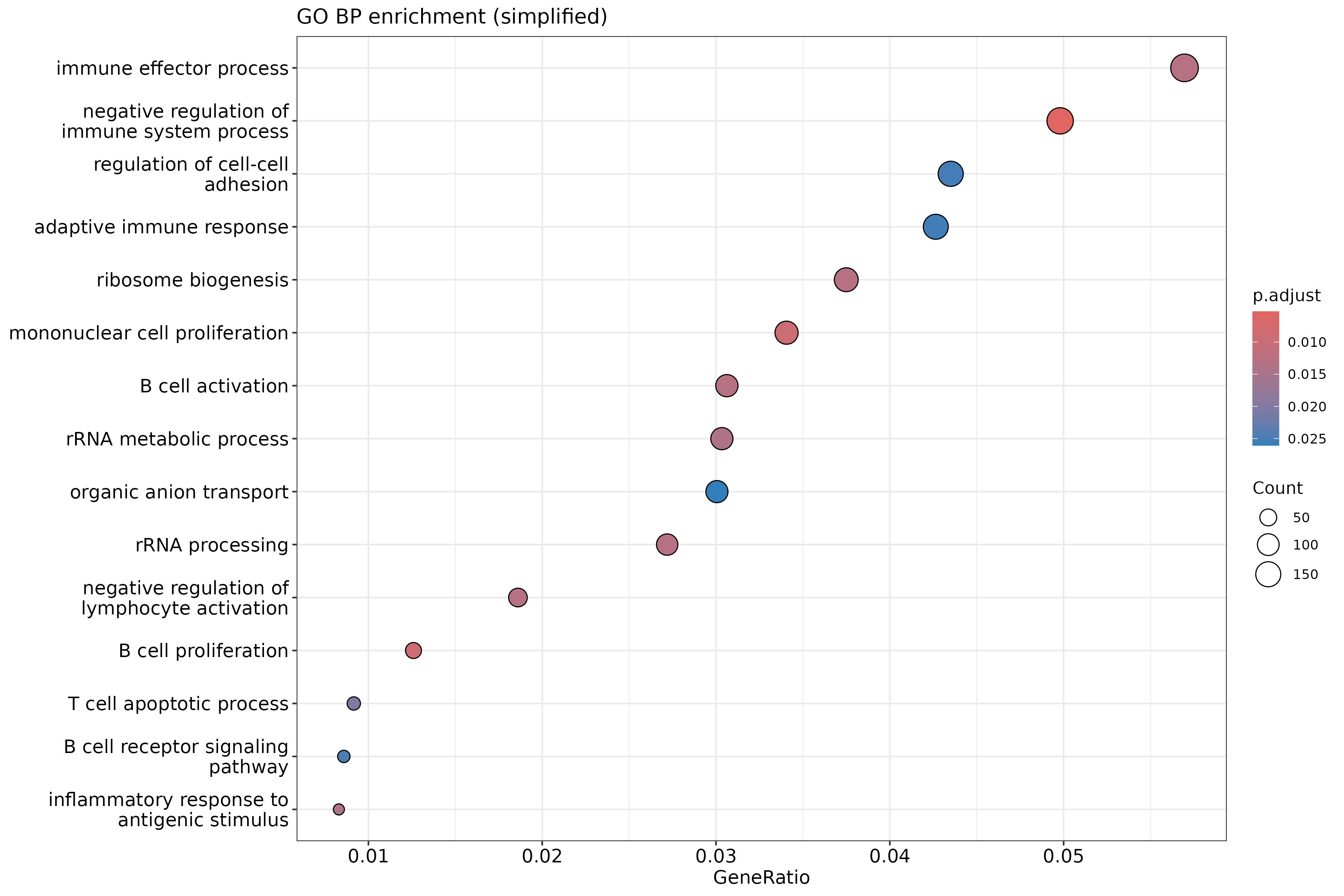
The same simplified result as a barplot:
R
barplot(ego_bp_simple, showCategory = 15) +
    ggtitle("GO BP enrichment (simplified) - Top 15 terms")
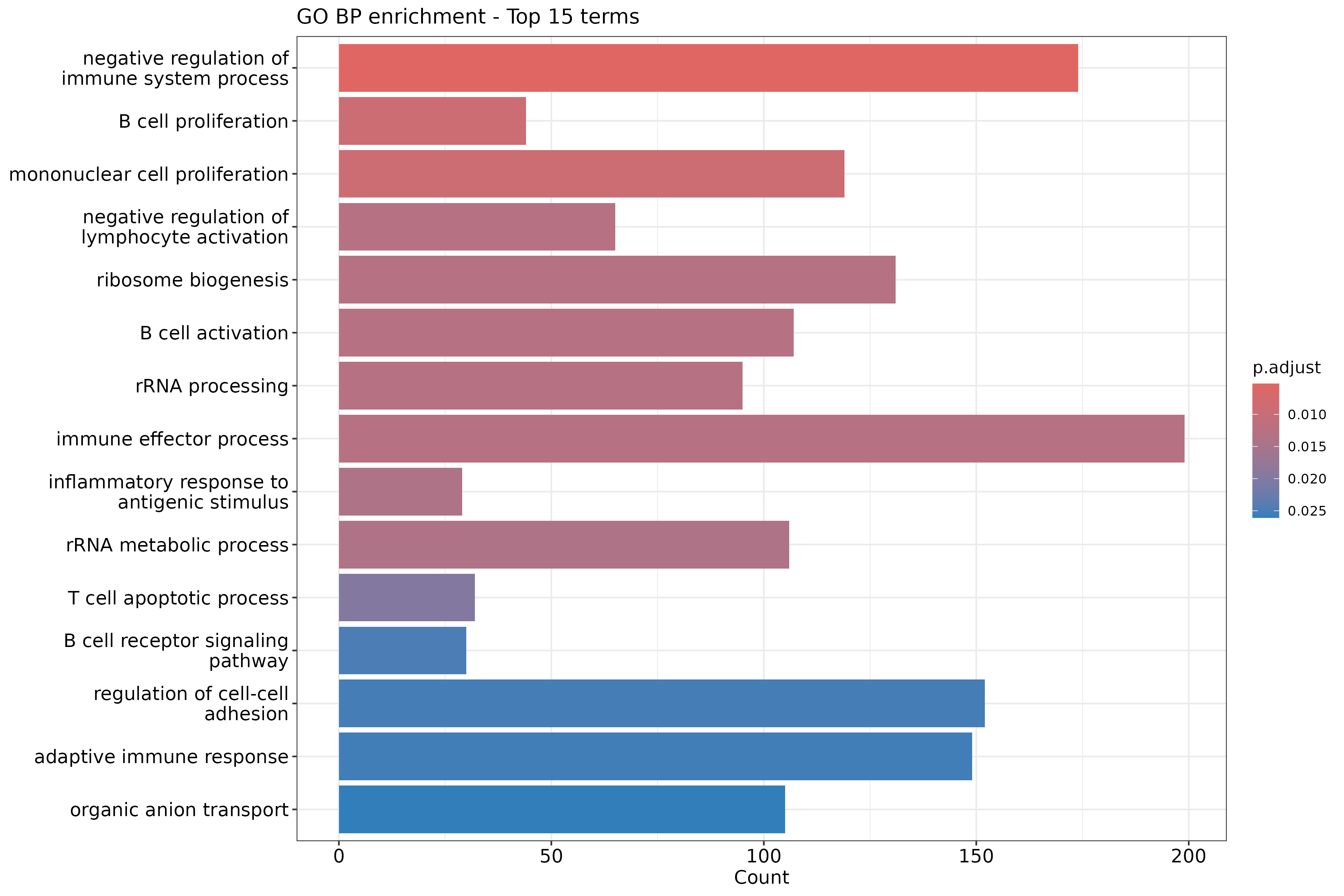
Why simplify GO results?
The GO hierarchy means related terms often appear together: - “regulation of cell death” and “positive regulation of cell death” - “response to stimulus” and “response to external stimulus”
simplify() removes redundant terms based on semantic
similarity, making results easier to interpret. The cutoff
parameter (0-1) controls how aggressively terms are merged.
Enrichment map visualization
For many significant terms, an enrichment map shows relationships:
R
ego_bp_em <- pairwise_termsim(ego_bp_simple)
emapplot(ego_bp_em, showCategory = 30) +
    ggtitle("GO BP enrichment map")
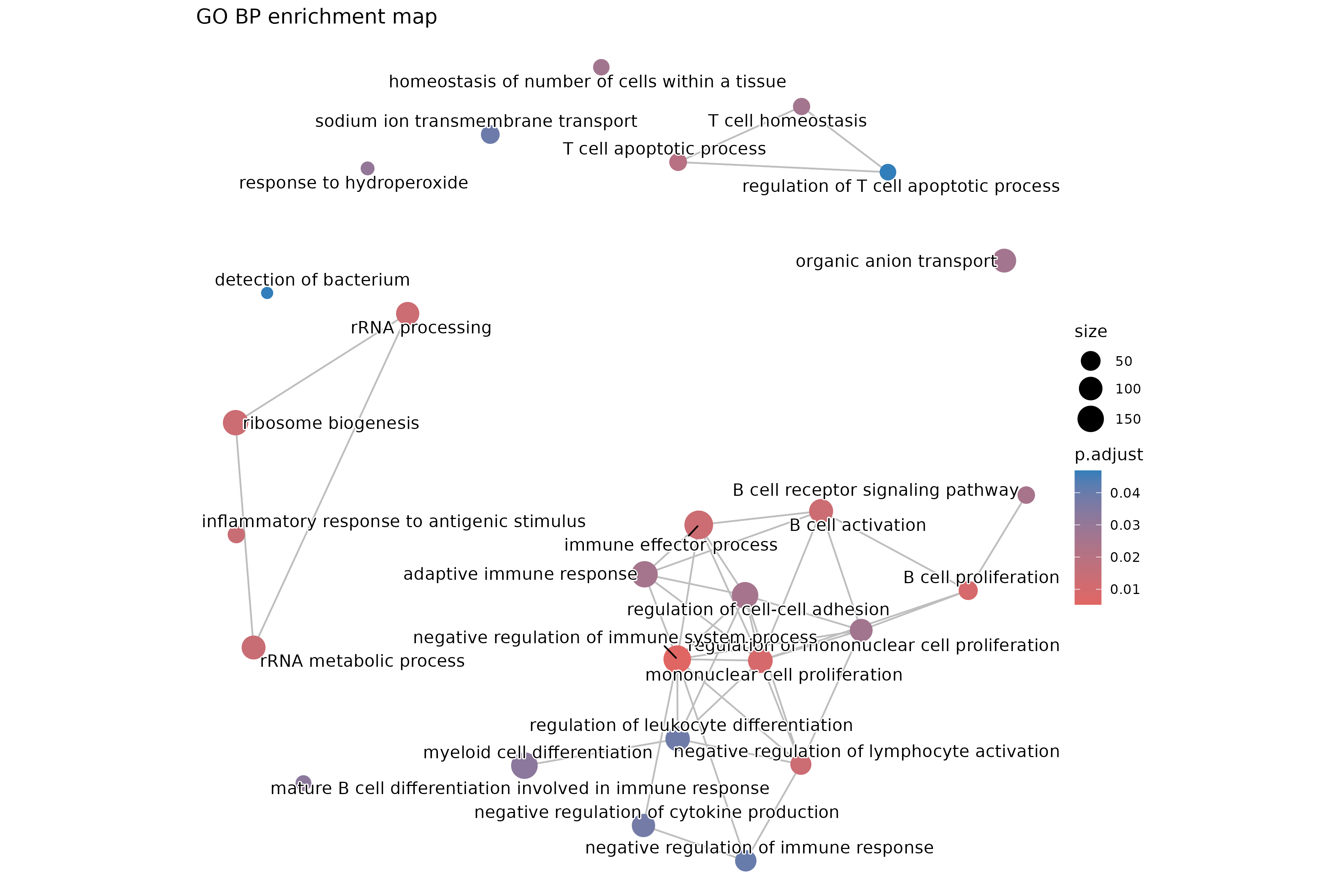
The enrichment map clusters similar terms together, revealing functional themes.
Exercise: Compare GO ontologies
Run enrichment for GO Molecular Function (MF) and Cellular Component (CC):
R
ego_mf <- enrichGO(gene = sig_entrez, universe = universe_entrez,
                   OrgDb = org.Mm.eg.db, ont = "MF", readable = TRUE)
ego_cc <- enrichGO(gene = sig_entrez, universe = universe_entrez,
                   OrgDb = org.Mm.eg.db, ont = "CC", readable = TRUE)
- How do the top terms differ between BP, MF, and CC?
- Are there consistent themes across ontologies?
- Which ontology provides the most interpretable results for your experiment?
Example interpretation:
- BP terms describe processes (e.g., “cell cycle”, “RNA processing”).
- MF terms describe molecular activities (e.g., “RNA binding”, “kinase activity”).
- CC terms describe locations (e.g., “nucleus”, “mitochondrion”).
Consistent themes across ontologies strengthen biological interpretation. For example, if BP shows “translation” enrichment, MF might show “ribosome binding”, and CC might show “ribosome” or “cytoplasm”.
Step 3: KEGG pathway enrichment
KEGG provides curated pathway maps connecting genes to biological systems.
R
ekegg <- enrichKEGG(
    gene = sig_entrez,
    universe = universe_entrez,
    organism = "mmu",  # Mouse
    pAdjustMethod = "BH",
    pvalueCutoff = 0.05
)

head(ekegg)
Output (geneID column not shown for brevity):
Reading KEGG annotation online: "https://rest.kegg.jp/link/mmu/pathway"...
Reading KEGG annotation online: "https://rest.kegg.jp/list/pathway/mmu"...
                                     category
mmu04115                   Cellular Processes
mmu05322                       Human Diseases
mmu04977                   Organismal Systems
mmu04514 Environmental Information Processing
mmu05150                       Human Diseases
mmu04981                                 <NA>
                                 subcategory       ID
mmu04115               Cell growth and death mmu04115
mmu05322                      Immune disease mmu05322
mmu04977                    Digestive system mmu04977
mmu04514 Signaling molecules and interaction mmu04514
mmu05150       Infectious disease: bacterial mmu05150
mmu04981                                <NA> mmu04981
                                      Description GeneRatio BgRatio RichFactor
mmu04115                    p53 signaling pathway   41/1705 64/5322  0.6406250
mmu05322             Systemic lupus erythematosus   46/1705 87/5322  0.5287356
mmu04977         Vitamin digestion and absorption   12/1705 15/5322  0.8000000
mmu04514 Cell adhesion molecule (CAM) interaction   43/1705 85/5322  0.5058824
mmu05150          Staphylococcus aureus infection   19/1705 30/5322  0.6333333
mmu04981          Folate transport and metabolism   13/1705 18/5322  0.7222222
         FoldEnrichment   zScore       pvalue     p.adjust       qvalue
mmu04115       1.999652 5.523483 1.225915e-07 4.094557e-05 3.935833e-05
mmu05322       1.650399 4.199195 3.991355e-05 6.665562e-03 6.407175e-03
mmu04977       2.497126 3.986245 1.825880e-04 2.032813e-02 1.954012e-02
mmu04514       1.579065 3.694708 2.631397e-04 2.197216e-02 2.112042e-02
mmu05150       1.976891 3.683678 4.054504e-04 2.708409e-02 2.603418e-02
mmu04981       2.254350 3.659635 5.427993e-04 3.021583e-02 2.904452e-02
         Count
mmu04115    41
mmu05322    46
mmu04977    12
mmu04514    43
mmu05150    19
mmu04981 13KEGG organism codes
Common organism codes: - "hsa": Human -
"mmu": Mouse - "rno": Rat -
"dme": Drosophila - "sce": Yeast -
"ath": Arabidopsis
Find your organism:
search_kegg_organism("species name")
Visualize KEGG results:
R
barplot(ekegg, showCategory = 15) +
    ggtitle("KEGG pathway enrichment")
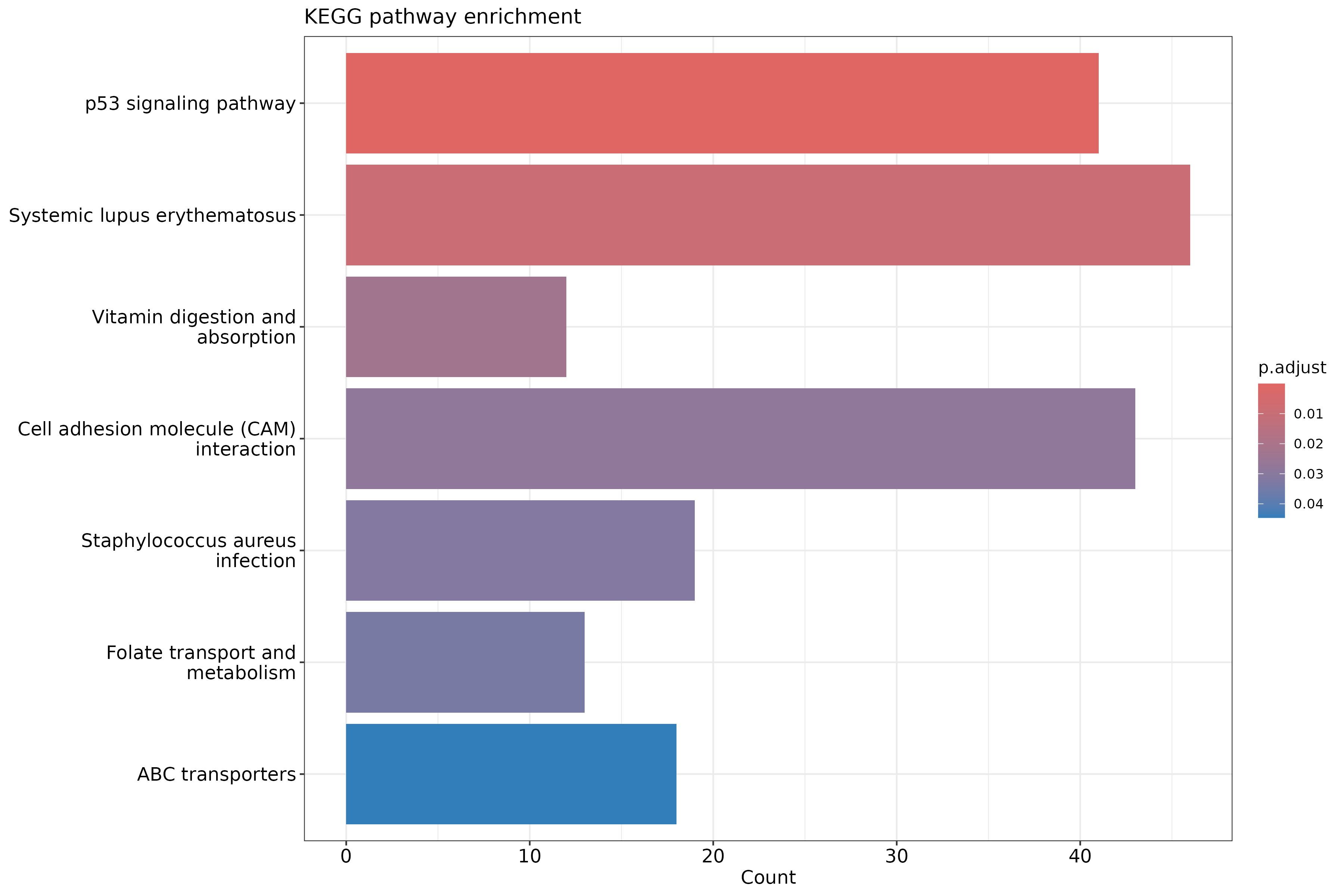
Warnings from the plotting functions
enrichplot’s barplot(), dotplot(),
emapplot(), and gseaplot2() may print warnings
such as `aes_string()` was deprecated in ggplot2 3.0.0,
Using `size` aesthetic for lines was deprecated, or
Arguments in ... must be used. Problematic argument: by = x.
They come from the package internals and the installed ggplot2 version,
not from your code, and the plots are correct.
KEGG limitations
Be aware of KEGG-specific issues:
- ID coverage: KEGG uses its own gene IDs; some Entrez IDs may not map.
- Update frequency: KEGG pathways are updated periodically; results may vary.
- License: KEGG has usage restrictions for commercial applications.
- Incomplete mapping: Some genes lack pathway assignments.
Check dropped genes:
R
message(sprintf("KEGG analysis used %d of %d input genes",
    length(ekegg@gene), length(sig_entrez)))
Output:
KEGG analysis used 3608 of 3608 input genesStep 4: MSigDB Hallmark enrichment
MSigDB Hallmark gene sets are 50 curated signatures representing well-defined biological states and processes.
Load Hallmark gene sets
R
hallmark <- msigdbr(species = "Mus musculus", collection = "H")
head(hallmark)
Output:
Using human MSigDB with ortholog mapping to mouse. Use `db_species = "MM"` for mouse-native gene sets.
This message is displayed once per session.
Downloading gene sets (first use only, may take a few minutes)...
# A tibble: 6 × 23
  gene_symbol ncbi_gene ensembl_gene db_gene_symbol db_ncbi_gene db_ensembl_gene
  <chr>       <chr>     <chr>        <chr>          <chr>        <chr>
1 Abca1       11303     ENSMUSG0000… ABCA1          19           ENSG00000165029
2 Abcb8       74610     ENSMUSG0000… ABCB8          11194        ENSG00000197150
3 Acaa2       52538     ENSMUSG0000… ACAA2          10449        ENSG00000167315
4 Acadl       11363     ENSMUSG0000… ACADL          33           ENSG00000115361
5 Acadm       11364     ENSMUSG0000… ACADM          34           ENSG00000117054
6 Acads       11409     ENSMUSG0000… ACADS          35           ENSG00000122971
# ℹ 17 more variables: source_gene <chr>, gs_id <chr>, gs_name <chr>,
#   gs_collection <chr>, gs_subcollection <chr>, gs_collection_name <chr>,
#   gs_description <chr>, gs_source_species <chr>, gs_pmid <chr>,
#   gs_geoid <chr>, gs_exact_source <chr>, gs_url <chr>, db_version <chr>,
#   db_target_species <chr>, ortholog_taxon_id <int>, ortholog_sources <chr>,
# num_ortholog_sources <dbl>About the msigdbr download
MSigDB gene sets are curated for human. For mouse, msigdbr maps each
human gene to its mouse ortholog, which is why the table has both mouse
columns (gene_symbol, ncbi_gene) and human
db_* columns. Recent msigdbr releases (version 10 and
later) download the MSigDB data the first time you call
msigdbr() and cache it under
~/.cache/R/msigdbr. If you see a warning like
cannot rename file ... reason 'Invalid cross-device link',
the cache could not be saved because the temporary directory and your
home directory are on different file systems; the gene sets still load,
but the next session downloads them again. Older tutorials use
category = "H" and the entrez_gene column;
current msigdbr uses collection = "H" and
ncbi_gene.
Prepare gene set list:
R
hallmark_list <- hallmark %>%
    dplyr::select(gs_name, ncbi_gene) %>%
    dplyr::rename(term = gs_name, gene = ncbi_gene)
Run Hallmark enrichment
R
ehall <- enricher(
    gene = sig_entrez,
    universe = universe_entrez,
    TERM2GENE = hallmark_list,
    pAdjustMethod = "BH",
    pvalueCutoff = 0.05
)

head(ehall)
Output (columns truncated for brevity):
                                             ID             Description
HALLMARK_MYC_TARGETS_V2 HALLMARK_MYC_TARGETS_V2 HALLMARK_MYC_TARGETS_V2
HALLMARK_P53_PATHWAY       HALLMARK_P53_PATHWAY    HALLMARK_P53_PATHWAY
                        GeneRatio  BgRatio RichFactor FoldEnrichment   zScore
HALLMARK_MYC_TARGETS_V2   40/1135  57/3216  0.7017544       1.988407 5.559694
HALLMARK_P53_PATHWAY      87/1135 164/3216  0.5304878       1.503127 4.883817
                              pvalue     p.adjust       qvalue
HALLMARK_MYC_TARGETS_V2 6.761005e-08 3.380503e-06 2.917908e-06
HALLMARK_P53_PATHWAY    1.349008e-06 3.372520e-05 2.911017e-05
                        Count
HALLMARK_MYC_TARGETS_V2    40
HALLMARK_P53_PATHWAY       87
Visualize:
R
dotplot(ehall, showCategory = 20) +
    ggtitle("MSigDB Hallmark enrichment")
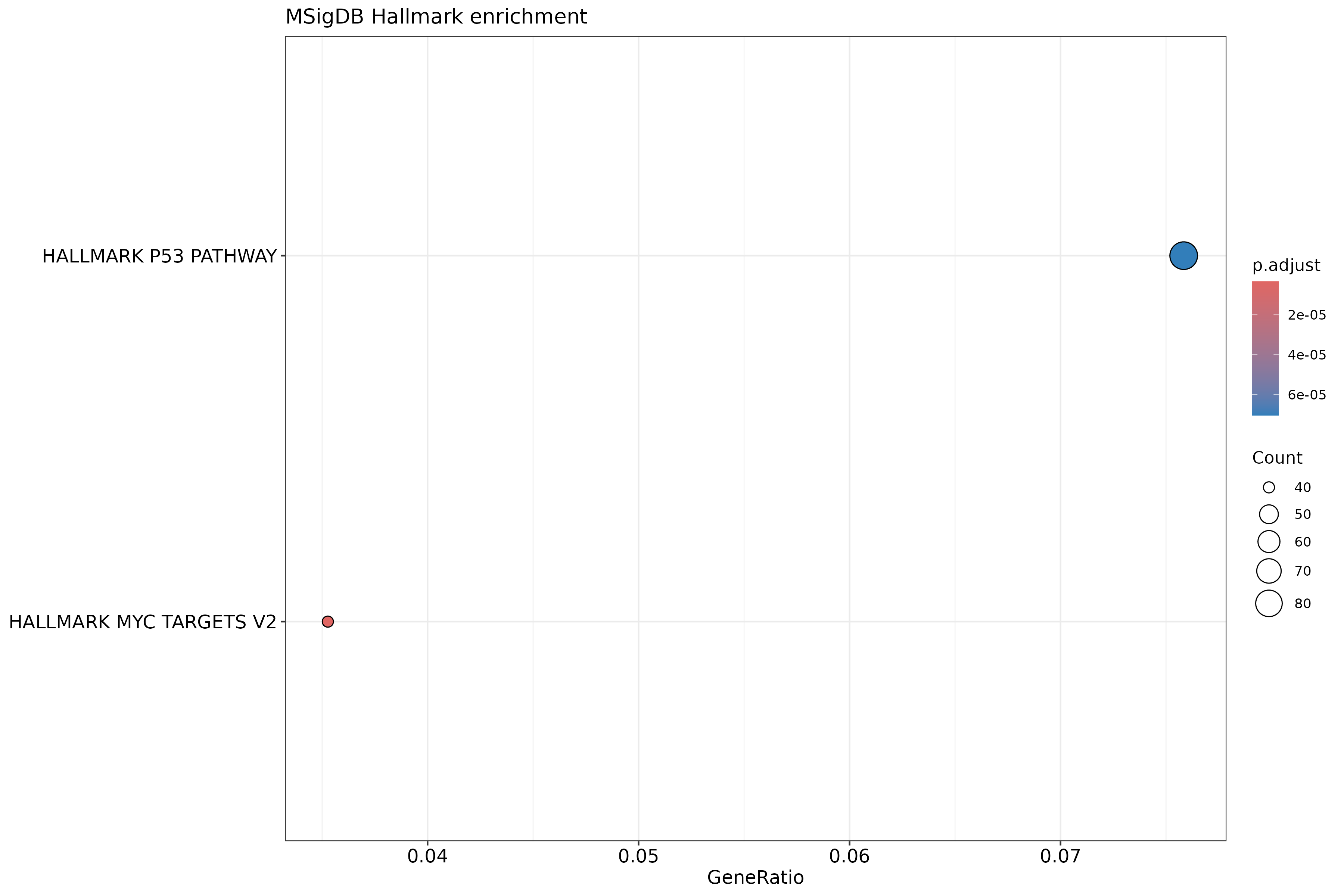
Why use Hallmark gene sets?
Advantages of Hallmark over GO/KEGG:
- Reduced redundancy: Each signature is distinct and non-overlapping.
- Expert curation: Refined from multiple sources to represent coherent biology.
- Interpretability: 50 sets is manageable for detailed examination.
- Reproducibility: Well-documented and stable definitions.
Common Hallmark sets include: - HALLMARK_INFLAMMATORY_RESPONSE - HALLMARK_P53_PATHWAY - HALLMARK_OXIDATIVE_PHOSPHORYLATION - HALLMARK_MYC_TARGETS_V1
Step 5: Compare results across databases
Create a summary of top enriched terms from each database:
R
# Extract top 10 from each
top_go <- head(ego_bp_simple@result, 10) %>%
    mutate(Database = "GO BP") %>%
    dplyr::select(Database, Description, p.adjust, Count)

top_kegg <- head(ekegg@result, 10) %>%
    mutate(Database = "KEGG") %>%
    dplyr::select(Database, Description, p.adjust, Count)

top_hall <- head(ehall@result, 10) %>%
    mutate(Database = "Hallmark") %>%
    dplyr::select(Database, ID, p.adjust, Count) %>%
    dplyr::rename(Description = ID)

# Combine
comparison <- bind_rows(top_go, top_kegg, top_hall)
comparison
Output:
                                 Database
GO:0002683                          GO BP
GO:0042100                          GO BP
GO:0032943                          GO BP
GO:0051250                          GO BP
GO:0042254                          GO BP
GO:0042113                          GO BP
GO:0006364                          GO BP
GO:0002252                          GO BP
GO:0002437                          GO BP
GO:0016072                          GO BP
mmu04115                             KEGG
mmu05322                             KEGG
mmu04977                             KEGG
mmu04514                             KEGG
mmu05150                             KEGG
mmu04981                             KEGG
mmu02010                             KEGG
mmu03008                             KEGG
mmu05202                             KEGG
mmu04068                             KEGG
HALLMARK_MYC_TARGETS_V2          Hallmark
HALLMARK_P53_PATHWAY             Hallmark
HALLMARK_XENOBIOTIC_METABOLISM   Hallmark
HALLMARK_HEME_METABOLISM         Hallmark
HALLMARK_IL2_STAT5_SIGNALING     Hallmark
HALLMARK_ALLOGRAFT_REJECTION     Hallmark
HALLMARK_MYC_TARGETS_V1          Hallmark
HALLMARK_TNFA_SIGNALING_VIA_NFKB Hallmark
HALLMARK_ESTROGEN_RESPONSE_EARLY Hallmark
HALLMARK_APOPTOSIS               Hallmark
                                                                  Description
GO:0002683                       negative regulation of immune system process
GO:0042100                                               B cell proliferation
GO:0032943                                     mononuclear cell proliferation
GO:0051250                       negative regulation of lymphocyte activation
GO:0042254                                                ribosome biogenesis
GO:0042113                                                  B cell activation
GO:0006364                                                    rRNA processing
GO:0002252                                            immune effector process
GO:0002437                        inflammatory response to antigenic stimulus
GO:0016072                                             rRNA metabolic process
mmu04115                                                p53 signaling pathway
mmu05322                                         Systemic lupus erythematosus
mmu04977                                     Vitamin digestion and absorption
mmu04514                             Cell adhesion molecule (CAM) interaction
mmu05150                                      Staphylococcus aureus infection
mmu04981                                      Folate transport and metabolism
mmu02010                                                     ABC transporters
mmu03008                                    Ribosome biogenesis in eukaryotes
mmu05202                              Transcriptional misregulation in cancer
mmu04068                                               FoxO signaling pathway
HALLMARK_MYC_TARGETS_V2                               HALLMARK_MYC_TARGETS_V2
HALLMARK_P53_PATHWAY                                     HALLMARK_P53_PATHWAY
HALLMARK_XENOBIOTIC_METABOLISM                 HALLMARK_XENOBIOTIC_METABOLISM
HALLMARK_HEME_METABOLISM                             HALLMARK_HEME_METABOLISM
HALLMARK_IL2_STAT5_SIGNALING                     HALLMARK_IL2_STAT5_SIGNALING
HALLMARK_ALLOGRAFT_REJECTION                     HALLMARK_ALLOGRAFT_REJECTION
HALLMARK_MYC_TARGETS_V1                               HALLMARK_MYC_TARGETS_V1
HALLMARK_TNFA_SIGNALING_VIA_NFKB             HALLMARK_TNFA_SIGNALING_VIA_NFKB
HALLMARK_ESTROGEN_RESPONSE_EARLY             HALLMARK_ESTROGEN_RESPONSE_EARLY
HALLMARK_APOPTOSIS                                         HALLMARK_APOPTOSIS
                                     p.adjust Count
GO:0002683                       5.355478e-03   174
GO:0042100                       9.307986e-03    44
GO:0032943                       9.307986e-03   119
GO:0051250                       1.301158e-02    65
GO:0042254                       1.301158e-02   131
GO:0042113                       1.301158e-02   107
GO:0006364                       1.301158e-02    95
GO:0002252                       1.301158e-02   199
GO:0002437                       1.414184e-02    29
GO:0016072                       1.414184e-02   106
mmu04115                         4.094557e-05    41
mmu05322                         6.665562e-03    46
mmu04977                         2.032813e-02    12
mmu04514                         2.197216e-02    43
mmu05150                         2.708409e-02    19
mmu04981                         3.021583e-02    13
mmu02010                         3.907863e-02    18
mmu03008                         6.905345e-02    35
mmu05202                         6.905345e-02    60
mmu04068                         9.044789e-02    48
HALLMARK_MYC_TARGETS_V2          3.380503e-06    40
HALLMARK_P53_PATHWAY             3.372520e-05    87
HALLMARK_XENOBIOTIC_METABOLISM   1.059555e-01    57
HALLMARK_HEME_METABOLISM         1.059555e-01    72
HALLMARK_IL2_STAT5_SIGNALING     1.645802e-01    69
HALLMARK_ALLOGRAFT_REJECTION     1.645802e-01    70
HALLMARK_MYC_TARGETS_V1          1.797650e-01    84
HALLMARK_TNFA_SIGNALING_VIA_NFKB 2.056196e-01    67
HALLMARK_ESTROGEN_RESPONSE_EARLY 2.056196e-01    56
HALLMARK_APOPTOSIS 2.567067e-01 54Exercise: Identify convergent themes
Looking at your GO, KEGG, and Hallmark results:
- Are there biological themes that appear across multiple databases?
- Are there database-specific findings that don’t replicate elsewhere?
- How would you prioritize which findings to investigate further?
Convergent signals to look for:
- If GO shows “cell cycle” terms, KEGG might show “Cell cycle” pathway, and Hallmark might show “HALLMARK_G2M_CHECKPOINT”.
- If GO shows “immune response”, KEGG might show “Cytokine-cytokine receptor interaction”, and Hallmark might show “HALLMARK_INFLAMMATORY_RESPONSE”.
Database-specific findings may indicate: - Pathway coverage differences. - Annotation biases. - Potentially spurious signals (require validation).
Prioritization strategy: 1. Focus on themes appearing in multiple databases. 2. Consider effect size (how many genes, fold enrichment). 3. Assess biological plausibility given experimental design. 4. Validate key findings with independent methods.
Step 5b: Direction-aware enrichment analysis
ORA on all significant genes (up + down combined) can mask biological signals when up-regulated and down-regulated genes have different functions. Analyzing directions separately often reveals clearer patterns.
Prepare direction-specific gene lists
R
# Up-regulated genes
up_genes <- res %>%
    filter(padj < 0.05, log2FoldChange > log2fc_cut) %>%
    pull(ensembl_gene_id_version)
up_clean <- gsub("\\.\\d+$", "", up_genes)
up_entrez <- id_map %>%
    filter(ENSEMBL %in% up_clean) %>%
    pull(ENTREZID) %>%
    unique()

# Down-regulated genes
down_genes <- res %>%
    filter(padj < 0.05, log2FoldChange < -log2fc_cut) %>%
    pull(ensembl_gene_id_version)
down_clean <- gsub("\\.\\d+$", "", down_genes)
down_entrez <- id_map %>%
    filter(ENSEMBL %in% down_clean) %>%
    pull(ENTREZID) %>%
    unique()

message(sprintf("Up-regulated: %d genes, Down-regulated: %d genes",
    length(up_entrez), length(down_entrez)))
Up-regulated: 1800 genes, Down-regulated: 1808 genesRun enrichment for each direction
R
# GO enrichment for up-regulated genes
ego_up <- enrichGO(
    gene = up_entrez,
    universe = universe_entrez,
    OrgDb = org.Mm.eg.db,
    ont = "BP",
    readable = TRUE
)

# GO enrichment for down-regulated genes
ego_down <- enrichGO(
    gene = down_entrez,
    universe = universe_entrez,
    OrgDb = org.Mm.eg.db,
    ont = "BP",
    readable = TRUE
)
Compare directions
R
# Combine top results for comparison
up_top <- head(ego_up@result, 10) %>%
    mutate(Direction = "Up-regulated") %>%
    dplyr::select(Direction, Description, p.adjust, Count)

down_top <- head(ego_down@result, 10) %>%
    mutate(Direction = "Down-regulated") %>%
    dplyr::select(Direction, Description, p.adjust, Count)

direction_comparison <- bind_rows(up_top, down_top)
direction_comparison
Output:
                Direction
GO:0022613   Up-regulated
GO:0042254   Up-regulated
GO:0006364   Up-regulated
GO:0016072   Up-regulated
GO:0042273   Up-regulated
GO:0042274   Up-regulated
GO:0006399   Up-regulated
GO:0000470   Up-regulated
GO:0009451   Up-regulated
GO:0000463   Up-regulated
GO:0002694 Down-regulated
GO:0002683 Down-regulated
GO:0050865 Down-regulated
GO:0002252 Down-regulated
GO:0007264 Down-regulated
GO:0051249 Down-regulated
GO:0009617 Down-regulated
GO:0002697 Down-regulated
GO:0007186 Down-regulated
GO:0030036 Down-regulated
                                                                                        Description
GO:0022613                                                     ribonucleoprotein complex biogenesis
GO:0042254                                                                      ribosome biogenesis
GO:0006364                                                                          rRNA processing
GO:0016072                                                                   rRNA metabolic process
GO:0042273                                                       ribosomal large subunit biogenesis
GO:0042274                                                       ribosomal small subunit biogenesis
GO:0006399                                                                   tRNA metabolic process
GO:0000470                                                                   maturation of LSU-rRNA
GO:0009451                                                                         RNA modification
GO:0000463 maturation of LSU-rRNA from tricistronic rRNA transcript (SSU-rRNA, 5.8S rRNA, LSU-rRNA)
GO:0002694                                                       regulation of leukocyte activation
GO:0002683                                             negative regulation of immune system process
GO:0050865                                                            regulation of cell activation
GO:0002252                                                                  immune effector process
GO:0007264                                                small GTPase-mediated signal transduction
GO:0051249                                                      regulation of lymphocyte activation
GO:0009617                                                                    response to bacterium
GO:0002697                                                    regulation of immune effector process
GO:0007186                                             G protein-coupled receptor signaling pathway
GO:0030036                                                          actin cytoskeleton organization
               p.adjust Count
GO:0022613 2.480013e-27   164
GO:0042254 3.493539e-25   128
GO:0006364 4.747624e-19    92
GO:0016072 7.399451e-19   100
GO:0042273 1.126647e-08    33
GO:0042274 4.470014e-08    45
GO:0006399 1.050626e-06    62
GO:0000470 2.540424e-05    17
GO:0009451 5.152986e-05    48
GO:0000463 7.562447e-05    13
GO:0002694 7.414774e-07   127
GO:0002683 8.815232e-07   113
GO:0050865 1.337910e-06   131
GO:0002252 1.337910e-06   130
GO:0007264 2.698226e-06    95
GO:0051249 4.396731e-06   111
GO:0009617 4.561043e-06   120
GO:0002697 1.142019e-05    88
GO:0007186 1.142019e-05    97
GO:0030036 3.006957e-05 123When to analyze directions separately
Separate analysis is particularly useful when:
- You expect different biological processes to be activated vs. suppressed.
- Combined analysis shows few significant results (opposing signals may cancel out).
- You want to understand mechanism (what’s gained vs. lost).
Separate analysis is less useful when:
- You have very few DE genes in one direction.
- The biological question is about overall pathway disruption.
Step 5c: Gene Set Enrichment Analysis (GSEA)
ORA has a fundamental limitation: it requires an arbitrary cutoff to define “significant” genes. GSEA uses the full ranked gene list without cutoffs.
How GSEA differs from ORA
| Aspect | ORA | GSEA |
|---|---|---|
| Input | List of significant genes | All genes, ranked by fold change |
| Cutoff | Required (padj, LFC) | None |
| Sensitivity | May miss coordinated small changes | Detects subtle but consistent shifts |
| Gene weights | All DE genes treated equally | Magnitude of change matters |
Prepare ranked gene list for GSEA
GSEA requires a named vector of gene scores (typically log2 fold change or a signed significance score):
R
# Create ranked list using signed -log10(pvalue) * sign(LFC)
# This weights by both significance and direction
res_gsea <- res %>%
    filter(!is.na(padj), !is.na(log2FoldChange)) %>%
    mutate(
        ensembl_clean = gsub("\\.\\d+$", "", ensembl_gene_id_version),
        rank_score = -log10(pvalue) * sign(log2FoldChange)
    )

# Map to Entrez IDs
res_gsea <- res_gsea %>%
    inner_join(id_map, by = c("ensembl_clean" = "ENSEMBL"))

# Create named vector (required format for GSEA)
gene_list <- res_gsea$rank_score
names(gene_list) <- res_gsea$ENTREZID

# Sort by rank score (required for GSEA)
gene_list <- sort(gene_list, decreasing = TRUE)
R
head(gene_list)
tail(gene_list)
   27015    12519    65964    17246   217882   230784
250.3965 244.4231 231.8965 213.2033 212.3574 211.3000
    15002     23943     66222     12481    108105     20343
-101.4362 -103.0995 -108.3381 -124.5315 -126.5745 -261.1024
Run GSEA with clusterProfiler
R
# 1. Sort the list in decreasing order (required by clusterProfiler)
gene_list <- sort(gene_list, decreasing = TRUE)
# 2. Remove duplicate Entrez IDs
# (Since we sorted by value, this keeps the instance with the highest absolute value)
gene_list <- gene_list[!duplicated(names(gene_list))]
# 3. Verify it is a named numeric vector
# (large positive scores first, Entrez IDs as names)
head(gene_list)
# 4. Run GSEA. The p-values come from random permutations, so set a seed
#    to get the same result every time you run it.
set.seed(42)
gsea_go <- gseGO(
    geneList     = gene_list,      # Pass the numeric vector, NOT names(gene_list)
    OrgDb        = org.Mm.eg.db,
    ont          = "BP",
    minGSSize    = 10,
    maxGSSize    = 500,
    pvalueCutoff = 0.05,
    eps          = 0,              # estimate very small p-values exactly
    seed         = TRUE,           # use the seed set above
    verbose      = FALSE
)
head(gsea_go)
Output (columns truncated for brevity):
   27015    12519    65964    17246   217882   230784
250.3965 244.4231 231.8965 213.2033 212.3574 211.3000
Warning message:
There are ties in the preranked stats (0.52% of the list).
The order of those tied genes will be arbitrary, which may produce unexpected results.
                   ID                                   Description setSize
GO:0042254 GO:0042254                           ribosome biogenesis     304
GO:0022613 GO:0022613          ribonucleoprotein complex biogenesis     425
GO:0006364 GO:0006364                               rRNA processing     210
GO:0016072 GO:0016072                        rRNA metabolic process     241
GO:0042274 GO:0042274            ribosomal small subunit biogenesis     106
GO:0042770 GO:0042770 signal transduction in response to DNA damage     170
           enrichmentScore      NES       pvalue     p.adjust       qvalue rank
GO:0042254       0.7712952 2.029569 4.343010e-16 2.279212e-12 2.042129e-12 1867
GO:0022613       0.7190404 1.928719 4.302215e-14 1.128901e-10 1.011473e-10 1867
GO:0006364       0.7693857 1.984821 1.180550e-10 2.065175e-07 1.850357e-07 1867
GO:0016072       0.7524483 1.951091 1.777747e-10 2.332404e-07 2.089788e-07 1867
GO:0042274       0.7953617 1.917009 1.560185e-07 1.637571e-04 1.467231e-04  947
GO:0042770       0.7420666 1.875837 4.473394e-07 3.912729e-04 3.505728e-04  891
                             leading_edge
GO:0042254 tags=50%, list=16%, signal=43%
GO:0022613 tags=47%, list=16%, signal=41%
GO:0006364 tags=53%, list=16%, signal=45%
GO:0016072 tags=52%, list=16%, signal=44%
GO:0042274  tags=37%, list=8%, signal=34%
GO:0042770 tags=16%, list=8%, signal=15%Messages from gseGO()
You may see
There are ties in the preranked stats (x% of the list).
Genes with identical scores (genes with the same p-value and direction)
have no defined order between them; with ties in about 0.5 percent of
the list here, the effect on the results is negligible. Setting
eps = 0 makes fgsea estimate very small p-values exactly
instead of reporting them as 1e-10, which avoids the
message suggesting it. Because GSEA p-values come from permutations,
results differ slightly between runs unless you set a seed as above.
Visualize GSEA results
R
# Dot plot of enriched gene sets
dotplot(gsea_go, showCategory = 20, split = ".sign") +
    facet_grid(. ~ .sign) +
    ggtitle("GSEA: GO Biological Process")
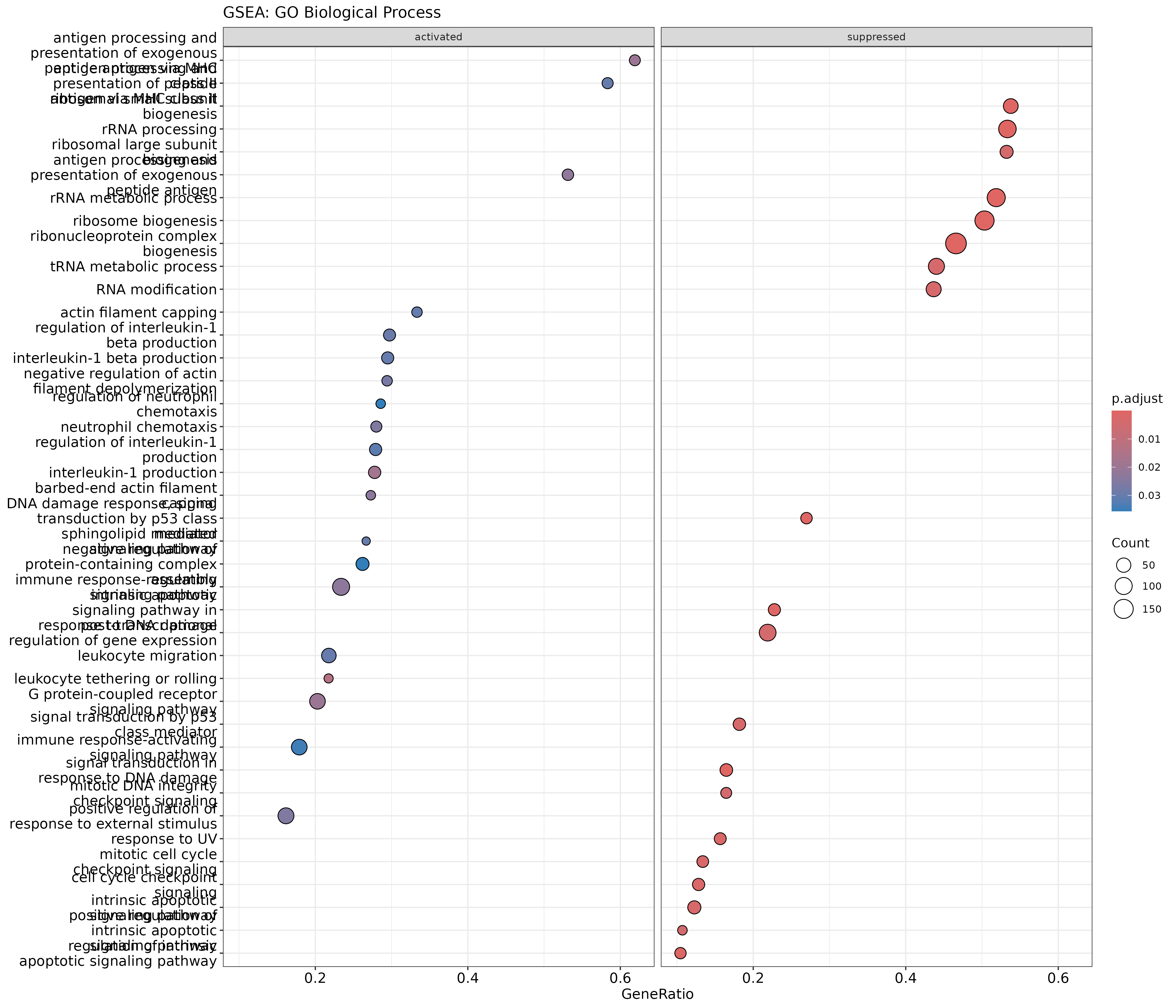
The .sign column indicates whether the gene set is
enriched in up-regulated (activated) or down-regulated
(suppressed) genes.
GSEA enrichment plot for a specific term
R
# Enrichment plot for top gene set
gseaplot2(gsea_go, geneSetID = 1, title = gsea_go$Description[1])
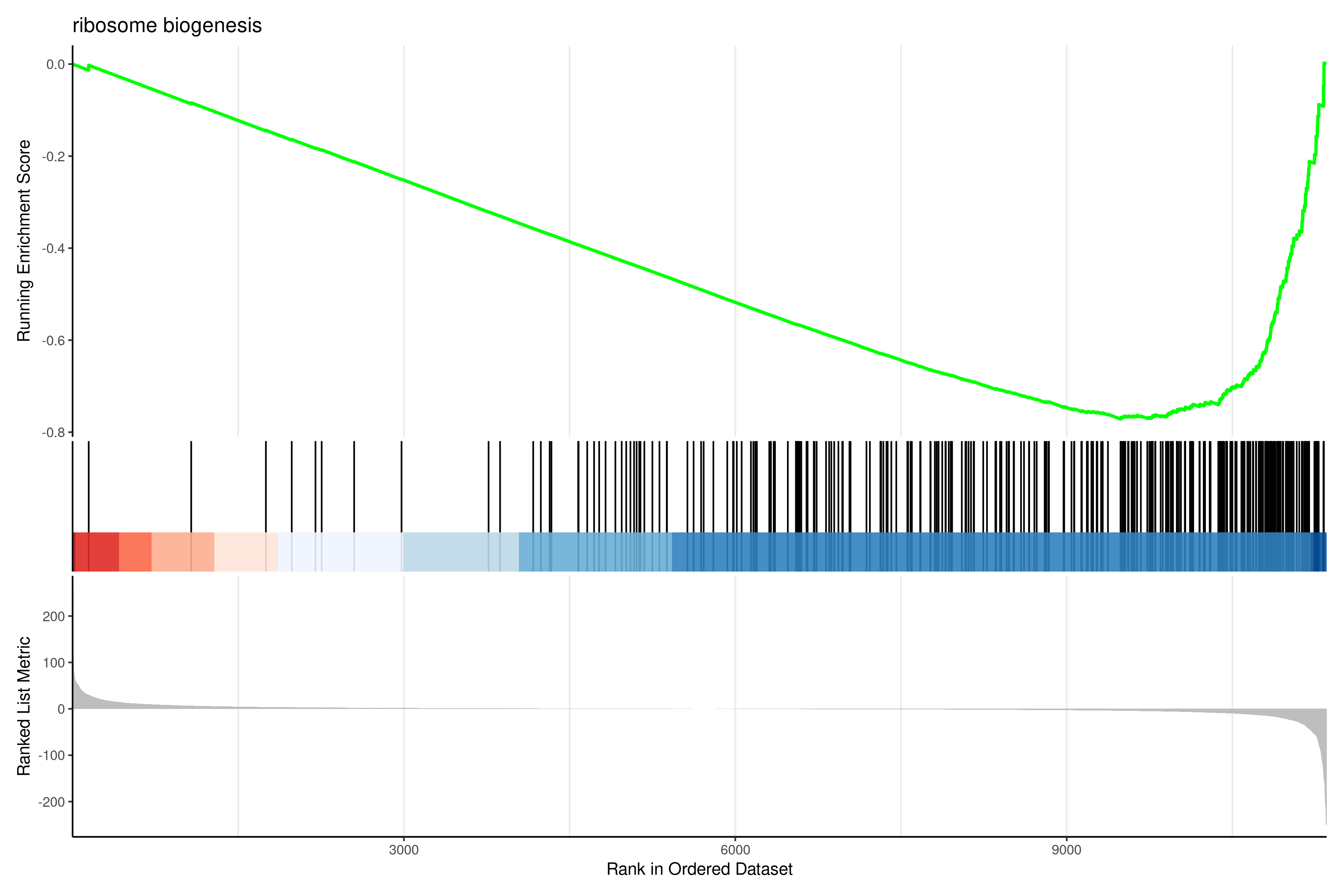
Interpreting GSEA results
Key metrics:
- NES (Normalized Enrichment Score): Direction and strength of enrichment. Positive = enriched in up-regulated genes; Negative = enriched in down-regulated genes.
- pvalue/p.adjust: Statistical significance.
- core_enrichment: Genes contributing most to the enrichment signal (“leading edge”).
GSEA is particularly valuable when:
- Changes are subtle but coordinated across many genes.
- You want to avoid arbitrary significance cutoffs.
- You’re comparing with published gene signatures.
Exercise: Compare ORA and GSEA results
- Do the same pathways appear in both ORA and GSEA results?
- Does GSEA identify any pathways that ORA missed?
- For pathways appearing in both, is the direction (NES sign) consistent with the ORA direction analysis?
Observations for this dataset:
- The strongest signals agree. Ribosome and rRNA biogenesis terms top both the up-regulated ORA and the GSEA table, and “signal transduction in response to DNA damage” is enriched among genes that go up after IR (NES about +1.9).
- GSEA reports 74 significant GO terms, many of which the cutoff-based ORA does not, because it also uses genes with modest changes.
- For the 25 terms found by both GSEA and the direction-specific ORA, the NES sign matches the ORA direction in all 25.
- Where the two disagree, the signal usually comes from many small, consistent changes (seen by GSEA) rather than a few large ones (needed by ORA).
Step 6: Save results
Save all enrichment results:
R
# Create output directory
dir.create("results/enrichment", showWarnings = FALSE)

# GO results
write_csv(as.data.frame(ego_bp), "results/enrichment/GO_BP_enrichment.csv")
write_csv(as.data.frame(ego_bp_simple), "results/enrichment/GO_BP_simplified.csv")

# KEGG results
write_csv(as.data.frame(ekegg), "results/enrichment/KEGG_enrichment.csv")

# Hallmark results
write_csv(as.data.frame(ehall), "results/enrichment/Hallmark_enrichment.csv")

# Direction-aware results
write_csv(as.data.frame(ego_up), "results/enrichment/GO_BP_up_regulated.csv")
write_csv(as.data.frame(ego_down), "results/enrichment/GO_BP_down_regulated.csv")

# GSEA results
write_csv(as.data.frame(gsea_go), "results/enrichment/GSEA_GO_BP.csv")
Save plots:
R
# GO dotplot
pdf("results/enrichment/GO_BP_dotplot.pdf", width = 10, height = 8)
dotplot(ego_bp_simple, showCategory = 20) +
    ggtitle("GO Biological Process enrichment")
dev.off()

# KEGG barplot
pdf("results/enrichment/KEGG_barplot.pdf", width = 10, height = 6)
barplot(ekegg, showCategory = 15) +
    ggtitle("KEGG pathway enrichment")
dev.off()

# Hallmark dotplot
pdf("results/enrichment/Hallmark_dotplot.pdf", width = 10, height = 8)
dotplot(ehall, showCategory = 20) +
    ggtitle("MSigDB Hallmark enrichment")
dev.off()
Interpretation guidelines
Signs of meaningful enrichment
Enrichment results are more reliable when:
- Multiple related terms appear (not just one isolated hit).
- Consistent themes emerge across databases.
- Biological plausibility: Results align with known biology of your system.
- Reasonable gene counts: Terms with many genes (>5-10) are more robust.
- Moderate p-values: Extremely low p-values (e.g., 10^-50) may indicate annotation bias.
Common pitfalls
- Over-interpretation: A significant p-value doesn’t prove causation.
- Ignoring effect size: A term with 3/1000 genes is less meaningful than 30/100.
- Cherry-picking: Report all significant results, not just expected ones.
- Universe mismatch: Using wrong background inflates or deflates significance.
- Outdated annotations: Gene function annotations improve over time.
Summary
- ORA tests if gene sets contain more DE genes than expected by chance using the hypergeometric test.
- The background universe must include all genes that could have been detected as DE.
- Multiple testing correction (FDR) is essential when testing thousands of gene sets.
- GO provides comprehensive but redundant functional annotation; use
simplify()to reduce redundancy. - KEGG provides curated pathway maps but has limited gene coverage and requires Entrez IDs.
- MSigDB Hallmark sets offer 50 high-quality, non-redundant biological signatures.
- Direction-aware analysis (up vs. down separately) often reveals clearer biological signals.
- GSEA avoids arbitrary cutoffs by using the full ranked gene list; it detects subtle but coordinated changes.
- Convergent findings across multiple databases and methods strengthen biological interpretation.
- Always report methods, thresholds, and full results for reproducibility.